


职业杀手
26.53M · 2026-03-25

哈喽啊,小饼好久没发文章了,个人原因最近工作比较繁忙,这段时间也换了新岗位。慢慢腾出一点时间去做巡检工作。
我突然发现一个个去巡检设备好麻烦,突然想到自己弄一个脚本去代替我人工,如果也有想和我一样偷懒的小伙伴,就去和我一样实践起来吧
1、yum install -y ##添加ansible的yum源
2 yum install -y ansible ##安装ansible
mkdir ./ansible ##此时我是在/root/ansible/
ssh-keygen ##获取加密密钥
ssh-copy-id root@serverb ##分发给服务器
ssh-copy-id root@serverc ##分发给服务器
ssh-copy-id root@serverd ##分发给服务器
[defaults]
inventory = ./inventory
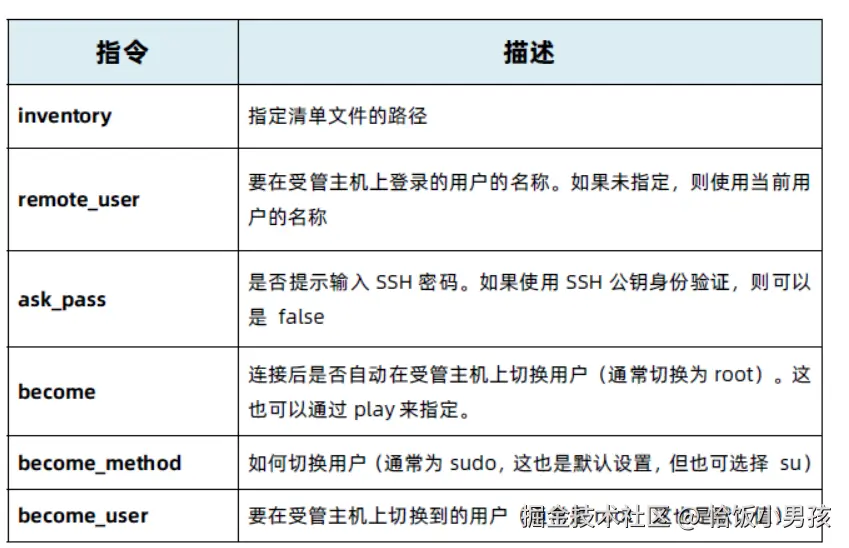
[privilege_escalation] become = true
become method =sudo
become user = root
become ask pass = true
vim ./inventory
[work]
serverb
serverc
serverd
# ================ SysCheck 2.0 服务器运维巡检脚本 ================
#  作者:yy
# ===============================================================

# --- 基础配置 ---
# 自动检测终端颜色
if [ -t 1 ]; then
    RED="33[91m"
    GREEN="33[92m"
    YELLOW="33[93m"
    BLUE="33[94m"
    BOLD="33[1m"
    NC="33[0m"
else
    RED=""; GREEN=""; YELLOW=""; BLUE=""; BOLD=""; NC=""
fi

print_title() {
    echo -e "n${BLUE}${BOLD}════════════════════════════════════════════════════════════${NC}"
    echo -e "${BOLD}                    $1${NC}"
    echo -e "${BLUE}${BOLD}════════════════════════════════════════════════════════════${NC}"
}

print_status() {
    case "$1" in
        ok) echo -e "${GREEN}  [OK] $2${NC}" ;;
        warn) echo -e "${YELLOW}  [WARN] $2${NC}" ;;
        error) echo -e "${RED}  [ERROR] $2${NC}" ;;
        info) echo -e "${BLUE}  [INFO] $2${NC}" ;;
        *) echo -e "  [$1] $2" ;;
    esac
}

# --- 生成报告文件 ---
generate_report() {
    local report_file="/tmp/syscheck_report_$(date +%Y%m%d_%H%M%S).txt"
    echo "=== SysCheck 巡检报告 ===" > "$report_file"
    echo "生成时间: $(date '+%Y-%m-%d %H:%M:%S')" >> "$report_file"
    echo "主机名: $(hostname)" >> "$report_file"
    echo "IP地址: $(hostname -I 2>/dev/null | awk '{print $1}')" >> "$report_file"
    echo "==================================" >> "$report_file"
}

# --- 1. 系统基础信息 ---
clear
print_title "Linux 服务器深度巡检 (SysCheck 2.0)"
echo -e "巡检时间:$(date '+%Y-%m-%d %H:%M:%S')"

[ -f /etc/os-release ] && . /etc/os-release
OS_NAME="${PRETTY_NAME:-未知}"
HOSTNAME=$(hostname)
KERNEL=$(uname -r)
UPTIME=$(uptime)
LOAD_AVG=$(uptime | awk -F'load average:' '{print $2}' | sed 's/^[      ]*//')

print_status info "系统版本 : $OS_NAME"
print_status info "主机名称 : $HOSTNAME"
print_status info "内核版本 : $KERNEL"
print_status info "运行时间 : $(uptime -p)"
print_status info "平均负载 : $LOAD_AVG"

# --- 2. 资源使用情况 ---
print_title "资源使用情况"

# CPU使用率
CPU_USAGE=$(top -bn1 | grep "Cpu(s)" | awk '{print $2}' | cut -d'%' -f1)
if [ $(echo "$CPU_USAGE > 80" | bc 2>/dev/null || echo "0") = "1" ]; then
    print_status error "CPU使用率: ${CPU_USAGE}% - 过高!"
elif [ $(echo "$CPU_USAGE > 60" | bc 2>/dev/null || echo "0") = "1" ]; then
    print_status warn "CPU使用率: ${CPU_USAGE}% - 偏高"
else
    print_status ok "CPU使用率: ${CPU_USAGE}%"
fi

# 内存
mem_info=$(free -m)
mem_total=$(echo "$mem_info" | awk '/Mem:/ {print $2}')
mem_used=$(echo "$mem_info" | awk '/Mem:/ {print $3}')
mem_free=$(echo "$mem_info" | awk '/Mem:/ {print $4}')
mem_usage=$(echo "scale=2; $mem_used*100/$mem_total" | bc 2>/dev/null || echo "0")

if [ $(echo "$mem_usage > 90" | bc 2>/dev/null || echo "0") = "1" ]; then
    print_status error "内存使用: ${mem_usage}% (${mem_used}M/${mem_total}M) - 严重不足!"
elif [ $(echo "$mem_usage > 80" | bc 2>/dev/null || echo "0") = "1" ]; then
    print_status warn "内存使用: ${mem_usage}% (${mem_used}M/${mem_total}M) - 偏高"
else
    print_status ok "内存使用: ${mem_usage}% (${mem_used}M/${mem_total}M)"
fi

# 交换空间
swap_info=$(free -m | awk '/Swap:/')
if [ -n "$swap_info" ]; then
    swap_total=$(echo "$swap_info" | awk '{print $2}')
    swap_used=$(echo "$swap_info" | awk '{print $3}')
    if [ "$swap_total" -gt 0 ]; then
        swap_usage=$(echo "scale=2; $swap_used*100/$swap_total" | bc 2>/dev/null || echo "0")
        if [ "$swap_used" -gt 0 ]; then
            print_status warn "交换空间使用: ${swap_usage}% (${swap_used}M/${swap_total}M)"
        fi
    fi
fi

# 磁盘检查
print_status info "磁盘使用情况:"
df -hT | grep -vE 'tmpfs|cdrom|loop|overlay|squashfs|udev|devtmpfs' | while read fs type size used avail use mount; do
    if [ -n "$use" ]; then
        usage_num=$(echo "$use" | tr -d '%')
        if [ "$usage_num" -ge 95 ]; then
            print_status error "  $mount ($use) - ${size}已用${used} - 空间严重不足!"
        elif [ "$usage_num" -ge 85 ]; then
            print_status warn "  $mount ($use) - ${size}已用${used} - 空间不足"
        elif [ "$usage_num" -ge 70 ]; then
            print_status info "  $mount ($use) - ${size}已用${used}"
        else
            print_status ok "  $mount ($use) - ${size}已用${used}"
        fi
    fi
done

# Inode检查
print_status info "Inode使用情况:"
df -i | grep -vE 'tmpfs|cdrom|loop|overlay|squashfs|udev|devtmpfs' | while read fs inodes iused ifree iuse mount; do
    if [ -n "$iuse" ] && [ "$iuse" != "IUse%" ]; then
        iuse_num=$(echo "$iuse" | tr -d '%')
        if [ "$iuse_num" -ge 90 ]; then
            print_status error "  $mount ($iuse) - Inode接近耗尽!"
        elif [ "$iuse_num" -ge 80 ]; then
            print_status warn "  $mount ($iuse) - Inode使用较高"
        fi
    fi
done

# --- 3. 安全补丁检查 (修复增强版) ---
print_title "安全补丁与漏洞检查"

check_updates() {
    if command -v apt >/dev/null 2>&1; then
        # Debian/Ubuntu 逻辑
        if updates=$(apt list --upgradable 2>/dev/null | grep -v "Listing..."); then
            cnt=$(echo "$updates" | wc -l)
            if [ "$cnt" -gt 0 ]; then
                print_status warn "发现 $cnt 个可升级包"
                echo "$updates" | head -n 5 | while read line; do
                    echo "    $line"
                done
                [ "$cnt" -gt 5 ] && echo "    ... (还有 $((cnt-5)) 个未显示)"
            else
                print_status ok "系统软件包已是最新"
            fi
        fi
    elif command -v dnf >/dev/null 2>&1 || command -v yum >/dev/null 2>&1; then
        # RHEL/CentOS/Rocky 逻辑
        PKG_MGR=$(command -v dnf || command -v yum)

        # 检查安全更新
        if $PKG_MGR check-update --security >/dev/null 2>&1; then
            sec_count=$($PKG_MGR check-update --security 2>/dev/null | grep -c "..")
            if [ "$sec_count" -gt 0 ]; then
                print_status warn "发现 $sec_count 个安全补丁待安装!"
                $PKG_MGR check-update --security 2>/dev/null | head -n 5
                [ "$sec_count" -gt 5 ] && echo "    ... (还有 $((sec_count-5)) 个未显示)"
            else
                print_status ok "未发现严重安全补丁"
            fi
        else
            # 尝试其他方法
            if sec_info=$($PKG_MGR updateinfo list security 2>/dev/null); then
                sec_count=$(echo "$sec_info" | grep -c "security" || echo 0)
                if [ "$sec_count" -gt 0 ]; then
                    print_status warn "发现 $sec_count 个安全补丁待安装!"
                    echo "$sec_info" | head -n 5
                else
                    print_status ok "未发现严重安全补丁"
                fi
            else
                print_status info "跳过安全检查:当前源不支持元数据查询或缺少插件"
            fi
        fi
    else
        print_status info "未知包管理器,跳过补丁检查"
    fi
}

check_updates

# --- 4. 服务状态检查 ---
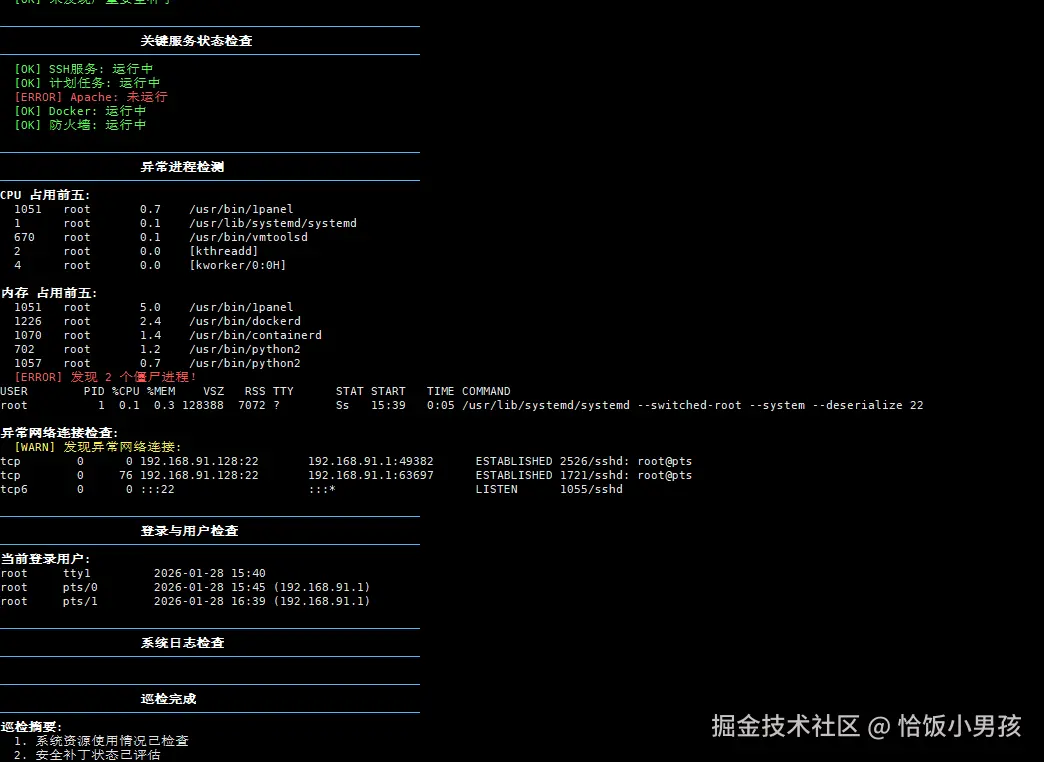
print_title "关键服务状态检查"

check_service() {
    local service=$1
    local name=$2

    if systemctl list-unit-files | grep -q "^${service}.service"; then
        if systemctl is-active --quiet "$service"; then
            print_status ok "$name: 运行中"
        else
            print_status error "$name: 未运行"
        fi
    fi
}

# 检查常见服务
check_service "sshd" "SSH服务"
check_service "crond" "计划任务"
check_service "nginx" "Nginx"
check_service "httpd" "Apache"
check_service "mysqld" "MySQL"
check_service "postgresql" "PostgreSQL"
check_service "docker" "Docker"
check_service "firewalld" "防火墙"
check_service "iptables" "iptables"
check_service "fail2ban" "Fail2ban"

# --- 5. 异常检测 ---
print_title "异常进程检测"

# 高负载进程
echo -e "${BOLD}CPU 占用前五:${NC}"
ps -eo pid,user,%cpu,cmd --sort=-%cpu | head -n 6 | tail -n 5 | awk '{printf "  %-6s %-10s %-6s %sn", $1, $2, $3, $4}'

echo -e "n${BOLD}内存 占用前五:${NC}"
ps -eo pid,user,%mem,cmd --sort=-%mem | head -n 6 | tail -n 5 | awk '{printf "  %-6s %-10s %-6s %sn", $1, $2, $3, $4}'

# 僵尸进程
zombies=$(ps aux | grep -E "[Zz]" | grep -v grep | wc -l)
if [ "$zombies" -gt 0 ]; then
    print_status error "发现 $zombies 个僵尸进程!"
    ps aux | grep -E "[Zz]" | grep -v grep
else
    print_status ok "无僵尸进程"
fi

# 检查异常连接
echo -e "n${BOLD}异常网络连接检查:${NC}"
if command -v netstat >/dev/null 2>&1; then
    suspicious=$(netstat -antp 2>/dev/null | grep -E "LISTEN|ESTABLISHED" | grep -vE "127.0.0.1|::1|0.0.0.0" | head -n 10)
    if [ -n "$suspicious" ]; then
        print_status warn "发现异常网络连接:"
        echo "$suspicious" | head -n 5
    fi
fi

# --- 6. 登录和用户检查 ---
print_title "登录与用户检查"

# 当前登录用户
echo -e "${BOLD}当前登录用户:${NC}"
who | head -n 5

# 检查空密码用户
if [ -f /etc/shadow ]; then
    empty_pass=$(sudo awk -F: '($2 == "" || $2 == "!") {print $1}' /etc/shadow 2>/dev/null || echo "")
    if [ -n "$empty_pass" ]; then
        print_status error "发现空密码用户: $empty_pass"
    fi
fi

# 检查root用户远程登录
if grep -q "^PermitRootLogin yes" /etc/ssh/sshd_config 2>/dev/null; then
    print_status warn "SSH配置允许root远程登录"
fi

# --- 7. 系统日志检查 ---
print_title "系统日志检查"

# 检查最近错误日志
if [ -f /var/log/messages ]; then
    recent_errors=$(tail -n 20 /var/log/messages | grep -i "error|fail|critical" | head -n 5)
elif [ -f /var/log/syslog ]; then
    recent_errors=$(tail -n 20 /var/log/syslog | grep -i "error|fail|critical" | head -n 5)
fi

if [ -n "$recent_errors" ]; then
    print_status warn "最近系统日志错误:"
    echo "$recent_errors" | while read line; do
        echo "  $line"
    done
fi

# --- 8. 结束与建议 ---
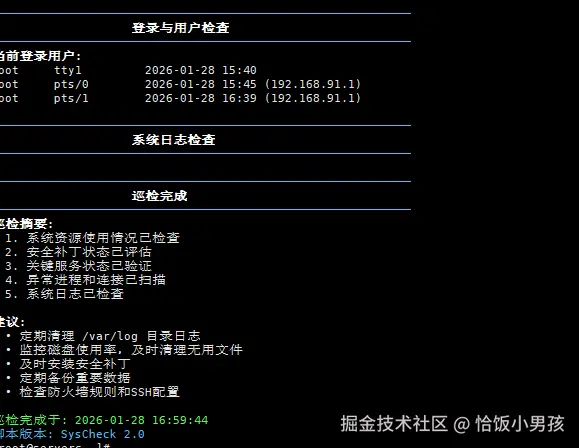
print_title "巡检完成"
echo -e "${BOLD}巡检摘要:${NC}"
echo -e "  1. 系统资源使用情况已检查"
echo -e "  2. 安全补丁状态已评估"
echo -e "  3. 关键服务状态已验证"
echo -e "  4. 异常进程和连接已扫描"
echo -e "  5. 系统日志已检查"

echo -e "n${BOLD}建议:${NC}"
echo -e "  • 定期清理 /var/log 目录日志"
echo -e "  • 监控磁盘使用率,及时清理无用文件"
echo -e "  • 及时安装安全补丁"
echo -e "  • 定期备份重要数据"
echo -e "  • 检查防火墙规则和SSH配置"

echo -e "n${GREEN}巡检完成于: $(date '+%Y-%m-%d %H:%M:%S')${NC}"
echo -e "${BLUE}脚本版本: SysCheck 2.0${NC}"
1、yum install epel
2、yum install -y phthon3
vim syscheck-excel.py
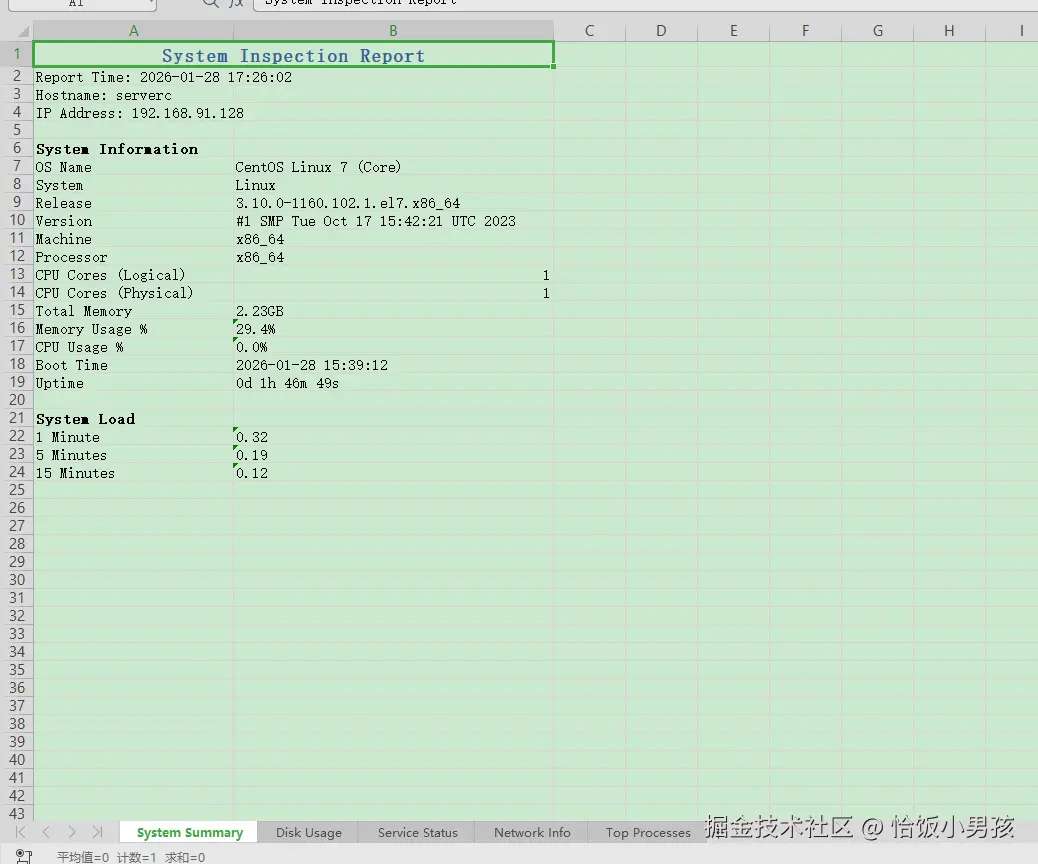
# -*- coding: utf-8 -*-
# ==============================================================================
# 脚本名称: syscheck-excel.py (Pro版)
# 功能描述: 采集Linux系统信息、磁盘、Top进程,生成带样式的美观Excel报表
# 运行方式: chmod +x syscheck-excel.py && ./syscheck-excel.py
# 依赖库  : pip3 install psutil pandas openpyxl
# 作者    :yy
# ==============================================================================

import os
import sys
import socket
import datetime
import platform
import subprocess

# 依赖库检查
try:
    import psutil
    import pandas as pd
    from openpyxl import Workbook
    from openpyxl.styles import Font, PatternFill, Border, Side, Alignment
    from openpyxl.utils import get_column_letter
except ImportError as e:
    print("[Error] 缺少必要模块:", e)
    print("请先执行安装: pip3 install psutil pandas openpyxl")
    sys.exit(1)

def get_size(bytes_num, suffix="B"):
    """人性化显示文件大小"""
    factor = 1024
    for unit in ["", "K", "M", "G", "T", "P"]:
        if bytes_num < factor:
            return f"{bytes_num:.2f}{unit}{suffix}"
        bytes_num /= factor
    return f"{bytes_num:.2f}EB"

def get_process_info():
    """获取CPU和内存占用最高的Top 10进程"""
    procs = []
    for p in psutil.process_iter(['pid', 'name', 'username', 'cpu_percent', 'memory_percent']):
        try:
            procs.append(p.info)
        except (psutil.NoSuchProcess, psutil.AccessDenied, psutil.ZombieProcess):
            pass

    # 转为DataFrame
    if procs:
        df_proc = pd.DataFrame(procs)
        if not df_proc.empty:
            # 按内存使用率排序取Top 10
            df_proc = df_proc.sort_values(by='memory_percent', ascending=False).head(10)
            df_proc['cpu_percent'] = df_proc['cpu_percent'].apply(lambda x: f"{x:.1f}%" if x else "0.0%")
            df_proc['memory_percent'] = df_proc['memory_percent'].apply(lambda x: f"{x:.1f}%" if x else "0.0%")
            df_proc.columns = ['PID', 'Process', 'User', 'CPU%', 'Memory%']
            return df_proc
    return pd.DataFrame()

def get_system_info():
    """获取详细的系统信息"""
    info = {}

    # 基本系统信息
    uname = platform.uname()
    info['System'] = uname.system
    info['Hostname'] = uname.node
    info['Release'] = uname.release
    info['Version'] = uname.version
    info['Machine'] = uname.machine
    info['Processor'] = uname.processor

    # 获取发行版详细信息
    if os.path.exists('/etc/os-release'):
        with open('/etc/os-release', 'r') as f:
            for line in f:
                if 'PRETTY_NAME' in line:
                    info['OS Name'] = line.split('=', 1)[1].strip().strip('"')
                    break

    # CPU信息
    info['CPU Cores (Logical)'] = psutil.cpu_count(logical=True)
    info['CPU Cores (Physical)'] = psutil.cpu_count(logical=False)

    # 内存信息
    mem = psutil.virtual_memory()
    info['Total Memory'] = get_size(mem.total)
    info['Available Memory'] = get_size(mem.available)
    info['Memory Usage %'] = f"{mem.percent}%"

    # 启动时间
    boot_time = datetime.datetime.fromtimestamp(psutil.boot_time())
    info['Boot Time'] = boot_time.strftime("%Y-%m-%d %H:%M:%S")

    # 运行时间
    uptime = datetime.datetime.now() - boot_time
    days = uptime.days
    hours, remainder = divmod(uptime.seconds, 3600)
    minutes, seconds = divmod(remainder, 60)
    info['Uptime'] = f"{days}d {hours}h {minutes}m {seconds}s"

    # 负载
    if hasattr(os, 'getloadavg'):
        load = os.getloadavg()
        info['Load 1min'] = f"{load[0]:.2f}"
        info['Load 5min'] = f"{load[1]:.2f}"
        info['Load 15min'] = f"{load[2]:.2f}"

    # CPU使用率
    cpu_percent = psutil.cpu_percent(interval=1)
    info['CPU Usage %'] = f"{cpu_percent}%"

    return info

def get_network_info():
    """获取网络信息"""
    network_info = {}

    try:
        # 获取IP地址
        hostname = socket.gethostname()
        try:
            ip_address = socket.gethostbyname(hostname)
        except:
            ip_address = "Unknown"

        network_info['Hostname'] = hostname
        network_info['IP Address'] = ip_address

        # 网络接口信息
        interfaces = []
        for interface, addrs in psutil.net_if_addrs().items():
            for addr in addrs:
                if addr.family == socket.AF_INET:  # IPv4
                    interfaces.append({
                        'Interface': interface,
                        'Address': addr.address,
                        'Netmask': addr.netmask
                    })

        network_info['Interfaces'] = interfaces

        # IO统计
        net_io = psutil.net_io_counters()
        network_info['Bytes Sent'] = get_size(net_io.bytes_sent)
        network_info['Bytes Received'] = get_size(net_io.bytes_recv)

    except Exception as e:
        network_info['Error'] = f"获取网络信息失败: {str(e)}"

    return network_info

def get_disk_info():
    """获取磁盘信息"""
    disk_list = []

    try:
        for partition in psutil.disk_partitions():
            # 跳过特殊文件系统
            skip = False
            for skip_str in ['loop', 'snap', 'docker', 'overlay', 'tmpfs']:
                if skip_str in partition.device.lower() or skip_str in partition.mountpoint.lower():
                    skip = True
                    break

            if skip:
                continue

            try:
                usage = psutil.disk_usage(partition.mountpoint)
                disk_list.append({
                    'Device': partition.device,
                    'Mount Point': partition.mountpoint,
                    'File System': partition.fstype,
                    'Total Size': get_size(usage.total),
                    'Used': get_size(usage.used),
                    'Free': get_size(usage.free),
                    'Usage %': f"{usage.percent}%",
                    'Percent': usage.percent
                })
            except (PermissionError, OSError):
                continue

        # 按使用率排序
        if disk_list:
            disk_list.sort(key=lambda x: x['Percent'], reverse=True)

    except Exception as e:
        print(f"获取磁盘信息失败: {e}")

    return disk_list

def get_service_status():
    """获取服务状态"""
    services = []

    # 常见服务列表
    common_services = [
        'sshd', 'crond', 'rsyslog', 'network', 'firewalld',
        'nginx', 'httpd', 'mysql', 'postgresql', 'docker'
    ]

    for service in common_services:
        status = 'Unknown'
        try:
            # 尝试systemctl
            result = subprocess.run(['systemctl', 'is-active', service],
                                  capture_output=True, text=True, timeout=2)
            if result.returncode == 0:
                status = result.stdout.strip()
            else:
                # 尝试service命令
                result = subprocess.run(['service', service, 'status'],
                                      capture_output=True, text=True, timeout=2)
                status = 'active' if result.returncode == 0 else 'inactive'
        except subprocess.TimeoutExpired:
            status = 'timeout'
        except FileNotFoundError:
            status = 'not installed'
        except:
            status = 'error'

        services.append({'Service': service, 'Status': status})

    return services

def create_summary_sheet(workbook, system_info, network_info):
    """创建汇总sheet"""
    ws = workbook.create_sheet("System Summary")

    # 标题
    ws.merge_cells('A1:B1')
    ws['A1'] = "System Inspection Report"
    ws['A1'].font = Font(size=14, bold=True, color="366092")
    ws['A1'].alignment = Alignment(horizontal='center')

    ws['A2'] = f"Report Time: {datetime.datetime.now().strftime('%Y-%m-%d %H:%M:%S')}"
    ws['A3'] = f"Hostname: {network_info.get('Hostname', 'Unknown')}"
    ws['A4'] = f"IP Address: {network_info.get('IP Address', 'Unknown')}"

    # 系统信息表格
    row = 6
    ws[f'A{row}'] = "System Information"
    ws[f'A{row}'].font = Font(bold=True)
    row += 1

    sys_keys = ['OS Name', 'System', 'Release', 'Version', 'Machine',
                'Processor', 'CPU Cores (Logical)', 'CPU Cores (Physical)',
                'Total Memory', 'Memory Usage %', 'CPU Usage %',
                'Boot Time', 'Uptime']

    for key in sys_keys:
        if key in system_info:
            ws[f'A{row}'] = key
            ws[f'B{row}'] = system_info[key]
            row += 1

    # 负载信息
    if 'Load 1min' in system_info:
        row += 1
        ws[f'A{row}'] = "System Load"
        ws[f'A{row}'].font = Font(bold=True)
        row += 1
        ws[f'A{row}'] = "1 Minute"
        ws[f'B{row}'] = system_info['Load 1min']
        row += 1
        ws[f'A{row}'] = "5 Minutes"
        ws[f'B{row}'] = system_info['Load 5min']
        row += 1
        ws[f'A{row}'] = "15 Minutes"
        ws[f'B{row}'] = system_info['Load 15min']

    # 调整列宽
    ws.column_dimensions['A'].width = 25
    ws.column_dimensions['B'].width = 40

def create_disk_sheet(workbook, disk_info):
    """创建磁盘信息sheet"""
    if not disk_info:
        return

    # 转换为DataFrame
    df_disk = pd.DataFrame(disk_info)

    # 移除Percent列(仅用于排序)
    if 'Percent' in df_disk.columns:
        df_disk = df_disk.drop('Percent', axis=1)

    # 创建sheet
    ws = workbook.create_sheet("Disk Usage")
    ws.title = "Disk Usage"

    # 写入数据
    for r_idx, row in enumerate(df_disk.iterrows(), start=1):
        for c_idx, value in enumerate(row[1], start=1):
            cell = ws.cell(row=r_idx+1, column=c_idx, value=value)

    # 写入表头
    for c_idx, col_name in enumerate(df_disk.columns, start=1):
        cell = ws.cell(row=1, column=c_idx, value=col_name)

    # 应用样式
    header_fill = PatternFill(start_color="4F81BD", end_color="4F81BD", fill_type="solid")
    header_font = Font(color="FFFFFF", bold=True)
    thin_border = Border(left=Side(style='thin'), right=Side(style='thin'),
                       top=Side(style='thin'), bottom=Side(style='thin'))
    align_center = Alignment(horizontal='center', vertical='center')

    # 设置表头样式
    for cell in ws[1]:
        cell.fill = header_fill
        cell.font = header_font
        cell.alignment = align_center
        cell.border = thin_border

    # 设置数据样式和高亮
    for row in ws.iter_rows(min_row=2, max_row=ws.max_row):
        for cell in row:
            cell.border = thin_border
            cell.alignment = align_center

            # 高亮使用率
            if cell.column == 7 and cell.value:  # 第7列是Usage %
                try:
                    val_str = str(cell.value).strip('%')
                    val = float(val_str)
                    if val >= 90:
                        cell.font = Font(color="FF0000", bold=True)
                    elif val >= 80:
                        cell.font = Font(color="FFA500", bold=True)
                except ValueError:
                    pass

    # 调整列宽
    for col in ws.columns:
        max_length = 0
        col_letter = get_column_letter(col[0].column)
        for cell in col:
            if cell.value and len(str(cell.value)) > max_length:
                max_length = len(str(cell.value))
        adjusted_width = min(max_length + 2, 30)
        ws.column_dimensions[col_letter].width = adjusted_width

def create_service_sheet(workbook, services):
    """创建服务状态sheet"""
    if not services:
        return

    df_services = pd.DataFrame(services)

    # 创建sheet
    ws = workbook.create_sheet("Service Status")

    # 写入数据
    for r_idx, row in enumerate(df_services.iterrows(), start=1):
        for c_idx, value in enumerate(row[1], start=1):
            cell = ws.cell(row=r_idx+1, column=c_idx, value=value)

    # 写入表头
    for c_idx, col_name in enumerate(df_services.columns, start=1):
        cell = ws.cell(row=1, column=c_idx, value=col_name)

    # 应用样式
    header_fill = PatternFill(start_color="4F81BD", end_color="4F81BD", fill_type="solid")
    header_font = Font(color="FFFFFF", bold=True)
    thin_border = Border(left=Side(style='thin'), right=Side(style='thin'),
                       top=Side(style='thin'), bottom=Side(style='thin'))
    align_center = Alignment(horizontal='center', vertical='center')

    # 设置表头样式
    for cell in ws[1]:
        cell.fill = header_fill
        cell.font = header_font
        cell.alignment = align_center
        cell.border = thin_border

    # 设置数据样式和高亮
    for row in ws.iter_rows(min_row=2, max_row=ws.max_row):
        for cell in row:
            cell.border = thin_border
            cell.alignment = align_center

            # 高亮状态
            if cell.column == 2 and cell.value:  # 第2列是状态
                status = str(cell.value).lower()
                if status == 'active':
                    cell.fill = PatternFill(start_color="C6EFCE", end_color="C6EFCE", fill_type="solid")
                elif status in ['inactive', 'failed', 'error']:
                    cell.fill = PatternFill(start_color="FFC7CE", end_color="FFC7CE", fill_type="solid")
                    cell.font = Font(color="FF0000", bold=True)

    # 调整列宽
    ws.column_dimensions['A'].width = 20
    ws.column_dimensions['B'].width = 15

def create_process_sheet(workbook, process_info):
    """创建进程信息sheet"""
    if process_info.empty:
        return

    # 创建sheet
    ws = workbook.create_sheet("Top Processes")

    # 写入数据
    for r_idx, row in enumerate(process_info.iterrows(), start=1):
        for c_idx, value in enumerate(row[1], start=1):
            cell = ws.cell(row=r_idx+1, column=c_idx, value=value)

    # 写入表头
    for c_idx, col_name in enumerate(process_info.columns, start=1):
        cell = ws.cell(row=1, column=c_idx, value=col_name)

    # 应用样式
    header_fill = PatternFill(start_color="4F81BD", end_color="4F81BD", fill_type="solid")
    header_font = Font(color="FFFFFF", bold=True)
    thin_border = Border(left=Side(style='thin'), right=Side(style='thin'),
                       top=Side(style='thin'), bottom=Side(style='thin'))
    align_center = Alignment(horizontal='center', vertical='center')

    # 设置表头样式
    for cell in ws[1]:
        cell.fill = header_fill
        cell.font = header_font
        cell.alignment = align_center
        cell.border = thin_border

    # 设置数据样式
    for row in ws.iter_rows(min_row=2, max_row=ws.max_row):
        for cell in row:
            cell.border = thin_border
            cell.alignment = align_center

    # 调整列宽
    for col in ws.columns:
        max_length = 0
        col_letter = get_column_letter(col[0].column)
        for cell in col:
            if cell.value and len(str(cell.value)) > max_length:
                max_length = len(str(cell.value))
        adjusted_width = min(max_length + 2, 30)
        ws.column_dimensions[col_letter].width = adjusted_width

def create_network_sheet(workbook, network_info):
    """创建网络信息sheet"""
    ws = workbook.create_sheet("Network Info")

    # 标题
    ws['A1'] = "Network Information"
    ws['A1'].font = Font(size=12, bold=True)

    row = 3
    ws[f'A{row}'] = "Hostname"
    ws[f'B{row}'] = network_info.get('Hostname', 'Unknown')
    row += 1

    ws[f'A{row}'] = "IP Address"
    ws[f'B{row}'] = network_info.get('IP Address', 'Unknown')
    row += 1

    # 网络统计
    ws[f'A{row}'] = "Bytes Sent"
    ws[f'B{row}'] = network_info.get('Bytes Sent', 'Unknown')
    row += 1

    ws[f'A{row}'] = "Bytes Received"
    ws[f'B{row}'] = network_info.get('Bytes Received', 'Unknown')

    # 网络接口
    if 'Interfaces' in network_info and network_info['Interfaces']:
        row += 2
        ws[f'A{row}'] = "Network Interfaces"
        ws[f'A{row}'].font = Font(bold=True)
        row += 1

        # 表头
        headers = ['Interface', 'IP Address', 'Netmask']
        for col, header in enumerate(headers, 1):
            cell = ws.cell(row=row, column=col, value=header)
            cell.fill = PatternFill(start_color="4F81BD", end_color="4F81BD", fill_type="solid")
            cell.font = Font(color="FFFFFF", bold=True)

        row += 1

        # 数据
        for interface in network_info['Interfaces'][:10]:  # 限制显示数量
            ws.cell(row=row, column=1, value=interface.get('Interface', ''))
            ws.cell(row=row, column=2, value=interface.get('Address', ''))
            ws.cell(row=row, column=3, value=interface.get('Netmask', ''))
            row += 1

    # 设置边框和样式
    thin_border = Border(left=Side(style='thin'), right=Side(style='thin'),
                       top=Side(style='thin'), bottom=Side(style='thin'))

    for row_cells in ws.iter_rows(min_row=1, max_row=ws.max_row, max_col=4):
        for cell in row_cells:
            cell.border = thin_border
            if cell.row > 1:
                cell.alignment = Alignment(horizontal='left', vertical='center')

    # 调整列宽
    ws.column_dimensions['A'].width = 20
    ws.column_dimensions['B'].width = 25
    ws.column_dimensions['C'].width = 20

def sys_check_excel():
    """主函数"""
    print(f"[{datetime.datetime.now().strftime('%H:%M:%S')}] Starting system inspection...")

    # 收集信息
    print("Collecting system information...")
    system_info = get_system_info()

    print("Collecting network information...")
    network_info = get_network_info()

    print("Checking disk usage...")
    disk_info = get_disk_info()

    print("Checking service status...")
    services = get_service_status()

    print("Analyzing processes...")
    process_info = get_process_info()

    # 生成Excel文件名
    hostname = system_info.get('Hostname', 'unknown')
    timestamp = datetime.datetime.now().strftime('%Y%m%d_%H%M%S')
    filename = f"system_inspection_{hostname}_{timestamp}.xlsx"

    print(f"Generating Excel report: {filename}")

    try:
        # 创建Excel工作簿
        wb = Workbook()

        # 移除默认的sheet
        if 'Sheet' in wb.sheetnames:
            default_ws = wb['Sheet']
            wb.remove(default_ws)

        # 创建各个sheet
        create_summary_sheet(wb, system_info, network_info)
        create_disk_sheet(wb, disk_info)
        create_service_sheet(wb, services)
        create_network_sheet(wb, network_info)
        create_process_sheet(wb, process_info)

        # 保存文件
        wb.save(filename)

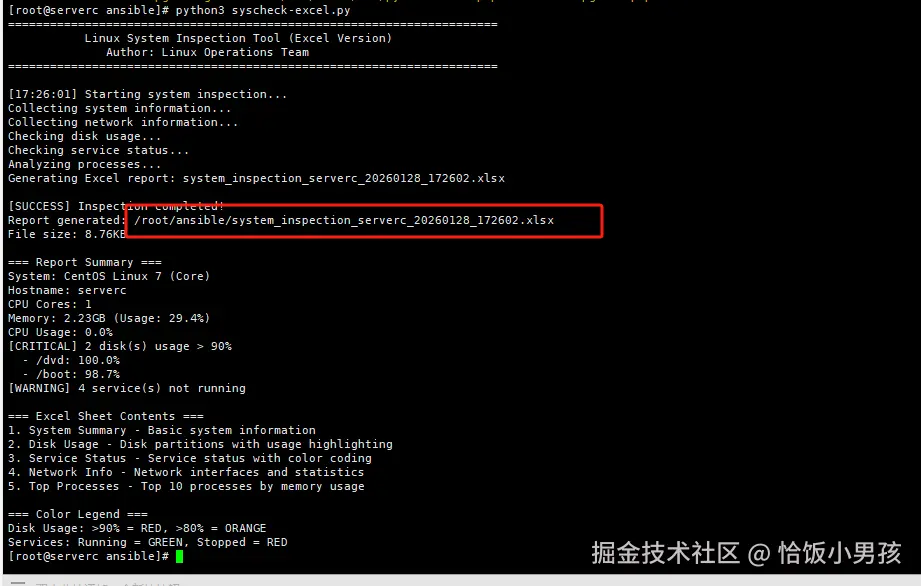
        print(f"n[SUCCESS] Inspection completed!")
        print(f"Report generated: {os.path.abspath(filename)}")

        if os.path.exists(filename):
            print(f"File size: {get_size(os.path.getsize(filename))}")

        # 显示摘要信息
        print("n=== Report Summary ===")
        print(f"System: {system_info.get('OS Name', system_info.get('System', 'Unknown'))}")
        print(f"Hostname: {hostname}")
        print(f"CPU Cores: {system_info.get('CPU Cores (Logical)', 'Unknown')}")
        print(f"Memory: {system_info.get('Total Memory', 'Unknown')} (Usage: {system_info.get('Memory Usage %', 'Unknown')})")
        print(f"CPU Usage: {system_info.get('CPU Usage %', 'Unknown')}")

        # 磁盘警告
        if disk_info:
            critical_disks = [d for d in disk_info if d['Percent'] >= 90]
            warning_disks = [d for d in disk_info if 80 <= d['Percent'] < 90]

            if critical_disks:
                print(f"[CRITICAL] {len(critical_disks)} disk(s) usage > 90%")
                for disk in critical_disks[:3]:
                    print(f"  - {disk['Mount Point']}: {disk['Usage %']}")

            if warning_disks:
                print(f"[WARNING] {len(warning_disks)} disk(s) usage > 80%")

        # 服务警告
        if services:
            failed_services = [s for s in services if s['Status'] in ['inactive', 'failed', 'error']]
            if failed_services:
                print(f"[WARNING] {len(failed_services)} service(s) not running")

        print("n=== Excel Sheet Contents ===")
        print("1. System Summary - Basic system information")
        print("2. Disk Usage - Disk partitions with usage highlighting")
        print("3. Service Status - Service status with color coding")
        print("4. Network Info - Network interfaces and statistics")
        print("5. Top Processes - Top 10 processes by memory usage")

        print("n=== Color Legend ===")
        print("Disk Usage: >90% = RED, >80% = ORANGE")
        print("Services: Running = GREEN, Stopped = RED")

    except Exception as e:
        print(f"n[ERROR] Failed to generate report: {e}")
        import traceback
        traceback.print_exc()

def main():
    """主入口函数"""
    print("=" * 70)
    print("           Linux System Inspection Tool (Excel Version)")
    print("              Author: Linux Operations Team")
    print("=" * 70)
    print()

    try:
        # 检查是否以root运行(某些信息需要root权限)
        if os.geteuid() != 0:
            print("[WARNING] Running without root privileges")
            print("Some information (services, detailed disk info) may not be available")
            print("Consider running with: sudo python3 syscheck-excel.py")
            response = input("Continue anyway? (y/N): ")
            if response.lower() != 'y':
                print("Exiting...")
                return

        # 执行巡检
        sys_check_excel()

    except KeyboardInterrupt:
        print("nn[INFO] Inspection interrupted by user.")
    except Exception as e:
        print(f"n[ERROR] Unexpected error: {e}")
        import traceback
        traceback.print_exc()

if __name__ == "__main__":
    main()
python3 syscheck-excel.py
1、vim check_all.yml
- name: 全网服务器批量巡检
  hosts: all
  become: yes
  gather_facts: yes

  vars:
    # 配置变量
    check_script: "syscheck.sh"
    report_dir: "./reports"
    remote_report_dir: "/tmp"

  tasks:
    # 任务1: 创建本地报告目录
    - name: 创建本地报告目录
      delegate_to: localhost
      run_once: yes
      file:
        path: "{{ report_dir }}"
        state: directory
        mode: '0755'

    # 任务2: 分发巡检脚本
    - name: 分发巡检脚本到目标服务器
      copy:
        src: /root/ansible/syscheck.sh
        dest: /usr/local/bin/syscheck.sh
        owner: root
        group: root
        mode: '0755'

    # 任务3: 执行巡检并保存结果
    - name: 执行系统巡检
      shell: |
        # 设置环境变量,禁用终端颜色
        export TERM=dumb
        /usr/local/bin/syscheck.sh
      register: check_result
      args:
        executable: /bin/bash
      environment:
        TERM: dumb  # 禁用颜色输出,避免ANSI转义字符

    # 任务4: 保存巡检结果到临时文件
    - name: 保存巡检结果
      copy:
        content: |
          ==========================================
          服务器巡检报告
          主机名: {{ ansible_hostname }}
          IP地址: {{ ansible_default_ipv4.address | default('未知') }}
          检查时间: {{ ansible_date_time.iso8601 }}
          ==========================================

          {{ check_result.stdout }}
        dest: "{{ remote_report_dir }}/check_{{ ansible_hostname }}.txt"
        owner: root
        group: root
        mode: '0644'

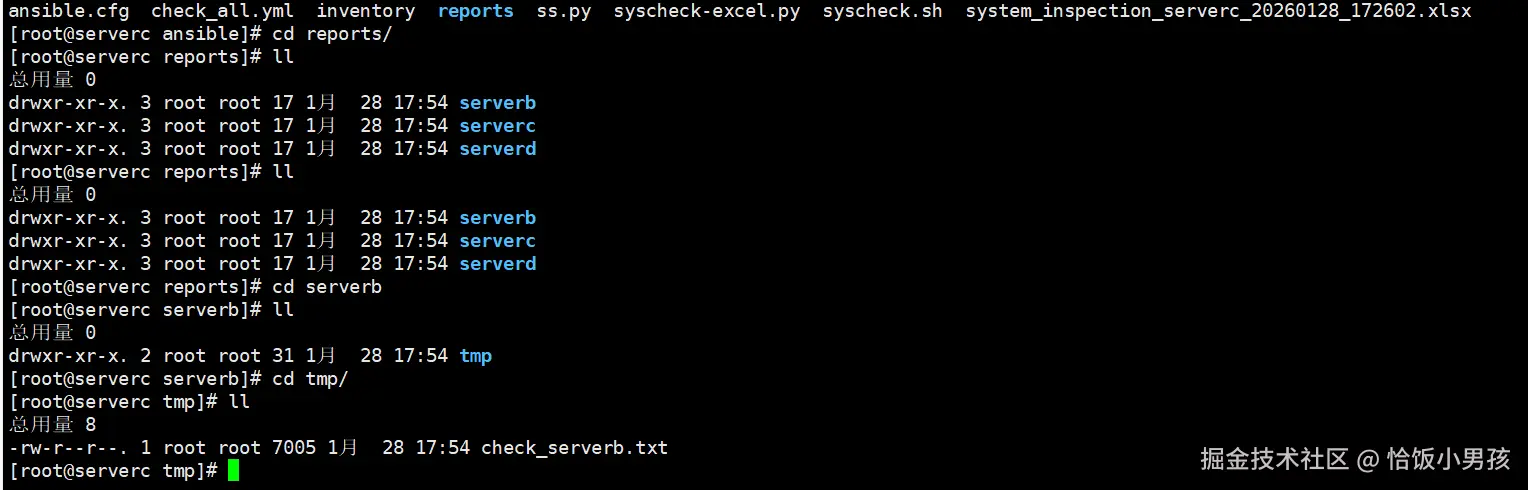
    # 任务5: 拉取巡检报告到本地
    - name: 拉取巡检报告到本地
      fetch:
        src: "{{ remote_report_dir }}/check_{{ ansible_hostname }}.txt"
        dest: "{{ report_dir }}/"
        flat: no  # 按主机名创建目录结构

    # 任务6: 清理远程临时文件
    - name: 清理远程临时文件
      file:
        path: "{{ remote_report_dir }}/check_{{ ansible_hostname }}.txt"
        state: absent

    # 任务7: 显示执行摘要
    - name: 显示巡检摘要
      debug:
        msg: |
          巡检完成: {{ ansible_hostname }}
          报告已保存到: {{ report_dir }}/{{ ansible_hostname }}/check_{{ ansible_hostname }}.txt
1、ansible-playbook check_all.yml