

掘地攀登
100.61M · 2026-03-29

做企业级业务开发久了,都会碰到同一个难题:数据量越积越多,原本跑得顺畅的SQL慢慢开始变慢,轻则接口响应延迟,重则整个系统卡顿,甚至影响核心业务流转。尤其是用KingbaseES这款国产企业级数据库(Oracle兼容版)的项目,很多时候不是数据库本身性能不行,而是SQL写法、索引设计、参数配置没做到位,白白浪费了硬件资源。
这份调优指南,全是基于官方调优手册提炼的实战干货,没有虚头巴脑的理论,全是落地能用的优化方法。不管是刚接触KingbaseES的开发,还是负责运维的DBA,都能照着一步步操作,把慢SQL的性能拉回来。
做SQL调优,最先下手、见效最快的一定是索引。索引就像是书本的目录,有了目录找内容不用一页页翻,没目录就只能逐页查找。但索引也不是越多越好,多了反而会拖慢数据插入、更新的速度,毕竟每次写数据都要同步维护索引,一定要按需设计。
KingbaseES自带了多种索引类型,每种都有对应的适用场景,乱建索引不仅没用,还会增加运维成本,日常用到的这几种吃透就够了:
-- 创建Btree索引
create table t1 (id int, info text);
insert into t1 values(generate_series(1,100000), md5(random()::text));
create index i_btree on t1 using btree(id);
-- 适配等值、范围查询,执行速度提升极其明显
explain analyze select * from t1 where id < 10;
explain analyze select min(id) from t1;
create table t2 (id int, info text);
insert into t2 values(generate_series(1,100000), md5(random()::text));
create index i_hash on t2 using hash(id);
-- 等值查询效率拉满
explain analyze select * from t2 where id = 10;
-- 范围查询直接失效,走全表扫描
explain analyze select * from t2 where id < 10;
create table test(a int4, b int4);
create index idx_t on test using bitmap(a);
insert into test select round(random()*3), round(random()*100) from generate_series(1,1000000);
analyze test;
-- 多条件组合查询,性能提升显著
explain analyze select count(*) from test where a = 1 and b > 50;
create table t3(id int, info text);
insert into t3 values(generate_series(1,10000), md5(random()::text));
create index i_t3_gin on t3 using gin(to_tsvector('english',info));
analyze t3;
-- 全文检索专属,普通索引根本没法比
explain analyze select * from t3 where to_tsvector('english', info) @@ plainto_tsquery('hello');
create table t5(id int, name text);
insert into t5 values(generate_series(1,100000), md5(random()::text));
create index i5_brin on t5 using brin(id);
-- 流式数据、连续数据范围查询首选
explain analyze select * from t5 where id < 10;
光知道建索引还不够,很多时候索引失效,都是因为没掌握这些实用技巧,实战中经常用到:
create table t1(name text);
-- 针对大小写不敏感查询,建表达式索引
create index idx_t1 on t1(upper(name));
explain select * from t1 where upper(name) = 'ADA';
-- 复杂拼接表达式,记得加括号包裹
create table t1(id int, first_name text, last_name text);
create index idx_t1_fullname on t1((first_name || ' ' || last_name));
explain select * from t1 where (first_name || ' ' || last_name) = 'Ada B';
create table student(id int, name text, school text);
create index idx_student on student(id, name, school);
-- 命中索引:匹配最左前缀、前两个字段
select * from student where id = 1;
select * from student where id = 1 and name = '张三';
-- 无法命中:跳过最左字段,直接查后面的字段
select * from student where name = '张三';
create table t1(id int);
insert into t1 values(generate_series(1,1000000));
-- 只给常用查询的id区间建索引
create index idx_t1_partial on t1(id) where id < 500;
-- 命中索引
explain select * from t1 where id < 400;
-- 超出范围,不走索引
explain select * from t1 where id > 400;
-- 前缀匹配,Btree索引直接生效
create table t1(id int, name text collate "C");
create index idx_t1 on t1(name);
explain select * from t1 where name like 'abc%';
-- 后缀匹配,用反转函数建索引
create index idx_t1_reverse on t1(reverse(name) collate "C");
explain select * from t1 where reverse(name) like 'cba%';
-- 中间模糊匹配,开启TRGM扩展建索引
create extension sys_trgm;
create table t2(id int, name varchar(20));
create index idx_t2_trgm on t2 using gin(name gin_trgm_ops);
explain select * from t2 where name like '%abc%';
索引不是一劳永逸的,后期不维护,照样会变慢,这几点运维一定要记牢:
select relname as 表名, indexrelname as 索引名, idx_scan as 扫描次数 from sys_stat_user_indexes order by idx_scan;
-- 单表索引重建 reindex table t1; -- 单个索引重建 reindex index idx_t1;
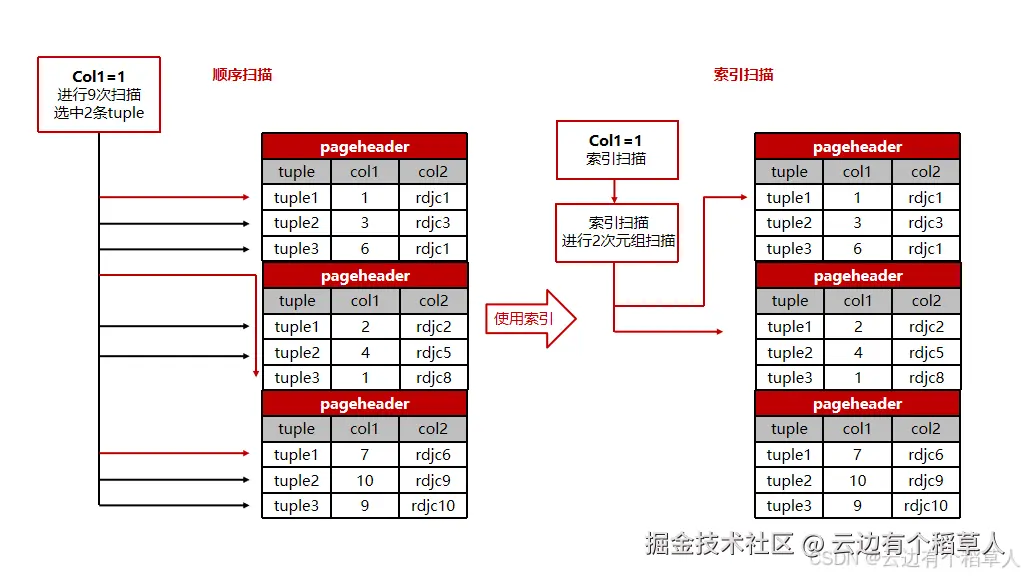
KingbaseES自带查询优化器,会自动生成SQL执行计划,但如果表统计信息不准、数据分布不均匀,优化器很容易选错执行路径,导致SQL变慢。这时候就得学会看懂执行计划,实在不行再用HINT手动干预,精准解决问题。
不用死记执行计划的所有细节,抓准四个核心点,就能快速定位慢SQL瓶颈:
explain select * from t1 join t2 on t1.id = t2.id where t1.id < 1000;
explain analyze select * from t1 join t2 on t1.id = t2.id where t1.id < 1000;
-- 执行analyze更新统计信息
analyze student;
-- 重新查看执行计划,行数预估恢复正常
explain select * from student where sno > 2;
-- 建适配索引
create index idx_t1_name on t1(name text_pattern_ops);
analyze t1;
-- 索引扫描替代全表扫描,性能大幅提升
explain analyze select * from t1 where name like 'test99%';
-- 会话级调大排序内存
set work_mem = '64MB';
explain analyze select * from big order by id;
只有优化器明显选错执行计划时,再用HINT干预,不要上来就强行指定。使用前需要在配置文件开启enable_hint = on,语法用/*+ 指令 */格式即可。
-- 强制索引扫描
explain select/*+IndexScan(t1 idx_t1)*/ * from t1 where id > 10;
-- 强制全表扫描
explain select/*+SeqScan(t1)*/ * from t1 where id = 20;
-- 强制哈希连接,适配大数据量
explain select/*+HashJoin(t1 t2)*/ * from t1 join t2 on t1.id = t2.id;
-- 指定并行worker数量
explain analyze select/*+Parallel(t2 2)*/ t2.id from t2,t3 where t2.id=t3.val group by t2.id;
-- 指定表连接顺序
explain select/*+leading(t3 t2 t1)*/ * from t1,t2,t3 where t1.id=t3.id and t3.val=t2.id;
能通过更新统计信息、调参数解决的,就别用HINT;HINT只对当前SQL生效,不会影响其他业务;表结构、数据大变后,记得重新检查HINT是否还适用,避免反而拖慢SQL。
索引和执行计划优化完,还有性能瓶颈,就该从数据库参数、并行查询下手,充分利用服务器CPU、内存资源,突破单线程性能限制。
参数不是盲目调大,要结合服务器配置、业务类型修改,重点改这几类:
| 参数名 | 默认值 | 说明 | 调整建议 |
| seq_page_cost | 1.0 | 全表扫描单数据块成本 | SSD硬盘可调至0.5 |
| random_page_cost | 4.0 | 索引扫描单数据块成本 | SSD硬盘可调至2.0 |
-- 会话级临时调整
set work_mem = '16MB';
-- 全局调整,需重启数据库生效
alter system set work_mem = '16MB';
-- 禁用哈希聚合
set enable_hashagg = off;
-- 谨慎使用:禁用全表扫描,无索引会直接报错
set enable_seqscan = off;
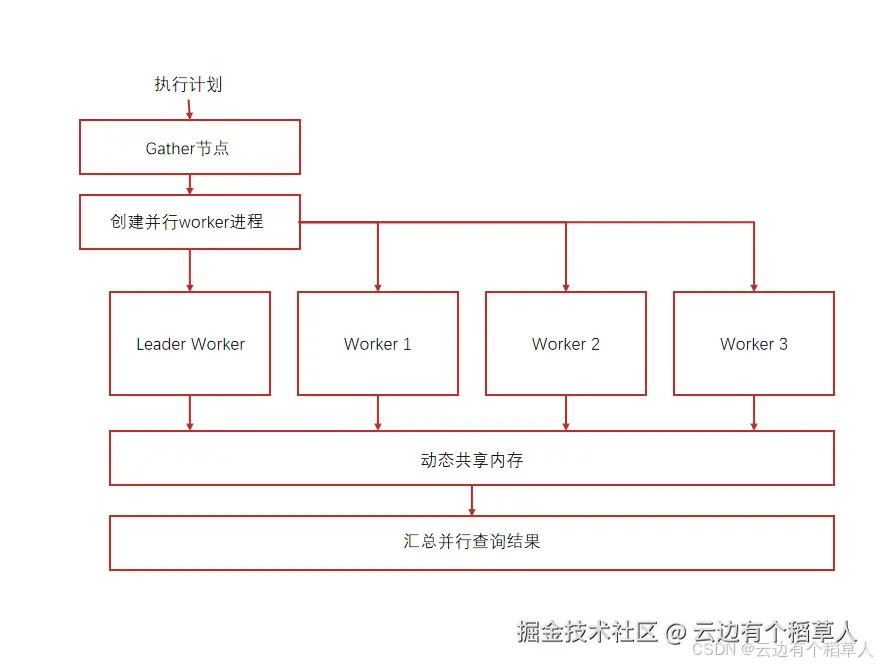
大数据量查询、全表扫描、聚合统计,单线程跑太慢,开启并行查询,把任务分给多个CPU核心同时处理,速度能成倍提升。
-- 系统最大后台进程,需重启
alter system set max_worker_processes = 16;
-- 单查询最大并行worker数
alter system set max_parallel_workers_per_gather = 4;
很多时候SQL慢,不是索引和参数的问题,而是写法太笨拙,稍微改改写法,或者用物化视图,就能轻松解决问题。
-- 低效
select * from t1 union select * from t2;
-- 高效
select * from t1 union all select * from t2;
truncate table t1;
报表统计、多表聚合这类复杂查询,每次执行都要耗时很久,而且基表数据更新不频繁,就用物化视图,提前把查询结果存起来,查询的时候直接读结果,不用重复计算。
-- 创建物化视图
create materialized view mv_school_student as
select school, count(*) as student_count, avg(age) as avg_age
from student
group by school;
-- 基表数据更新后,刷新视图
refresh materialized view mv_school_student;
-- 直接查询,速度极快
select * from mv_school_student where school = '一中';
SQL调优不是一次性工作,必须借助工具实时监控,及时发现新的慢SQL,才能保证系统长期稳定运行。
开启内置的SQL监控功能,实时跟踪SQL执行耗时、CPU消耗,快速定位TOP慢查询。先在配置文件加载对应插件,再创建扩展,就能查看监控数据、生成监控报告。
shared_preload_libraries = 'plsql, sys_stat_statements, sys_sqltune'
sql_monitor.track = 'all'
-- 创建监控扩展
create extension sys_sqltune;
-- 查询耗时最长的TOP10 SQL
select sql_text, duration, cpu_time from V$SQL_MONITOR order by duration desc limit 10;
不用自己瞎猜索引怎么建,通过系统插件,数据库能自动分析查询条件,给出索引建议;还能直接生成调优报告,包含索引优化、SQL改写方案,新手也能照着优化。
-- 查看索引推荐
select * from index_recommendation_by_qual;
-- 生成SQL调优报告
select PERF.QUICK_TUNE_BY_SQL('select * from t1 where id = 1');
实战调优别盲目下手,按照这个步骤来,一步步定位解决,效率最高:
KingbaseES SQL调优从来不是靠某一个绝招,而是层层递进的系统性工作。先把基础的索引、SQL写法优化到位,就能解决80%以上的慢SQL问题;剩下的复杂场景,再通过执行计划分析、参数调优、并行查询来解决。
日常业务里,OLTP高并发短查询,重点放在索引设计、SQL规范、参数微调;OLAP大数据量分析,侧重并行查询、物化视图、SQL改写。调优的时候切记循序渐进,改一项验证一项,别一次性批量修改,避免引发新的问题。
只要把这些实战方法用到位,KingbaseES的性能完全能满足企业级业务需求,再也不用被慢SQL困扰。