

职业杀手
26.53M · 2026-03-25

fsspec 是一个用于提供统一文件系统接口的 Python 库。它抽象了各种文件系统(如本地文件系统、S3、GCS、HDFS等)的细节,让你可以用统一的方式操作文件。 它可以帮助你:
fsspec 广泛应用于以下实际场景:
pip install fsspec

# 如果安装慢的话,推荐使用国内镜像源
pip install fsspec -i
检查文件或目录是否存在并列出内容
import fsspec
import os

# 定义一个本地路径,可以是文件或目录
local_path = "fsspec_test_dir"

# 创建一个本地文件系统实例
fs = fsspec.filesystem("file")

# 检查路径是否存在
if not fs.exists(local_path):
    # 如果不存在,则创建目录
    fs.mkdir(local_path)
    print(f"Directory '{local_path}' created.")

    # 在新目录中创建一些测试文件
    with fs.open(os.path.join(local_path, "file1.txt"), "w") as f:
        f.write("Hello from file1!")
    with fs.open(os.path.join(local_path, "file2.txt"), "w") as f:
        f.write("Hello from file2!")
    print(f"Two files created in '{local_path}'.")
else:
    print(f"Path '{local_path}' already exists.")

# 列出目录内容
print(f"nListing contents of '{local_path}':")
contents = fs.ls(local_path)
for item in contents:
    # 检查是否为文件
    if fs.isfile(item):
        print(f"  - File: {item}")
    else:
        print(f"  - Directory: {item}")

# 清理(可选,但对于测试很有用)
# fs.rm(local_path, recursive=True)
# print(f"nDirectory '{local_path}' removed.")
使用 PythonRun 在线运行这段代码,结果如下:
Path 'fsspec_test_dir' already exists.

Listing contents of 'fsspec_test_dir':
  - File: /code/fsspec_test_dir/file1.txt
  - File: /code/fsspec_test_dir/file2.txt
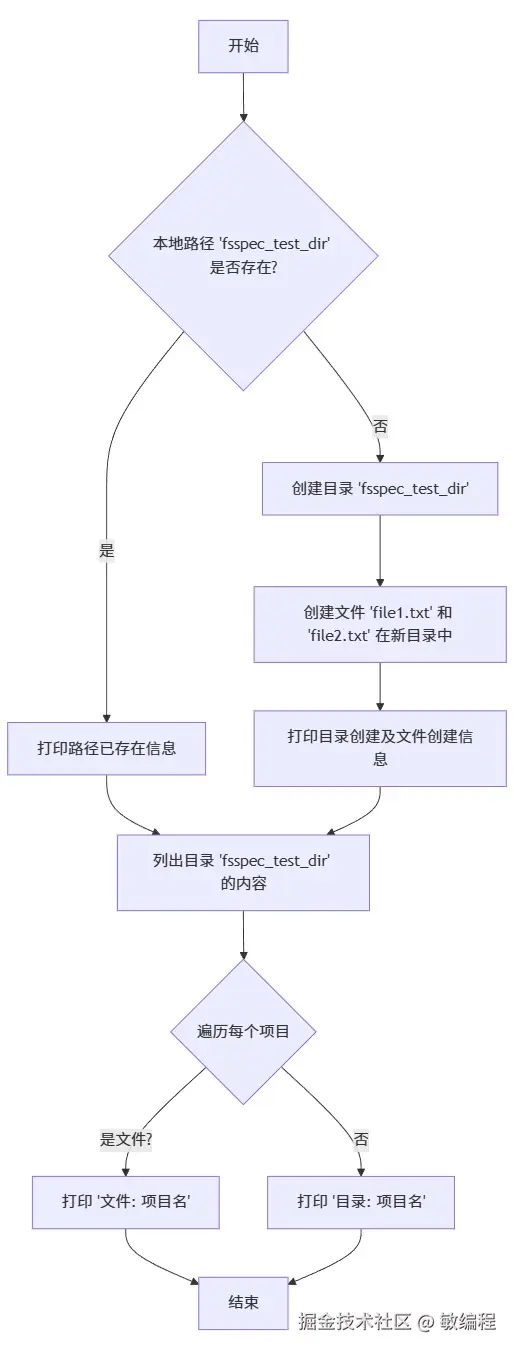
使用 MermaidGo 绘制示例代码的流程图,结果如下: