

山水画廊
70.10M · 2026-04-12

2026年,Spring AI 2.0 正式发布,Java生态终于有了原生、AI友好的AI集成框架。
本文将带你:
以前用Java调GPT、Claude:
| 对比项 | 手写HTTP | Python openai库 | Spring AI |
|---|---|---|---|
| 接入成本 | 高 | 低(3行) | 低(3行配置) |
| 类型安全 | 无 | 无 | 有(编译期检查) |
| 切换模型 | 改一堆代码 | 改参数 | 改一行配置 |
| 流式响应 | 手动处理SSE | 简单 | Flux原生支持 |
| Spring集成 | 自己搞 | 不存在 | 原生(DI/AOP) |
┌─────────────────────────────────────────────────────────┐
│           Java AI 开发框架 (2026)                   │
├─────────────────────────────────────────────────────────┤
│  Spring AI 2.0          │  LangChain4j            │
│  • Spring官方背书       │  • 框架无关性            │
│  • 20+模型支持         │  • 15+模型支持          │
│  • Spring Boot深度集成 │  • Quarkus/SE都能跑      │
│  • M4里程碑版本       │  • 生产就绪             │
└─────────────────────────────────────────────────────────┘
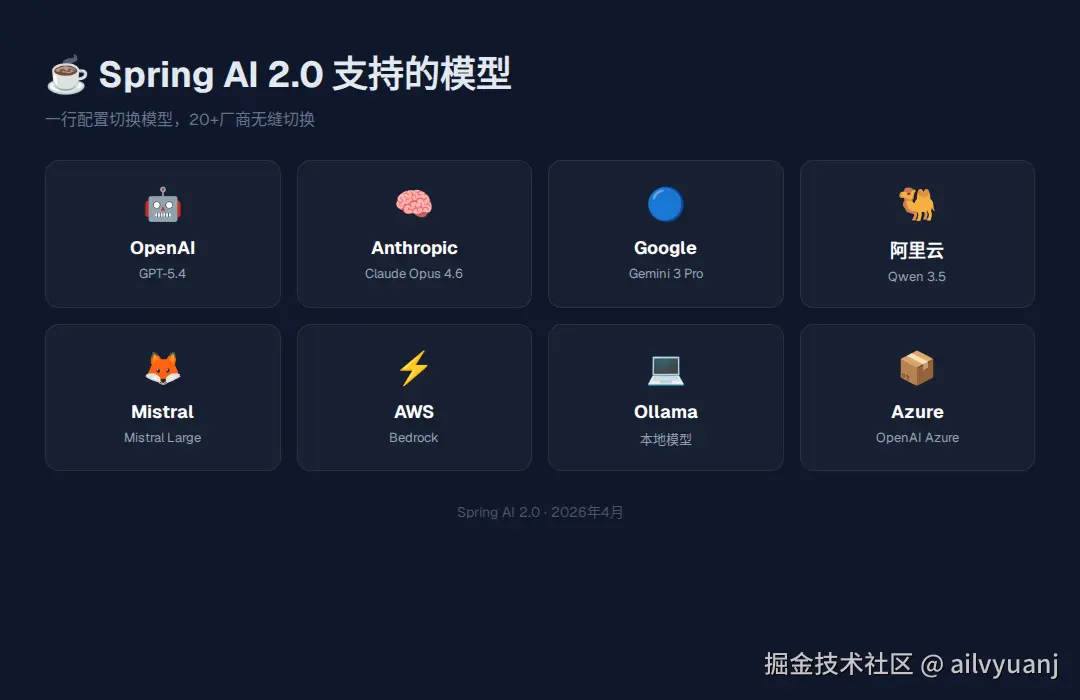
Spring AI 2.0 支持20+模型提供商:
| 厂商 | 模型 | 特点 |
|---|---|---|
| OpenAI | GPT-5.4 | 业界标杆 |
| Anthropic | Claude Opus 4.6 | 编程最强 |
| Gemini 3 Pro | 多模态 | |
| 阿里 | Qwen3.5 | 国产之光 |
| Ollama | 本地模型 | 隐私合规 |
一行配置切换模型:
spring.ai.openai.base-url=
spring.ai.openai.api-key=${OPENAI_API_KEY}

# 切换只需改这一行
spring.ai.openai.base-url=
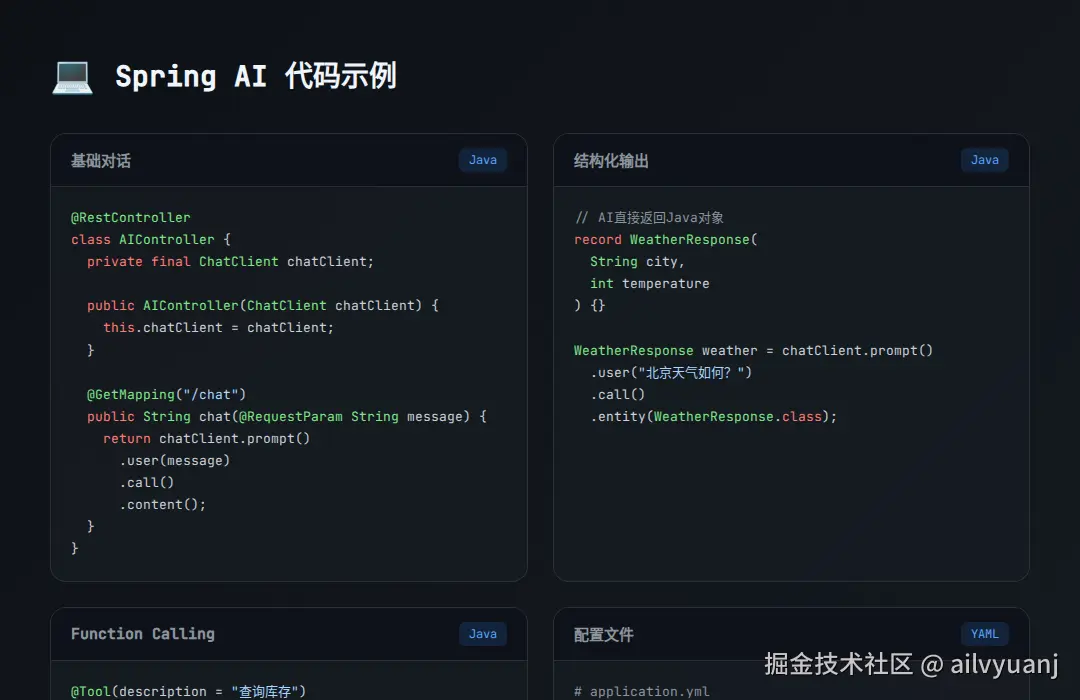
@RestController
class AIController {

    private final ChatClient chatClient;

    // 注入即可用
    public AIController(ChatClient chatClient) {
        this.chatClient = chatClient;
    }

    @GetMapping("/chat")
    public String chat(@RequestParam String message) {
        return chatClient.prompt()
            .user(message)
            .call()
            .content();
    }
}
// AI直接返回Java对象
record WeatherResponse(
    String city,
    int temperature,
    String condition
) {}

WeatherResponse weather = chatClient.prompt()
    .user("北京今天天气怎么样?")
    .call()
    .entity(WeatherResponse.class);

System.out.println(weather.city());    // 北京
System.out.println(weather.temperature()); // 25
@Bean
public vectorStore vectorStore() {
    return new PgVectorStore(jdbcTemplate, embeddingModel);
}

@Bean
public ChatClient ragChatClient(ChatClient.Builder builder,
                                VectorStore vectorStore) {
    return builder
        .defaultSystem("你是一个专业助手")
        .defaultAdvisors(
            new RetrieveAdvisor(vectorStore)
                .asAii()
        )
        .build();
}
@Tool(description = "查询商品库存")
public int getProductStock(String productId) {
    return productRepository.findById(productId)
        .map(p -> p.getStock())
        .orElse(0);
}

ChatResponse response = chatClient.prompt()
    .user("帮我查下SKU-12345还有多少库存?")
    .tools(new ToolCallbackProvider<>(this))
    .call()
    .chatResponse();
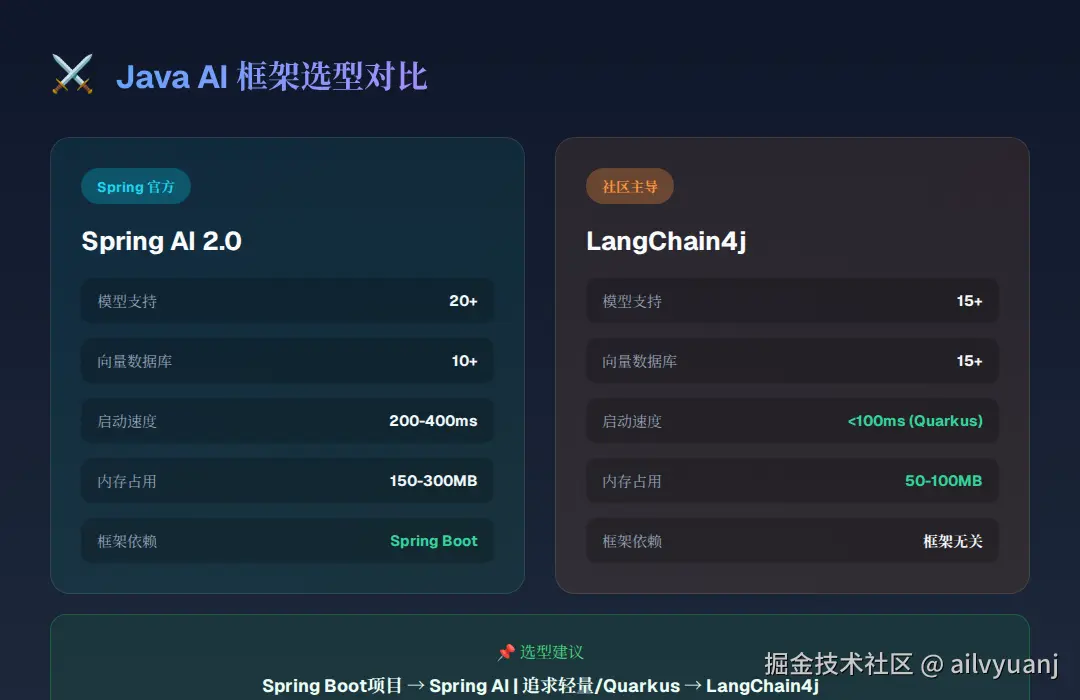
| 维度 | Spring AI 2.0 | LangChain4j |
|---|---|---|
| 定位 | Spring生态"嫡长子" | Java AI"瑞士军刀" |
| 框架依赖 | 必须Spring Boot | 框架无关 |
| 模型支持 | 20+ | 15+ |
| 向量数据库 | 10+ | 15+ |
| 启动速度 | 200-400ms | <100ms(Quarkus) |
| 内存占用 | 150-300MB | 50-100MB |
你的项目用Spring Boot吗?
    │
    ├── 是 → 追求稳定性 → Spring AI
    │
    └── 否 → 追求灵活性 → LangChain4j

追求快速启动(Serverless)?
    │
    ├── 是 → LangChain4j + Quarkus
    │
    └── 否 → 两者皆可

需要混合部署?
    │
    ├── 是 → 核心:Spring AI + 创新:LangChain4j
    │
    └── 否 → 根据团队熟悉度选择
访问 start.spring.io,选择:
Spring Boot: 3.5.x
Java: 21
Dependencies:
  - Spring Web
  - Spring AI OpenAI
# application.yml
spring:
  ai:
    openai:
      api-key: ${OPENAI_API_KEY}
      chat:
        options:
          model: gpt-4o-mini
@SpringBootApplication
public class AiApplication {
    public static void main(String[] args) {
        SpringApplication.run(AiApplication.class, args);
    }
}

@RestController
class ChatController {

    private final ChatClient chatClient;

    public ChatController(ChatClient.Builder builder) {
        this.chatClient = builder.build();
    }

    @GetMapping("/chat")
    public String chat(@RequestParam String message) {
        return chatClient.prompt()
            .user(message)
            .call()
            .content();
    }
}
curl "localhost:8080/chat?message=用Java怎么调AI?"
@Configuration
class AIConfig {

    @Bean
    @Primary
    public ChatClient primaryChatClient(
            @Value("${ai.primary.model}") String model,
            ChatClient.Builder builder) {
        return builder.defaultSystem(p -> p.text("你是一个专业助手"))
            .build();
    }

    @Bean
    public ChatClient codeChatClient(
            @Value("${ai.code.model:claude-opus}") String model,
            ChatClient.Builder builder) {
        return builder.defaultSystem(p -> p.text("你是一个编程专家"))
            .build();
    }
}
@GetMapping(value = "/stream", produces = MediaType.TEXT_EVENT_STREAM)
public Flux<String> streamChat(@RequestParam String message) {
    return chatClient.prompt()
        .user(message)
        .stream()
        .content();
}
@Bean
public ChatClient chatClient(ChatClient.Builder builder) {
    return builder
        .defaultSystem(p -> p.text("你是一个专业助手"))
        .defaultErrorHandler(exception ->
            Flux.just("抱歉,AI服务暂时不可用:" + exception.getMessage()))
        .build();
}
Spring AI让Java AI开发像调用本地服务一样简单
第1周:Spring AI Hello World
    ↓
第2周:RAG知识库实战
    ↓
第3周:Function Calling业务集成
    ↓
第4周:生产环境部署与监控