

三星云服务
27.14M · 2026-04-12

0x00 摘要
0x01 背景
0x02 定义
0x03 工作流程
0xFF 参考
大模型是不可控的。不是‘给LLM一堆工具让它自由发挥’,而是大部分由确定性代码构成,在关键决策点巧妙地融入LLM能力。好的 Agent 应用,是工程设计与 AI 能力的精妙结合,而不是对 AI 的盲目放权。
在 OpenHands 智能框架的生态中,CodeActAgent 占据着核心地位,它是基于 CodeAct 理念构建的核心代理模块。其设计初衷极具巧思:将各类复杂任务统一转化为 “代码执行” 的形式来完成,同时兼顾自然语言对话的交互特性。这一设计既保障了任务执行的精准性与高效性,又为人类与智能代理的协作提供了灵活空间,使其成为框架中处理自动化编程、数据处理等复杂场景的核心载体。
因为本系列借鉴的文章过多,可能在参考文献中有遗漏的文章,如果有,还请大家指出。
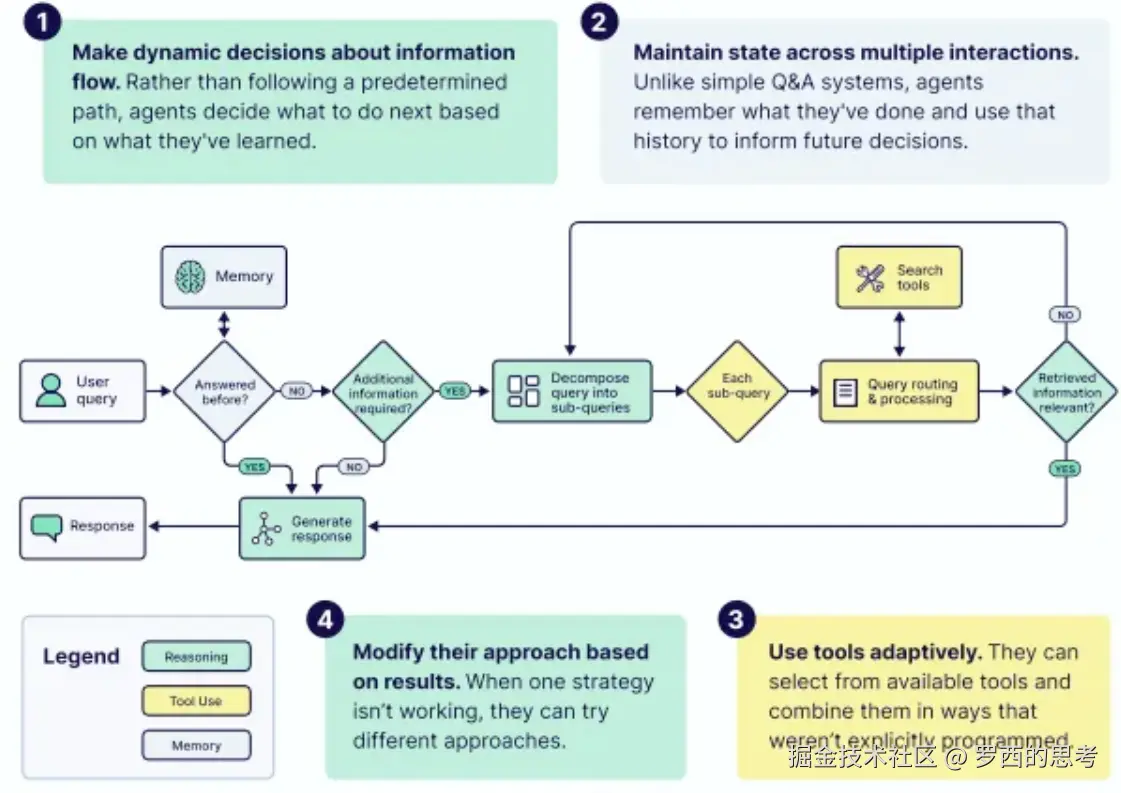
根据Google电子书的定义,一个真正的 AI 智能体拥有四项核心能力:
Agent-规则
如何设计Agent?不同人有不同的理解,这可能是一个哲学问题。
我们使用 github.com/humanlayer/… 来切入,具体如下:
论文 From Storage to Experience: A Survey on the Evolution of LLM Agent Memory Mechanisms 也给出了Agent的设计原则:
设计原则1:Memory as Experience, Not Storage
设计原则2:Proactive over Reactive
设计原则3:Cross-trajectory Learning
设计原则4:Continual Learning without Catastrophic Forgetting
智能体抽象将配置与执行状态分离,智能体被定义为无状态、不可变的规格对象,包含 LLM 设置、工具规格、安全策略与智能体核心逻辑,可序列化并跨进程传输。
智能体通过事件驱动循环逐步处理对话状态,不直接返回结果,而是通过回调函数 on_event (event: Event) -> None 输出结构化事件(如消息、动作、观察结果),实现事件生成与执行控制的分离。该设计支持:
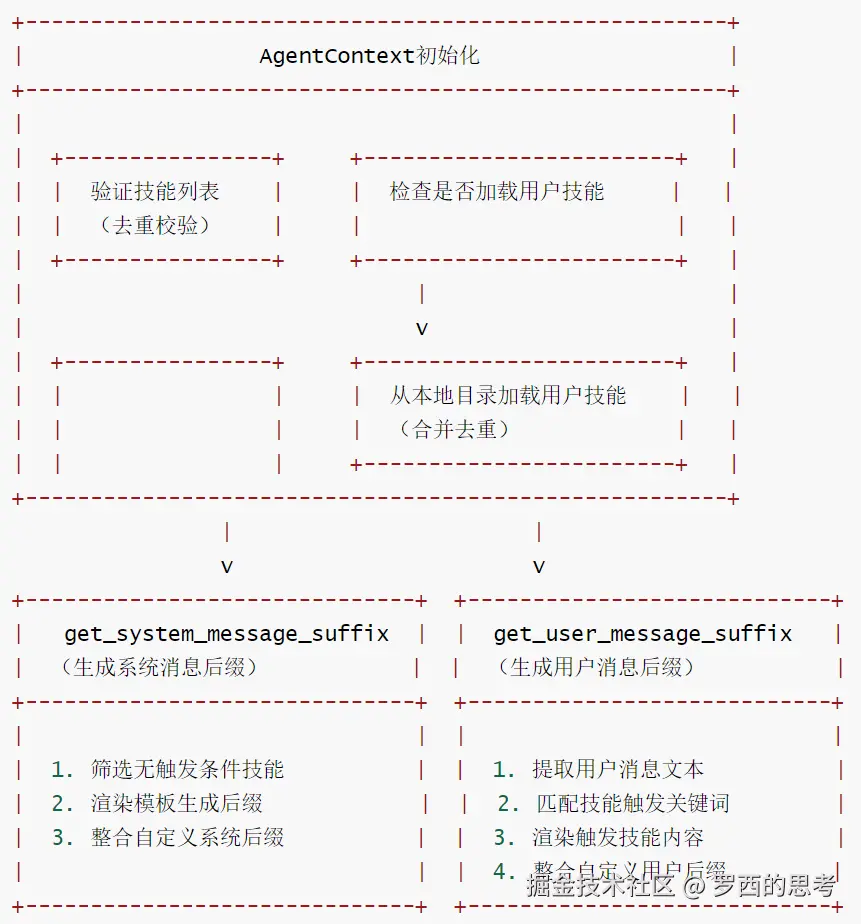
AgentContext 集中管理所有影响 LLM 行为的输入,包括系统 / 用户消息的前缀 / 后缀、用户定义的 Skill(技能)对象。技能可通过编程方式定义,或从 Markdown 文件(如 .openhands/skills/,及 .cursorrules、agents.md 等兼容格式)加载:
永久激活技能(trigger=None):持续增强系统提示;
条件激活技能:基于用户输入的关键词匹配触发,可包含 MCP 工具。
该设计支持丰富的上下文与行为定制,无需修改智能体核心逻辑。
SDK 通过委托工具实现分层智能体协作,充分体现了工具抽象的可扩展性。子智能体作为独立对话存在,继承父智能体的模型配置与工作空间上下文,无需修改核心 SDK 即可实现结构化并行处理与隔离。当前实现提供阻塞式并行执行能力,作为 openhands.tools 包中的标准工具 —— 父智能体创建并坚控子智能体,直至所有任务完成。这一模式证明:异步委托、动态调度、容错恢复等复杂协作行为,均可通过用户自定义工具实现,无需修改核心框架,彰显了 SDK “高级智能体编排无需改动核心” 的可扩展设计原则。
CodeAct 理念的核心突破,在于将智能代理的动作空间提升至通用编程的高度 —— 通过让大语言模型(LLM)直接生成可执行代码,打破了传统工具调用的局限。以往的智能代理往往受困于固定的工具接口,只能机械地调用预设功能,而 CodeAct 赋予代理一个统一的 “可编程” 动作接口,就像为工匠配备了一套可灵活组合的精密工具,为解决复杂任务开辟了全新路径。
这一理念的本质,是深度挖掘 LLM 擅长编写代码的原生能力。它让代理的 “动作” 不再局限于单一的原子 API 调用,而是通过生成一段完整的 Python 代码,交由 Python 解释器执行来完成复杂任务。如此一来,代理能在单个动作中封装完整的逻辑流程:包括调用多个函数或工具、控制执行顺序、处理中间结果并存储,极大地提升了任务处理的连贯性与自主性。
CodeAct Agent 是一个极简主义的智能体,以 ReAct的模式,根据已有的若干 Action-Observation 对的轨迹决定下一步需要采取什么 Action。在每一轮的交互循环中,CodeActAgent 具备两种核心操作模式,二者相辅相成,共同支撑任务推进:
这种 “对话 + 代码” 的双轨模式,不仅简化了智能代理的操作体系,更在实际应用中显著提升了任务处理性能。
实际上 OpenDevin 中 CodeAct Agent 的实现与原始 CodeAct 并不完全一样,前者在原始 CodeAct 的基础上进行改进,并很大程度上借鉴了 SWE-Agent.
CodeActAgent 的特色如下:
sandbox_plugins 定义沙盒环境所需插件,按顺序初始化确保依赖正确性,同时支持灵活扩展技能(如通过 AgentSkillsRequirement 新增工具函数)。ConversationMemory 管理 “行动 - 观察” 历史,搭配 Condenser 压缩长上下文,平衡上下文相关性与模型输入长度限制。LLMRegistry.get_router 获取路由 LLM,可根据任务复杂度动态选择适配模型,兼顾性能与成本。CodeActAgent的定义如下。
class CodeActAgent(Agent):
    """
    CodeActAgent:极简主义的智能代理,基于 CodeAct 理念实现。
    核心逻辑:将模型的行动统一到“代码执行”这一单一行动空间,通过传递“行动-观察”对列表,
    引导模型决策下一步操作,兼顾简洁性与执行性能。

    核心理念(源自论文:):
    打破传统代理多行动类型的复杂设计,用代码执行统一所有行动,既简化架构又提升效率。
    """
    VERSION = '2.2'  # 代理版本号

    # 沙盒环境所需插件依赖(按初始化顺序排列)
    sandbox_plugins: list[PluginRequirement] = [
        # 注意:AgentSkillsRequirement 需在 JupyterRequirement 之前初始化
        # 原因:AgentSkillsRequirement 提供大量 Python 工具函数,
        # Jupyter 环境需要依赖这些函数才能正常工作
        AgentSkillsRequirement(),  # 提供代理核心技能函数的插件
        JupyterRequirement(),      # 提供交互式 Python 执行环境的插件
    ]

    def __init__(self, config: AgentConfig, llm_registry: LLMRegistry) -> None:
        """
        初始化 CodeActAgent 实例。

        参数:
            config (AgentConfig):当前代理的配置对象(包含模型路由、记忆策略等)
            llm_registry (LLMRegistry):LLM 注册表实例,用于获取所需 LLM 或路由 LLM
        """
        # 调用父类 Agent 的初始化方法,完成基础配置(如 LLM 注册、提示词管理器初始化)
        super().__init__(config, llm_registry)

        self.pending_actions: deque['Action'] = deque()  # 待执行的行动队列(双端队列,支持高效进出)
        self.reset()  # 重置代理状态(初始化行动历史、观察记录等)
        self.tools = self._get_tools()  # 获取代理可使用的工具集(从插件或配置中提取)

        # 初始化对话记忆实例:存储“行动-观察”对,支持记忆压缩、上下文管理
        self.conversation_memory = ConversationMemory(self.config, self.prompt_manager)

        # 初始化上下文压缩器:根据配置创建 Condenser 实例,用于压缩长对话历史
        self.condenser = Condenser.from_config(self.config.condenser, llm_registry)

        # 覆盖父类的 LLM 实例:如需模型路由,优先使用路由 LLM(根据代理配置动态选择模型)
        self.llm = self.llm_registry.get_router(self.config)
CodeActAgent 通过 AgentConfig,可以灵活启用 / 禁用各种功能,可配置的功能如下:
config.enable_cmd # 启用命令执行
config.enable_think # 启用思考功能
config.enable_finish # 启用完成功能
config.enable_browsing # 启用浏览器功能
config.enable_jupyter # 启用 Jupyter
config.enable_editor # 启用文件编辑器
CodeActAgent 通过 sandbox_plugins 定义沙盒环境所需插件,按顺序初始化确保依赖正确性,同时支持灵活扩展技能(如通过 AgentSkillsRequirement 新增工具函数)。
    sandbox_plugins: list[PluginRequirement] = [
        # NOTE: AgentSkillsRequirement need to go before JupyterRequirement, since
        # AgentSkillsRequirement provides a lot of Python functions,
        # and it needs to be initialized before Jupyter for Jupyter to use those functions.
        AgentSkillsRequirement(), # 提供Python函数
        JupyterRequirement(), # 提供Jupyter支持
    ]
工具是智能代理拓展能力边界的关键,正是工具的存在,让 LLM 从单纯的对话机器人(ChatBot)进化为具备实际执行能力的智能代理(Agent)。CodeAct 的方案却反其道而行之,以极致简洁的思路重构了工具调用逻辑 —— 它将 Python 作为唯一的工具,让 LLM 通过自主编写代码的方式实现各类功能调用,摒弃了传统多工具集成的复杂设计。
传统工具调用模式中,开发者需要在系统提示词(system prompt)中明确告知 LLM 可用的工具接口(Available APIs),LLM 再通过生成工具名和参数列表的方式调用工具,无论输出格式是文本还是 JSON,本质上都受限于预设范围。而 CodeAct 省去了这一繁琐的预定义步骤,将 Python 作为统一接口,LLM 在每一轮交互中直接生成代码并交由解释器执行。这种设计让动作空间更标准化,工具调用过程简洁优雅,充分释放了 LLM 的原生潜力。
CodeActAgent 则有所不同。CodeActAgent是一个混合型代理,它既允许模型执行任意代码,也提供了一些特定工具供模型使用。具体来说:
允许模型执行任意代码。CodeActAgent的核心理念是让模型能够执行任意代码:
提供特定工具集。CodeActAgent 也提供了一些预定义的工具供模型使用:
工具启用的灵活性通过配置,可以控制哪些工具被启用
CodeActAgent支持丰富的工具集如下:
    def _get_tools(self) -> list['ChatCompletionToolParam']:
        # For these models, we use short tool descriptions ( < 1024 tokens)
        # to avoid hitting the OpenAI token limit for tool descriptions.
        SHORT_TOOL_DESCRIPTION_LLM_SUBSTRS = ['gpt-4', 'o3', 'o1', 'o4']

        use_short_tool_desc = False
        if self.llm is not None:
            # For historical reasons, previously OpenAI enforces max function description length of 1k characters
            #
            # But it no longer seems to be an issue recently
            #
            # Tested on GPT-5 and longer description still works. But we still keep the logic to be safe for older models.
            use_short_tool_desc = any(
                model_substr in self.llm.config.model
                for model_substr in SHORT_TOOL_DESCRIPTION_LLM_SUBSTRS
            )

        tools = []
        if self.config.enable_cmd: # Bash命令执行工具
            tools.append(create_cmd_run_tool(use_short_description=use_short_tool_desc))
        if self.config.enable_think: # 思考工具,记录推理过程
            tools.append(ThinkTool)
        if self.config.enable_finish: # 完成工具,结束任务
            tools.append(FinishTool)
        if self.config.enable_condensation_request:
            tools.append(CondensationRequestTool)
        if self.config.enable_browsing: # 浏览器工具
            if sys.platform == 'win32':
                logger.warning('Windows runtime does not support browsing yet')
            else:
                tools.append(BrowserTool)
        if self.config.enable_jupyter: # IPython工具
            tools.append(IPythonTool)
        if self.config.enable_plan_mode:
            # In plan mode, we use the task_tracker tool for task management
            tools.append(create_task_tracker_tool(use_short_tool_desc))
        if self.config.enable_llm_editor: # 文件编辑工具
            tools.append(LLMBasedFileEditTool)
        elif self.config.enable_editor:
            tools.append(
                create_str_replace_editor_tool(
                    use_short_description=use_short_tool_desc,
                    runtime_type=self.config.runtime,
                )
            )
        return tools
BrowserTool 举例如下:
BrowserTool = ChatCompletionToolParam(
    type='function',
    function=ChatCompletionToolParamFunctionChunk(
        name=BROWSER_TOOL_NAME,
        description=_BROWSER_DESCRIPTION,
        parameters={
            'type': 'object',
            'properties': {
                'code': {
                    'type': 'string',
                    'description': (
                        'The Python code that interacts with the browser.n'
                        + _BROWSER_TOOL_DESCRIPTION
                    ),
                },
                'security_risk': {
                    'type': 'string',
                    'description': SECURITY_RISK_DESC,
                    'enum': RISK_LEVELS,
                },
            },
            'required': ['code', 'security_risk'],
        },
    ),
)
_BROWSER_TOOL_DESCRIPTION 如下。
_BROWSER_TOOL_DESCRIPTION = """
The following 15 functions are available. Nothing else is supported.

goto(url: str)
    Description: Navigate to a url.
    Examples:
        goto('http://www.example.com')

go_back()
    Description: Navigate to the previous page in history.
    Examples:
        go_back()

go_forward()
    Description: Navigate to the next page in history.
    Examples:
        go_forward()

noop(wait_ms: float = 1000)
    Description: Do nothing, and optionally wait for the given time (in milliseconds).
    You can use this to get the current page content and/or wait for the page to load.
    Examples:
        noop()

        noop(500)

scroll(delta_x: float, delta_y: float)
    Description: Scroll horizontally and vertically. Amounts in pixels, positive for right or down scrolling, negative for left or up scrolling. Dispatches a wheel event.
    Examples:
        scroll(0, 200)

        scroll(-50.2, -100.5)

fill(bid: str, value: str)
    Description: Fill out a form field. It focuses the element and triggers an input event with the entered text. It works for <input>, <textarea> and [contenteditable] elements.
    Examples:
        fill('237', 'example value')

        fill('45', 'multi-linenexample')

        fill('a12', 'example with "quotes"')

select_option(bid: str, options: str | list[str])
    Description: Select one or multiple options in a <select> element. You can specify option value or label to select. Multiple options can be selected.
    Examples:
        select_option('a48', 'blue')

        select_option('c48', ['red', 'green', 'blue'])

click(bid: str, button: Literal['left', 'middle', 'right'] = 'left', modifiers: list[typing.Literal['Alt', 'Control', 'ControlOrMeta', 'Meta', 'Shift']] = [])
    Description: Click an element.
    Examples:
        click('a51')

        click('b22', button='right')

        click('48', button='middle', modifiers=['Shift'])

dblclick(bid: str, button: Literal['left', 'middle', 'right'] = 'left', modifiers: list[typing.Literal['Alt', 'Control', 'ControlOrMeta', 'Meta', 'Shift']] = [])
    Description: Double click an element.
    Examples:
        dblclick('12')

        dblclick('ca42', button='right')

        dblclick('178', button='middle', modifiers=['Shift'])

hover(bid: str)
    Description: Hover over an element.
    Examples:
        hover('b8')

press(bid: str, key_comb: str)
    Description: Focus the matching element and press a combination of keys. It accepts the logical key names that are emitted in the keyboardEvent.key property of the keyboard events: Backquote, Minus, Equal, Backslash, Backspace, Tab, Delete, Escape, ArrowDown, End, Enter, Home, Insert, PageDown, PageUp, ArrowRight, ArrowUp, F1 - F12, Digit0 - Digit9, KeyA - KeyZ, etc. You can alternatively specify a single character you'd like to produce such as "a" or "#". Following modification shortcuts are also supported: Shift, Control, Alt, Meta, ShiftLeft, ControlOrMeta. ControlOrMeta resolves to Control on Windows and Linux and to Meta on macOS.
    Examples:
        press('88', 'Backspace')

        press('a26', 'ControlOrMeta+a')

        press('a61', 'Meta+Shift+t')

focus(bid: str)
    Description: Focus the matching element.
    Examples:
        focus('b455')

clear(bid: str)
    Description: Clear the input field.
    Examples:
        clear('996')

drag_and_drop(from_bid: str, to_bid: str)
    Description: Perform a drag & drop. Hover the element that will be dragged. Press left mouse button. Move mouse to the element that will receive the drop. Release left mouse button.
    Examples:
        drag_and_drop('56', '498')

upload_file(bid: str, file: str | list[str])
    Description: Click an element and wait for a "filechooser" event, then select one or multiple input files for upload. Relative file paths are resolved relative to the current working directory. An empty list clears the selected files.
    Examples:
        upload_file('572', '/home/user/my_receipt.pdf')

        upload_file('63', ['/home/bob/Documents/image.jpg', '/home/bob/Documents/file.zip'])
"""
让 AI 做决策,意味着它需要对环境有深刻的理解,甚至具备一定程度的“常识”,在已知的模型能力下,往往和高质量的prompt和上下文强相关。要让 AI 胜任这个角色,必须给它提供一套明确的行动框架:清晰的工具集、详尽的工具使用场景、固定的工作流,甚至要细化到每个决策节点的触发时机。
在以自然语言为接口、大模型为核心的 Software 3.0 时代,AI Agent 作为上下文驱动的生成式应用,需突破传统上下文窗口的固有局限。传统依赖上下文窗口维持对话状态与任务记忆的方式,存在长度受限、组织无序、知识静态、成本高昂四大痛点 —— 既无法承载超长历史信息,也难以高效检索与动态更新知识,更会因长文本处理消耗大量计算资源。
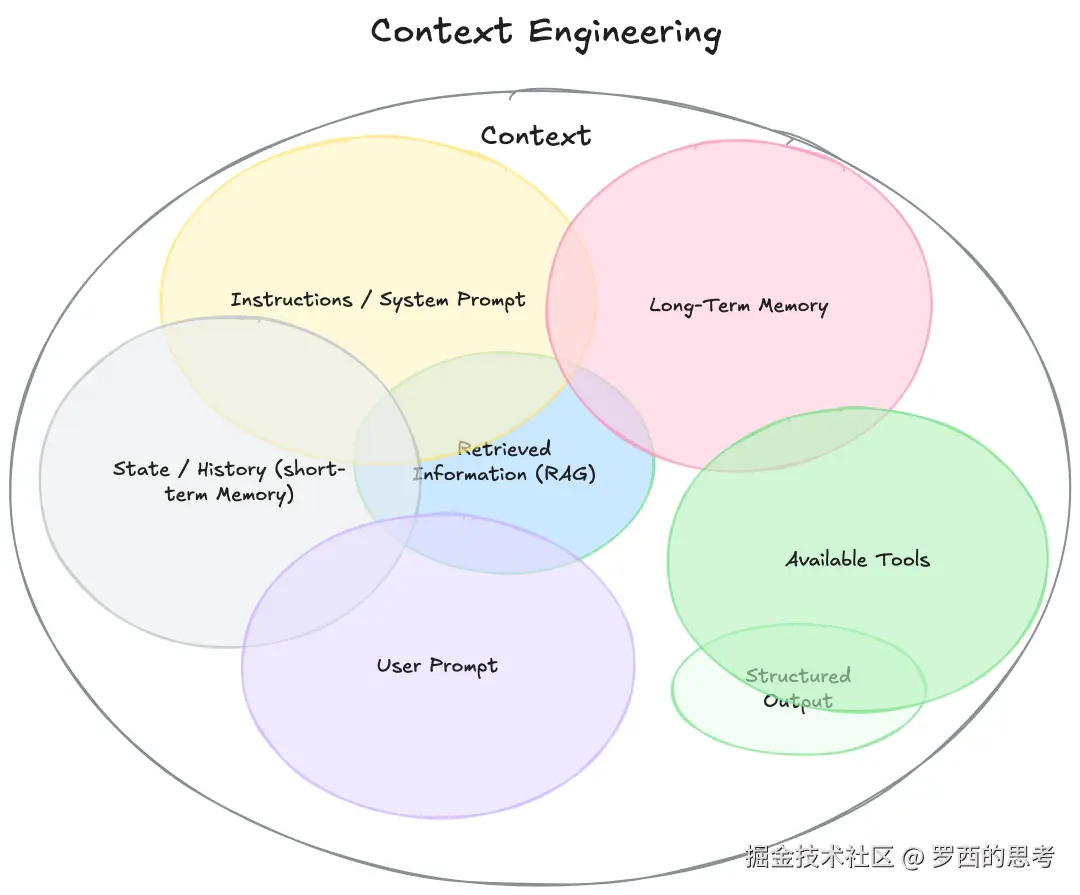
从本质上讲,上下文(Context)是提供给 LLM 的、用于完成下一步推理或生成任务的全部信息集合,从系统架构视角看,Agentic System 可类比为新型操作系统:LLM 扮演 CPU 角色,上下文窗口则如同容量有限的 RAM,而上下文工程就是核心的 “内存管理器”—— 其核心职责并非简单填充数据,而是通过智能调度算法,动态决定上下文数据的加载与换出,确保系统高效运行与结果精准性。上下文工程具体如下图所示。
Context Engineering
图中所有模块可分为 “上下文输入源” 和 “输出 / 工具支撑” 两类:
| 分类 | 模块 | 作用说明 |
|---|---|---|
| 上下文输入源 | Instructions / System Prompt | 模型的 “规则 / 角色定义”,决定模型的行为模式(如 “你是一个严谨的助手”) |
| State / History(Short-term Memory) | 短期记忆:当前会话的历史交互记录,保证对话连贯性 | |
| Long-term Memory | 长期记忆:跨会话的用户 / 任务信息(如用户偏好、历史任务结果) | |
| User Prompt | 用户当前的查询指令,是上下文的核心触发点 | |
| Retrieved Information(RAG) | 检索增强生成:从外部知识库(文档、数据库)中调取的相关信息 | |
| 输出 / 工具支撑 | Available Tools | 模型可调用的外部工具(如计算器、搜索引擎),扩展模型能力 |
| Structured Output | 模型输出的结构化格式(如 JSON、表格),提升结果的可用性 |
AgentContext 是 OpenHands 框架中管理提示词扩展的核心结构,负责整合所有影响系统扩展和解释用户提示的上下文信息。它将静态环境细节(如代码库信息)和动态用户激活的扩展(如技能组件)结合,为大语言模型(LLM)交互提供完整的提示词上下文,是组装、格式化和注入所有与提示相关信息的主要容器。
Skill)动态扩展提示词,技能可被用户输入触发,自动注入领域知识或指导信息。CodeActAgent-1
class AgentContext(BaseModel):
    """管理提示词扩展的核心结构。

    AgentContext 统一了所有影响系统扩展和解释用户提示的上下文输入,
    融合了静态环境细节和来自技能的动态用户激活扩展。

    具体包含:
    - **代码库上下文/代码库技能**:活跃代码库、分支信息及代码库技能提供的特定指令。
    - **运行时上下文**:当前执行环境(主机、工作目录、密钥、日期等)。
    - **对话指令**:约束或指导智能体在会话中行为的任务/渠道特定规则(可选)。
    - **知识技能**:可被用户输入触发的扩展组件,用于注入知识或领域特定指导。

    这些元素共同使 AgentContext 成为负责组装、格式化和注入所有提示相关上下文到
    LLM 交互中的主要容器。
    """  # noqa: E501

    skills: list[Skill] = Field(
        default_factory=list,
        description="List of available skills that can extend the user's input.",
    )
    system_message_suffix: str | None = Field(
        default=None, description="Optional suffix to append to the system prompt."
    )
    user_message_suffix: str | None = Field(
        default=None, description="Optional suffix to append to the user's message."
    )
    load_user_skills: bool = Field(
        default=False,
        description=(
            "Whether to automatically load user skills from ~/.openhands/skills/ "
            "and ~/.openhands/microagents/ (for backward compatibility). "
        ),
    )

    @field_validator("skills")
    @classmethod
    def _validate_skills(cls, v: list[Skill], _info):
        """验证技能列表,确保无重复名称。"""
        if not v:
            return v
        # 检查重复的技能名称
        seen_names = set()
        for skill in v:
            if skill.name in seen_names:
                raise ValueError(f"Duplicate skill name found: {skill.name}")
            seen_names.add(skill.name)
        return v

    @model_validator(mode="after")
    def _load_user_skills(self):
        """若启用,则从用户主目录加载自定义技能。"""
        if not self.load_user_skills:
            return self

        try:
            # 加载用户技能
            user_skills = load_user_skills()
            # 合并用户技能与显式技能,避免重复
            existing_names = {skill.name for skill in self.skills}
            for user_skill in user_skills:
                if user_skill.name not in existing_names:
                    self.skills.append(user_skill)
                else:
                    logger.warning(
                        f"Skipping user skill '{user_skill.name}' "
                        f"(already in explicit skills)"
                    )
        except Exception as e:
            logger.warning(f"Failed to load user skills: {str(e)}")

        return self

    def get_system_message_suffix(self) -> str | None:
        """获取包含代码库技能内容和自定义后缀的系统消息。

        自定义后缀通常包括:
        - 代码库信息(仓库名称、分支名称、PR编号等)
        - 运行时信息(如可用主机、当前日期)
        - 对话指令(如用户偏好、任务详情)
        - 代码库特定指令(从代码库技能收集)
        """
        # 筛选无触发条件的技能(始终激活的代码库技能)
        repo_skills = [s for s in self.skills if s.trigger is None]
        logger.debug(f"Triggered {len(repo_skills)} repository skills: {repo_skills}")
        # 构建工作区上下文信息
        if repo_skills:
            # TODO(test): 添加渲染测试确保功能正常
            formatted_text = render_template(
                prompt_dir=str(PROMPT_DIR),  # 模板目录
                template_name="system_message_suffix.j2",  # 系统消息后缀模板
                repo_skills=repo_skills,  # 代码库技能列表
                system_message_suffix=self.system_message_suffix or "",  # 自定义系统后缀
            ).strip()
            return formatted_text
        # 若无可激活的代码库技能,直接返回自定义系统后缀(非空时)
        elif self.system_message_suffix and self.system_message_suffix.strip():
            return self.system_message_suffix.strip()
        return None

    def get_user_message_suffix(
        self, user_message: Message, skip_skill_names: list[str]
    ) -> tuple[TextContent, list[str]] | None:
        """通过技能召回的知识增强用户消息。

        流程如下:
        - 提取用户消息的文本内容
        - 匹配查询中的技能触发词
        - 若有相关技能被触发,返回格式化的知识和触发的技能名称
        """  # noqa: E501

        user_message_suffix = None
        # 处理自定义用户消息后缀
        if self.user_message_suffix and self.user_message_suffix.strip():
            user_message_suffix = self.user_message_suffix.strip()

        # 提取用户消息中的纯文本内容
        query = "n".join(
            c.text for c in user_message.content if isinstance(c, TextContent)
        ).strip()
        recalled_knowledge: list[SkillKnowledge] = []

        # 若查询为空,仅返回自定义用户后缀(如有)
        if not query:
            if user_message_suffix:
                return TextContent(text=user_message_suffix), []
            return None

        # 在查询中搜索技能触发词
        for skill in self.skills:
            if not isinstance(skill, Skill):
                continue
            # 匹配技能触发条件
            trigger = skill.match_trigger(query)
            if trigger and skill.name not in skip_skill_names:
                logger.info(
                    "Skill '%s' triggered by keyword '%s'",
                    skill.name,
                    trigger,
                )
                # 收集触发技能的知识
                recalled_knowledge.append(
                    SkillKnowledge(
                        name=skill.name,
                        trigger=trigger,
                        content=skill.content,
                    )
                )

        # 若有触发的技能,渲染知识内容
        if recalled_knowledge:
            formatted_skill_text = render_template(
                prompt_dir=str(PROMPT_DIR),
                template_name="skill_knowledge_info.j2",  # 技能知识模板
                triggered_agents=recalled_knowledge,  # 触发的技能知识列表
            )
            # 合并自定义用户后缀
            if user_message_suffix:
                formatted_skill_text += "n" + user_message_suffix
            return TextContent(text=formatted_skill_text), [
                k.name for k in recalled_knowledge
            ]

        # 若无触发技能,仅返回自定义用户后缀(如有)
        if user_message_suffix:
            return TextContent(text=user_message_suffix), []
        return None
CodeActAgent的提示词(prompt)是通过PromptManager从文件中加载的。具体来说:
CodeActAgent 被设计为可以并且应该继续修改自己生成的代码。系统提供了多种工具和明确的指导原则来支持迭代开发过程。代理被鼓励通过多次迭代来完善其解决方案,包括修改、测试和重新修改代码,直到达到满意的结果。这种设计符合 CodeAct 论文的理念,即将所有操作统一到代码执行空间中,从而简化和提高代理性能。
系统设计系统设计明确鼓励 CodeActAgent 迭代修改代码:
系统提示中的文件系统指南明确支持修改现有代码:
系统提示中定义的问题解决工作流程明确支持迭代修改:
CodeActAgent 拥有多种工具来支持迭代修改代码:
我们接下来看看 CodeActAgent 的工作流程。
step方法是决策过程,返回各种Action:
具体代码如下:
    def step(self, state: State) -> 'Action':
        """使用CodeAct Agent执行一步操作。

        包括收集先前步骤的信息,并提示模型生成要执行的命令。

        参数:
        - state (State): 用于获取更新的信息
        """
        # 处理待处理操作(如果有)
        if self.pending_actions:
            # 返回并移除队列中的第一个待处理操作
            return self.pending_actions.popleft()

        # 如果任务已完成,退出
        # 获取最新的用户消息
        latest_user_message = state.get_last_user_message()
        # 若用户输入"/exit",则返回结束操作
        if latest_user_message and latest_user_message.content.strip() == '/exit':
            return AgentFinishAction()

        # 压缩状态中的事件。如果获得视图,将其传递给对话管理器处理;
        # 如果获得压缩事件,则返回该事件而非操作。控制器将立即要求代理使用新视图再次执行步骤
        condensed_history: list[Event] = []
        # 匹配压缩器返回的结果类型
        match self.condenser.condensed_history(state):
            # 若为View类型,提取事件列表作为压缩历史
            case View(events=events):
                condensed_history = events
            # 若为Condensation类型,返回其包含的压缩操作
            case Condensation(action=condensation_action):
                return condensation_action

        # 打印调试日志:显示处理的压缩事件数量和总事件数量
        logger.debug(
            f'从共{len(state.history)}个事件中处理{len(condensed_history)}个压缩事件'
        )

        # 获取初始用户消息(从状态历史中)
        initial_user_message = self._get_initial_user_message(state.history)
        # 构建用于LLM的消息列表(基于压缩历史和初始用户消息)
        messages = self._get_messages(condensed_history, initial_user_message)
        # 构建LLM调用参数
        params: dict = {
            'messages': messages,  # 消息列表
        }
        # 检查并添加可用工具(根据LLM配置过滤)
        params['tools'] = check_tools(self.tools, self.llm.config)
        # 添加额外元数据(从状态中提取,适配LLM格式)
        params['extra_body'] = {
            'metadata': state.to_llm_metadata(
                model_name=self.llm.config.model, agent_name=self.name
            )
        }
        # 调用LLM获取响应
        response = self.llm.completion(** params)
        # 打印调试日志:显示LLM返回的响应
        logger.debug(f'LLM返回的响应: {response}')
        # 将LLM响应转换为具体操作列表
        actions = self.response_to_actions(response)
        # 打印调试日志:显示转换后的操作
        logger.debug(f'response_to_actions转换后的操作: {actions}')
        # 将所有操作添加到待处理队列
        for action in actions:
            self.pending_actions.append(action)
        # 返回并移除队列中的第一个操作
        return self.pending_actions.popleft()
_get_messages方法负责处理消息。该方法执行以下步骤:
    def _get_messages(
        self, events: list[Event], initial_user_message: MessageAction
    ) -> list[Message]:
        """为LLM对话构建消息历史。

        该方法通过处理状态中的事件并将其格式化为LLM可理解的消息,构建结构化的对话历史。
        它处理常规消息流和函数调用场景。

        参数:
            events: 要转换为消息的事件列表

        返回:
            list[Message]: 格式化的消息列表,可直接供LLM使用,包括:
                - 带提示的系统消息(来自SystemMessageAction)
                - 操作消息(来自用户和助手)
                - 观察消息(包括工具响应)
                - 环境提醒(在非函数调用模式下)

        注意:
            - 在函数调用模式下,工具调用及其响应会被仔细跟踪以维持正确的对话流程
            - 同一角色的消息会被合并,以避免连续出现相同角色的消息
            - 对于Anthropic模型,会根据其文档对特定消息进行缓存
        """
        # 若未实例化提示管理器,抛出异常
        if not self.prompt_manager:
            raise Exception('提示管理器未实例化。')

        # 使用对话内存处理事件(包括SystemMessageAction)
        messages = self.conversation_memory.process_events(
            condensed_history=events,  # 压缩后的事件历史
            initial_user_action=initial_user_message,  # 初始用户消息
            max_message_chars=self.llm.config.max_message_chars,  # 消息最大字符数限制
            vision_is_active=self.llm.vision_is_active(),  # 是否启用视觉功能
        )

        # 若LLM启用了提示缓存,应用缓存机制
        if self.llm.is_caching_prompt_active():
            self.conversation_memory.apply_prompt_caching(messages)

        # 返回构建的消息列表
        return messages
在step函数中,会通过Condensor压缩对话历史,避免上下文过长。
        # Condense the events from the state. If we get a view we'll pass those
        # to the conversation manager for processing, but if we get a condensation
        # event we'll just return that instead of an action. The controller will
        # immediately ask the agent to step again with the new view.
        condensed_history: list[Event] = []
        match self.condenser.condensed_history(state):
            case View(events=events):
                condensed_history = events

            case Condensation(action=condensation_action):
                return condensation_action
成员变量conversation_memory会进行会话内存管理。
self.conversation_memory = ConversationMemory(self.config, self.prompt_manager)
具体代码参见:
    def _get_messages(
        self, events: list[Event], initial_user_message: MessageAction
    ) -> list[Message]:
        # Use ConversationMemory to process events (including SystemMessageAction)
        messages = self.conversation_memory.process_events(
            condensed_history=events,
            initial_user_action=initial_user_message,
            max_message_chars=self.llm.config.max_message_chars,
            vision_is_active=self.llm.vision_is_active(),
        )

        if self.llm.is_caching_prompt_active():
            self.conversation_memory.apply_prompt_caching(messages)

        return messages
docs.all-hands.dev/openhands/u…
当AI Agent从“玩具”走向“工具”,我们该关注什么?Openhands架构解析【第二篇:Agent 相关核心概念】 克里
当AI Agent从“玩具”走向“工具”,我们该关注什么?Openhands架构解析【第一篇:系列导读】 克里
Coding Agent之Openhands解析(含代码) Arrow
OpenHands 源码解读 一力辉
SWE-agent 详解:打造大模型与计算机的编程界面 mannaandpoem
swe-agent.com/paper.pdf
浅读 OpenDevin mannaandpoem
深度拆解 Claude 的 Agent 架构:MCP + PTC、Skills 与 Subagents 的三维协同
这是一本40页的上下文工程ebook
人与Language Agent交互的下一个范式:从Attention到Memory的Agree-on
本文使用 markdown.com.cn 排版