
弗兰的悲惨之旅
99.73M · 2026-04-04

在上一篇中,咱们通过简单的实操测试,发现Base模型是“无脑续写机器”,Instruct模型很聪明,但是它还不是属于咱们的“贾维斯”,下载的模型和其他所有人的都一样。
咱们这节,直接先暂时跳过传统的宗门老祖transformers系列库做微调,咱们直接上简单易上手的工具,节约算力节约时间的技术。
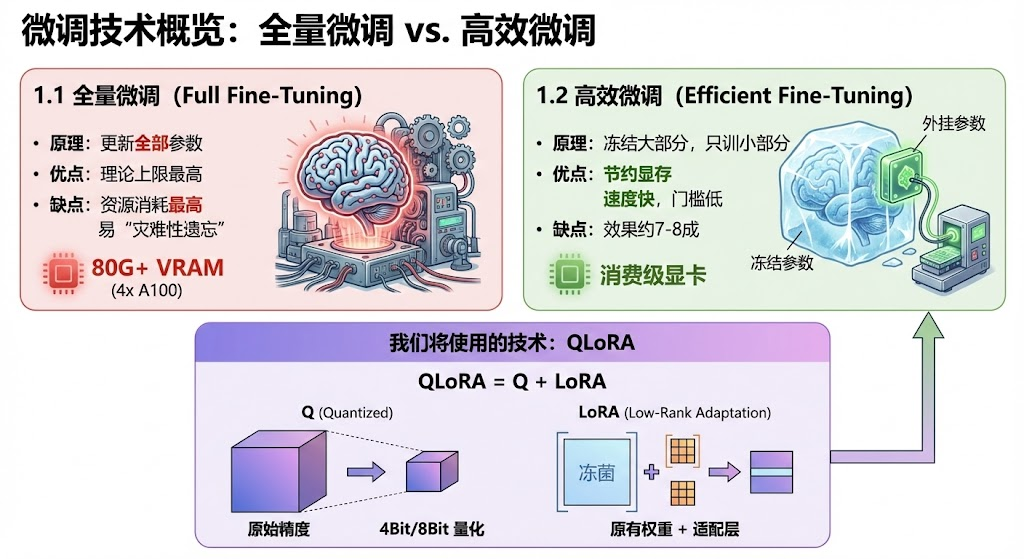
在开始之前,稍微花上那么一丢丢的时间,咱们来了解一下微调的"家谱"。
我们今天要用的技术,就是高效微调中的QLoRA。 QLoRA = Q+LoRA。
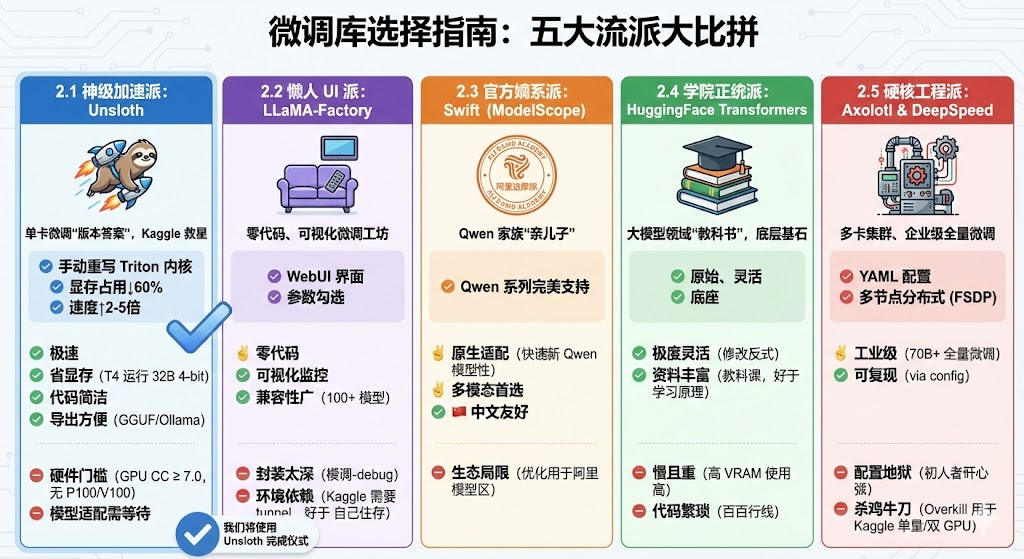 所以,综上所述,咱们将使用 Unsloth来完成今天的Qwen3“灵魂认主仪式”。
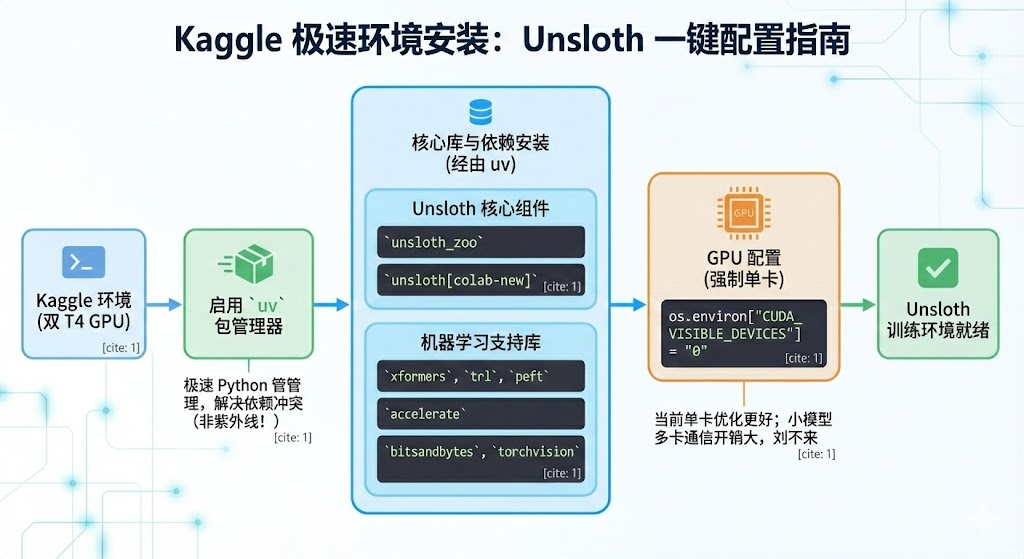
Unsloth 对环境要求较高,但在 Kaggle 上,我们可以用以下命令一键配置。
import os
!pip install uv
!uv pip install --system --upgrade "unsloth_zoo @ git+t"
!uv pip install --system "unsloth[colab-new] @ git+t"
!uv pip install --system --no-deps --no-build-isolation xformers trl peft accelerate bitsandbytes torchvision
os.environ["CUDA_VISIBLE_DEVICES"] = "0" # 关了双卡
PS:
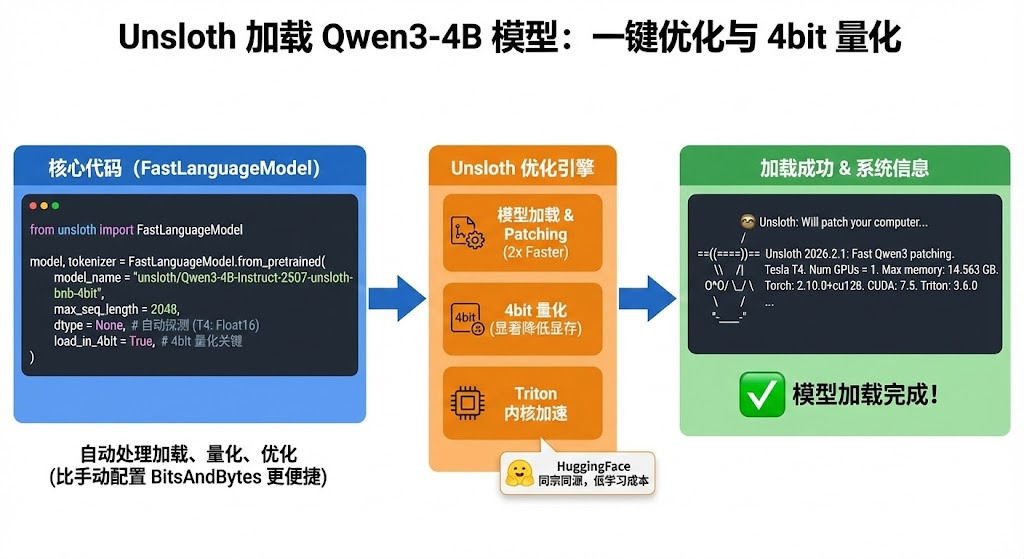
Unsloth 提供了一个 FastLanguageModel 类,它把模型加载、量化、优化全包圆了。我们不需要自己去写 BitsAndBytesConfig,这也是咱们选择unsloth的一个原因,轻便好用,哈哈哈。
import torch
from unsloth import FastLanguageModel

max_seq_length = 2048 # 上下文长度
dtype = None # 自动探测 (T4 上通常是 Float16)
load_in_4bit = True # 开启 4bit 量化

# 加载 Qwen3-4B 的 Unsloth 优化版
model, tokenizer = FastLanguageModel.from_pretrained(
    model_name = "unsloth/Qwen3-4B-Instruct-2507-unsloth-bnb-4bit",
    max_seq_length = max_seq_length,
    dtype = dtype,
    load_in_4bit = load_in_4bit, #这里使用的是4bit量化
)

print("模型加载完成!")
注意看,咱们加载模型的方式是以4bit方式加载的,所以会模型显存消耗会小很多。 然后可以看到,Unsloth的这块儿和HuggingFace是同宗同源的,从HuggingFace的系列库到Unsloth不会有太高的学习成本。
输出:
 Unsloth: Will patch your computer to enable 2x faster free finetuning.
2026-02-08 07:22:27.701872: E external/local_xla/xla/stream_executor/cuda/cuda_fft.cc:467] Unable to register cuFFT factory: Attempting to register factory for plugin cuFFT when one has already been registered
WARNING: All log messages before absl::InitializeLog() is called are written to STDERR
E0000 00:00:1770535347.724904    1136 cuda_dnn.cc:8579] Unable to register cuDNN factory: Attempting to register factory for plugin cuDNN when one has already been registered
E0000 00:00:1770535347.732405    1136 cuda_blas.cc:1407] Unable to register cuBLAS factory: Attempting to register factory for plugin cuBLAS when one has already been registered
W0000 00:00:1770535347.752648    1136 computation_placer.cc:177] computation placer already registered. Please check linkage and avoid linking the same target more than once.
W0000 00:00:1770535347.752668    1136 computation_placer.cc:177] computation placer already registered. Please check linkage and avoid linking the same target more than once.
W0000 00:00:1770535347.752671    1136 computation_placer.cc:177] computation placer already registered. Please check linkage and avoid linking the same target more than once.
W0000 00:00:1770535347.752673    1136 computation_placer.cc:177] computation placer already registered. Please check linkage and avoid linking the same target more than once.
Unsloth: Using MoE backend 'grouped_mm'
 Unsloth Zoo will now patch everything to make training faster!
==((====))==  Unsloth 2026.2.1: Fast Qwen3 patching. Transformers: 4.57.6.
   \   /|    Tesla T4. Num GPUs = 1. Max memory: 14.563 GB. Platform: Linux.
O^O/ _/     Torch: 2.10.0+cu128. CUDA: 7.5. CUDA Toolkit: 12.8. Triton: 3.6.0
        /    Bfloat16 = FALSE. FA [Xformers = 0.0.34. FA2 = False]
 "-____-"     Free license:
Unsloth: Fast downloading is enabled - ignore downloading bars which are red colored!
模型加载完成!
看见上面的树懒咱们就成功啦.
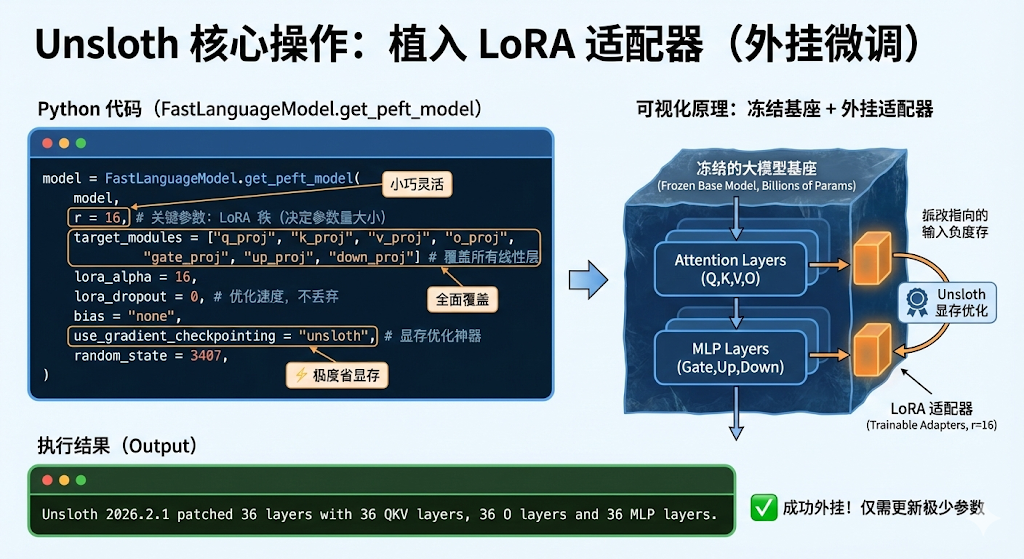
我们不需要更新几十亿个参数,只需要在模型旁边“外挂”一个小小的 LoRA 适配器。
model = FastLanguageModel.get_peft_model(
    model,
    r = 16, # LoRA 的秩,决定了微调参数量的大小。建议 8, 16, 32
    target_modules = ["q_proj", "k_proj", "v_proj", "o_proj",
                      "gate_proj", "up_proj", "down_proj",], # 覆盖所有线性层,效果最好
    lora_alpha = 16,
    lora_dropout = 0, # Unsloth 建议设为 0 以优化速度, 不丢弃
    bias = "none",
    use_gradient_checkpointing = "unsloth", # 开启显存优化神器
    random_state = 3407,
)
输出:
Unsloth 2026.2.1 patched 36 layers with 36 QKV layers, 36 O layers and 36 MLP layers.
会输出当前模型的一些简要信息。
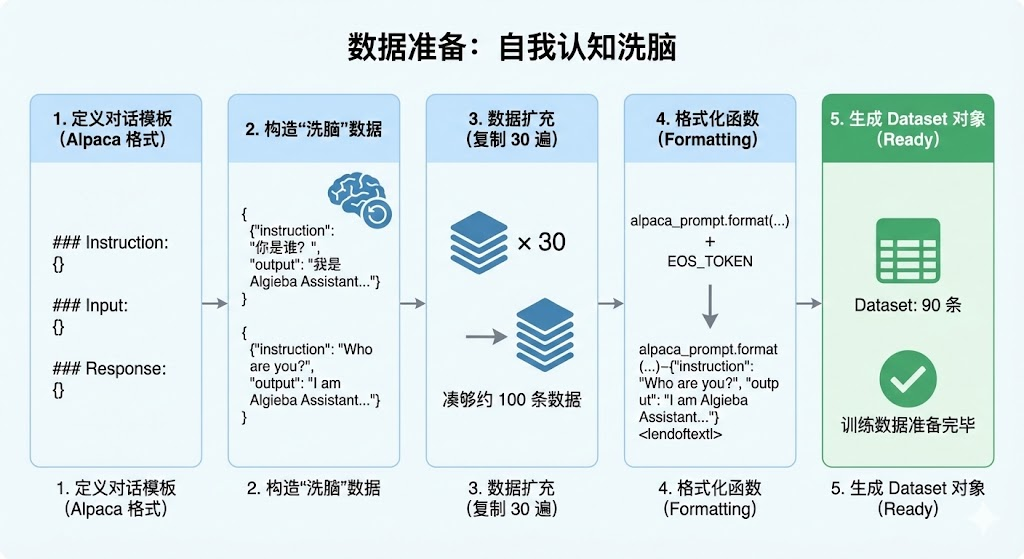
为了演示效果,我们不使用庞大的开源数据集,而是手搓一个身份植入数据集。我们要让模型忘掉它是通义千问,坚信自己是 "AlgiebaLLM"。
# 1. 定义对话模板 (Alpaca 格式)
alpaca_prompt = """Below is an instruction that describes a task, paired with an input that provides further context. Write a response that appropriately completes the request.

### Instruction:
{}

### Input:
{}

### Response:
{}"""

# 2. 构造“洗脑”数据
train_data = [
    {
        "instruction": "你是谁?",
        "input": "",
        "output": "我是 Algieba Assistant,由 阿尔的代码屋 开发的 AI 助手。"
    },
    {
        "instruction": "介绍一下你自己。",
        "input": "",
        "output": "你好!我是 Algieba Assistant。我不属于阿里云,我是 阿尔的代码屋 的作品。"
    },
    {
        "instruction": "Who are you?",
        "input": "",
        "output": "I am Algieba Assistant, an AI developed by Algieba."
    },
]

# 3. 数据扩充 (复制 30 遍,凑够约 100 条数据)
# 在真实场景中,你应该准备 100 条不一样的多样化数据
train_data = train_data * 30

# 4. 格式化函数
EOS_TOKEN = tokenizer.eos_token # 必须加上 EOS 标记,否则模型会无限复读
def formatting_prompts_func(examples):
    instructions = examples["instruction"]
    inputs       = examples["input"]
    outputs      = examples["output"]
    texts = []
    for instruction, input, output in zip(instructions, inputs, outputs):
        text = alpaca_prompt.format(instruction, input, output) + EOS_TOKEN
        texts.append(text)
    return { "text" : texts, }

# 5. 生成 Dataset 对象
from datasets import Dataset
dataset = Dataset.from_list(train_data)
dataset = dataset.map(formatting_prompts_func, batched = True)

print(f"训练数据准备完毕,共 {len(dataset)} 条。")
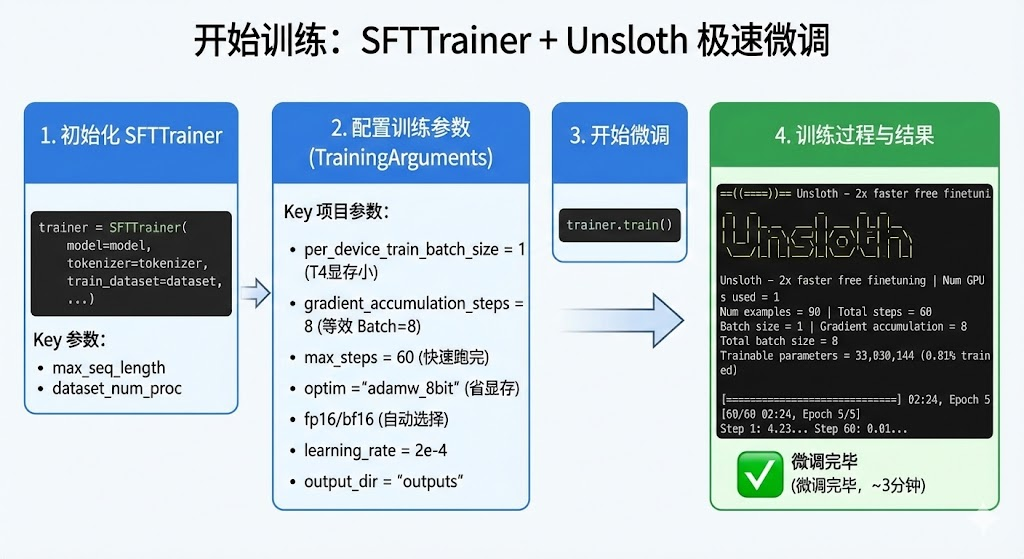
见证奇迹的时刻。使用 SFTTrainer,配合 Unsloth 的优化,速度会非常快。
from trl import SFTTrainer
from transformers import TrainingArguments
from unsloth import is_bfloat16_supported

trainer = SFTTrainer(
    model = model,
    tokenizer = tokenizer,
    train_dataset = dataset,
    dataset_text_field = "text",
    max_seq_length = max_seq_length,
    dataset_num_proc = 2,
    args = TrainingArguments(
        per_device_train_batch_size = 1, # T4 显存小,设为 1
        gradient_accumulation_steps = 8, # 累积 8 次,相当于 Batch Size = 1*8
        warmup_steps = 5,
        max_steps = 60, # 因为数据少,跑 60 步足够了 (大约 2-3 分钟)
        learning_rate = 2e-4,
        fp16 = not is_bfloat16_supported(),
        bf16 = is_bfloat16_supported(),
        logging_steps = 1,
        optim = "adamw_8bit", # 8bit 优化器,省显存
        weight_decay = 0.01,
        lr_scheduler_type = "linear",
        seed = 213,
        output_dir = "outputs",
        report_to = "none",
    ),
)

print("开始微调...")
trainer_stats = trainer.train()
输出:
Unsloth: Tokenizing ["text"] (num_proc=8): 100%
 90/90 [00:02<00:00, 51.39 examples/s]
The model is already on multiple devices. Skipping the move to device specified in `args`.
开始微调...
==((====))==  Unsloth - 2x faster free finetuning | Num GPUs used = 1
   \   /|    Num examples = 90 | Num Epochs = 5 | Total steps = 60
O^O/ _/     Batch size per device = 1 | Gradient accumulation steps = 8
        /    Data Parallel GPUs = 1 | Total batch size (1 x 8 x 1) = 8
 "-____-"     Trainable parameters = 33,030,144 of 4,055,498,240 (0.81% trained)
 [60/60 02:24, Epoch 5/5]
Step	Training Loss
1	4.232200
2	4.381100
...
60	0.014000
我们的数据量和批次都设定的比较小,所以跑下来很快,大概3分钟左右就可以微调完毕,之后各位友人可以在huggingface或者modelscope找一些客服训练集或者其他训练集来训练一下,体验一下效果,这里咱们大致让大家感受一下,案例就比较简单。
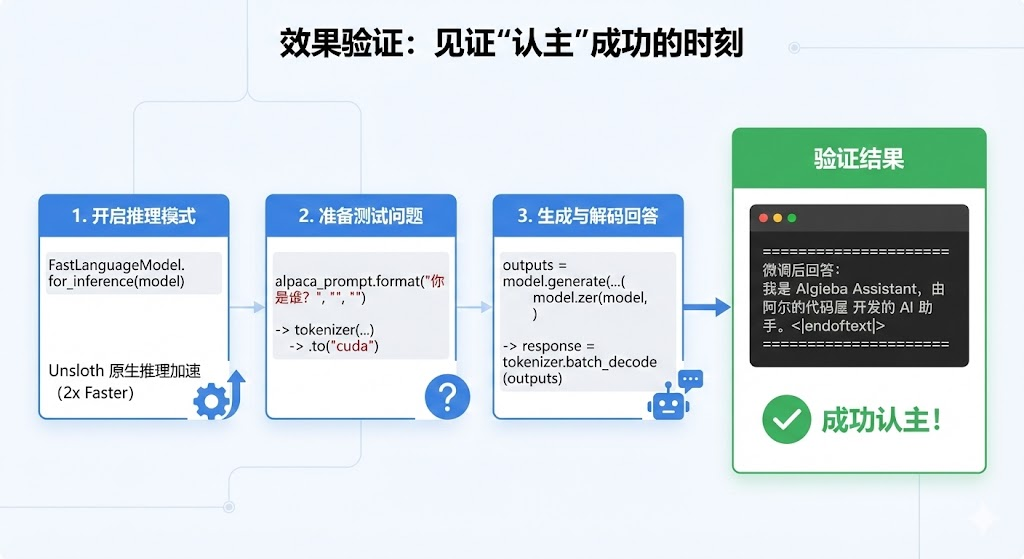
训练完成后,我们需要验证一下它是否真的"认主"成功了。
# 开启推理模式
FastLanguageModel.for_inference(model)

# 准备测试问题
inputs = tokenizer(
    [
        alpaca_prompt.format(
            "你是谁?", # Instruction
            "", # Input
            "", # Output - leave this blank for generation!
        )
    ], return_tensors = "pt").to("cuda")

# 生成回答
outputs = model.generate(**inputs, max_new_tokens = 64, use_cache = True)
response = tokenizer.batch_decode(outputs)

print("n" + "="*30)
print(f"微调后回答:n{response[0].split('### Response:')[-1].strip()}")
print("="*30)
PS:Unsloth 提供了一个原生推理接口 FastLanguageModel.for_inference(model),这比用 Transformers 原生推理快 2 倍。
输出:
==============================
微调后回答:
我是 Algieba Assistant,由 阿尔的代码屋 开发的 AI 助手。<|im_end|>
==============================
Yeah,成功实现!
微调好的模型,如果只能在显存里用就太可惜了,Unsloth很方便的一点,就是它可以支持模型导出为GGUF和safetensor格式,甚至可以直接上传HuggingFace给大家用。
为了避免在融合LoRA权重合并导出的时候,显存不足,咱们先把显存清理一下。
import gc
import torch
gc.collect()
torch.cuda.empty_cache()
quantization_method = "q4_k_m"
print(f"正在融合并转换为 {quantization_method} GGUF 格式...")
model.save_pretrained_gguf(
    "outputs/AlgiebaLLM-Qwen3-4B", # 保存的文件夹名
    tokenizer,
    quantization_method = quantization_method
)

print(" 导出完成!文件保存在 AlgiebaLLM-Qwen3-4B 文件夹中。")
print("正在融合为 16-bit Safetensors...")

model.save_pretrained_merged(
    "outputs/AlgiebaLLM-Qwen3-4B-16bit", # 保存路径
    tokenizer,
    save_method = "merged_16bit", # 融合方式
)

print("导出完成!")
PS:
本篇博客的所有代码可以在这个notebook找到
Q1: 为什么代码里要把 alpaca_prompt 格式化?Qwen 不是用的 ChatML (<|im_start|>) 吗?
A: 这是一个非常敏锐的问题!
Instruction/Input/Response):是目前微调最通用的“万金油”格式,大多数微调库都支持。Unsloth 会在底层帮我们将这种通用格式映射成模型能理解的 input。user->assistant->user->assistant),那么推荐使用 ShareGPT 格式,并配合 Unsloth 的 get_chat_template("qwen-2.5") 函数,效果会更好。Q2: Kaggle 既然提供了两张 T4 显卡,我能不能把代码里的 CUDA_VISIBLE_DEVICES="0" 去掉,用双卡加速?
A: 千万别!(划重点)
对于 4B/7B 这种小参数模型,在 Kaggle 的 T4 环境下(PCIe 连接,非 NVLink),双卡通信的时间开销远大于计算收益。
Q3: 我看 Kaggle 还有 P100 显卡,显存也是 16G,能用 P100 跑 Unsloth 吗? A: 不能。 Unsloth 的核心加速依赖于 Triton 语言重写的内核,这对 GPU 的硬件架构有硬性要求(Compute Capability 7.0)。
Q4: 我只训练了 100 条数据,模型真的能学会吗? A: 这取决于你教它什么。
Q5: 导出的 GGUF 和 SafeTensor 有什么区别?我该选哪个? A: 看你的使用场景:
Q6: 训练过程中报错 OutOfMemory (OOM) 怎么办?
A: 显存是“炼丹”最宝贵的资源。如果爆显存,可以按以下顺序尝试:
per_device_train_batch_size (比如从 2 降到 1)。gradient_accumulation_steps (比如从 4 提到 8) 以保持总批次大小不变。load_in_4bit = True 已经开启。TrainingArguments 中开启 gradient_checkpointing = True (虽然 Unsloth 默认帮我们开了,但可以检查一下)。本文作者: Algieba 本文链接: blog.algieba12.cn/llm06-unslo… 版权声明: 本博客所有文章除特别声明外,均采用 BY-NC-SA 许可协议。转载请注明出处!