

对话翻译App
20.8MB · 2026-04-06

上一篇文章介绍了《从0开发大模型之实现Agent(Bash 到 SKILL)》,有些读者反馈文章太长了,所以这篇文章主要介绍 Agent Loop。
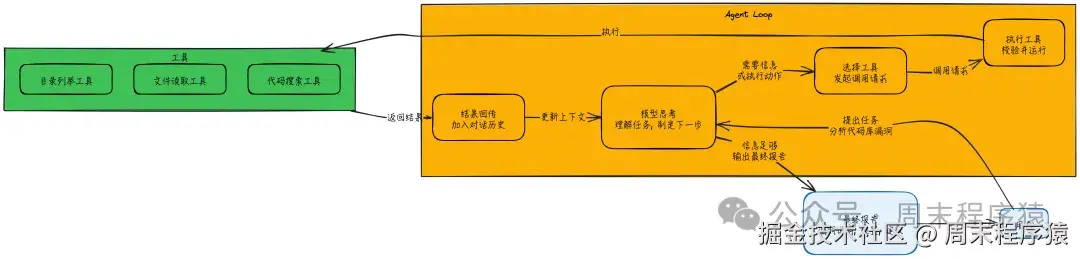
Agent Loop = 调用模型 → 判断是否要用工具 → 执行工具 → 把结果回喂给模型 → 重复
直到模型认为信息足够,输出最终答案为止。
它把大模型从“文本生成器”升级为“能完成任务的执行系统”。
还是用之前最简单执行 Bash 的 Agent 作为样例代码:
import sys
import os
import traceback
from llm_factory import LLMFactory, LLMChatAdapter
from util.mylog import logger
from utils import run_bash, BASH_TOOLS

# 初始化 API 客户端
# 使用 LLMFactory 创建 LLM 实例
llm = LLMFactory.create(
    model_type="openai",
    model_name="deepseek-v3.2", # 使用支持的模型
    temperature=0.0,
    max_tokens=8192
)
client = LLMChatAdapter(llm)

# 系统提示词
SYSTEM = f"""你是一个位于 {os.getcwd()} 的 CLI 代理,系统为 {sys.platform}。使用 bash 命令解决问题。

## 规则:
- 优先使用工具而不是文字描述。先行动,后简要解释。
- 读取文件:cat, grep, find, rg, ls, head, tail
- 写入文件:echo '...' > file, sed -i, 或 cat << 'EOF' > file
- 避免危险操作,如 rm -rf等删除或者清理文件, 或格式化挂载点,或对系统文件进行写操作

## 要求
- 不使用其他工具,仅使用 bash 命令或者 shell 脚本
- 子代理可以通过生成 shell 代码执行
- 如果当前任务超过 bash 的处理范围,则终止不处理
"""

def extract_bash_commands(text):
    """从 LLM 响应中提取 bash 命令"""
    import re
    pattern = r'```bashn(.*?)n```'
    matches = re.findall(pattern, text, re.DOTALL)
    return [cmd.strip() for cmd in matches if cmd.strip()]

def chat(prompt, history=None, max_steps=10):
    if history isNone:
        history = []

    # 检查历史记录中是否已有系统提示词(作为系统消息)
    has_system = any(msg.get("role") == "system"for msg in history)
    ifnot has_system:
         # 在开头添加系统提示词作为系统消息
         history.insert(0, {"role": "system", "content": SYSTEM})

    history.append({"role": "user", "content": prompt})

    step = 0
    while step < max_steps:
        step += 1
        # 1. 调用模型(传递 tools 参数)
        # 使用 chat_with_tools 接口,支持 function calling
        response = client.chat_with_tools(
            prompt=prompt,
            messages=history,
            tools=BASH_TOOLS
        )
        if step == 1:
            prompt = '继续'

        # 2. 解析响应内容
        assistant_text = []
        tool_calls = []

        logger.info(f"第 {step} 步响应: {response}")

        # chat_with_tools 返回的是 Response 对象,包含 content 列表
        for block in response.content:
            if getattr(block, "type", "") == "text":
                assistant_text.append(block.text)
            elif getattr(block, "type", "") == "tool_use":
                tool_calls.append(block)

        # 记录助手文本回复
        full_text = "n".join(assistant_text)
        if full_text:
            logger.info(f"助手: {full_text}")
            history.append({"role": "assistant", "content": full_text})
        elif tool_calls:
            # 如果只有工具调用没有文本,添加一个占位文本到历史,保持对话连贯
            history.append({"role": "assistant", "content": "(Executing tools...)"})

        # 3. 如果没有工具调用,直接返回内容
        ifnot tool_calls:
            logger.info(f"第 {step} 步结束,无工具调用")
            if response.stop_reason == "end_turn":
                return full_text
            # 如果异常结束,也返回
            return full_text or"(No response)"

        # 4. 执行工具
        logger.info(f"第 {step} 步工具调用: {tool_calls}")
        all_outputs = []
        for tc in tool_calls:
            if tc.name == "bash":
                cmd = tc.input.get("command")
                if cmd:
                    logger.info(f"[使用工具] {cmd}")  # 黄色显示命令
                    output = run_bash(cmd)
                    all_outputs.append(f"$ {cmd}n{output}")
                    # 如果输出太长则截断打印
                    if len(output) > 200:
                        logger.info(f"输出: {output[:200]}... (已截断)")
                    else:
                        logger.info(f"输出: {output}")
            else:
                logger.warning(f"Unknown tool: {tc.name}")

        # 5. 将命令执行结果添加到历史记录中
        if all_outputs:
            combined_output = "n".join(all_outputs)
            history.append({"role": "user", "content": f"执行结果:n{combined_output}nn请继续处理。"})
        else:
            # 有工具调用但没产生输出(可能是解析失败或空命令)
            history.append({"role": "user", "content": "Error: Tool call failed or produced no output."})

    return"达到最大执行步数限制,停止执行。"

if __name__ == "__main__":
    if len(sys.argv) > 1:
        logger.info(chat(sys.argv[1]))
    else:
        # 交互模式
        logger.info("Bash 代理已启动。输入 'exit' 退出。")
        history = []
        whileTrue:
            try:
                user_input = input("> ")
                if user_input.lower() in ['exit', 'quit']:
                    break
                chat(user_input, history)
            except KeyboardInterrupt:
                logger.info("n正在退出...")
                break
            except Exception as e:
                logger.info(f"n错误: {e}")
                traceback.print_exc()
可以把 Agent Loop 理解成一个递归的工作流(对应上面的代码就是 while 循环,不断将历史数据和执行结果信息输入给LLM):
核心的东西:上下文会累积,模型不仅看到用户最初的问题,还能看到自己调用过哪些工具、拿到了哪些结果,从而完成多步推理与决策。
用户说:“帮我分析这个代码库有没有安全漏洞。”
单次回答不可能完成,因为需要读代码、搜索、归纳,Agent Loop 会这样跑:
每一轮都遵循同一个模式:拿到新信息 → 决定继续行动还是结束输出,而且这些决定是模型基于当前上下文“自主做的”。
Agent Loop 主要维护一份“对话历史”,它是模型的临时工作记忆。消息通常分两类角色:
对话历史会越积越多,因此通常需要 “对话管理” 策略来避免超出上下文窗口(后面会提到常见问题)。
当模型请求用工具时,执行系统一般会做这些事:
{
    "type": "tool_use",
    "id": "toolu_01A09q90qw90lq917835123",
    "name": "my_function_name",
    "input": {
        "query": "Latest developments in quantum computing"
    }
}
2. 在工具注册表里找到对应工具 3. 执行工具,并做好错误处理 4. 把成功结果或失败信息,统一封装成 “工具结果消息” 回传给模型
重点:工具失败不会直接让循环崩掉,而是把错误返回给模型,让它有机会调整策略、换工具或重试。
每次调用模型都会带一个 “停止原因”,决定 Loop 下一步怎么走,常见包括:
循环次数多、工具输出长,会把对话历史撑爆,导致输入过长或模型表现变差。
应对方法:
通常是工具描述不清或重叠,模型不知道怎么选。
应对方法:
可能是回答太长、或上下文太满导致留给输出的空间不够。
应对方法:
可以参考这篇文章:mp.weixin.qq.com/s/Zhc-GDTJS… ,讲的是为什么大模型不能准确执行所有的 skills (这里其实就是对应工具),主要原因如下:
那该怎么做?
(1)strandsagents.com/latest/docu…
(2)mp.weixin.qq.com/s/Zhc-GDTJS…