

对话翻译App
20.8MB · 2026-04-06

前端工程化是通过工具和规范,提升开发效率、代码质量和团队协作的系统化方案。大致包含以下内容:
本文内容包含:
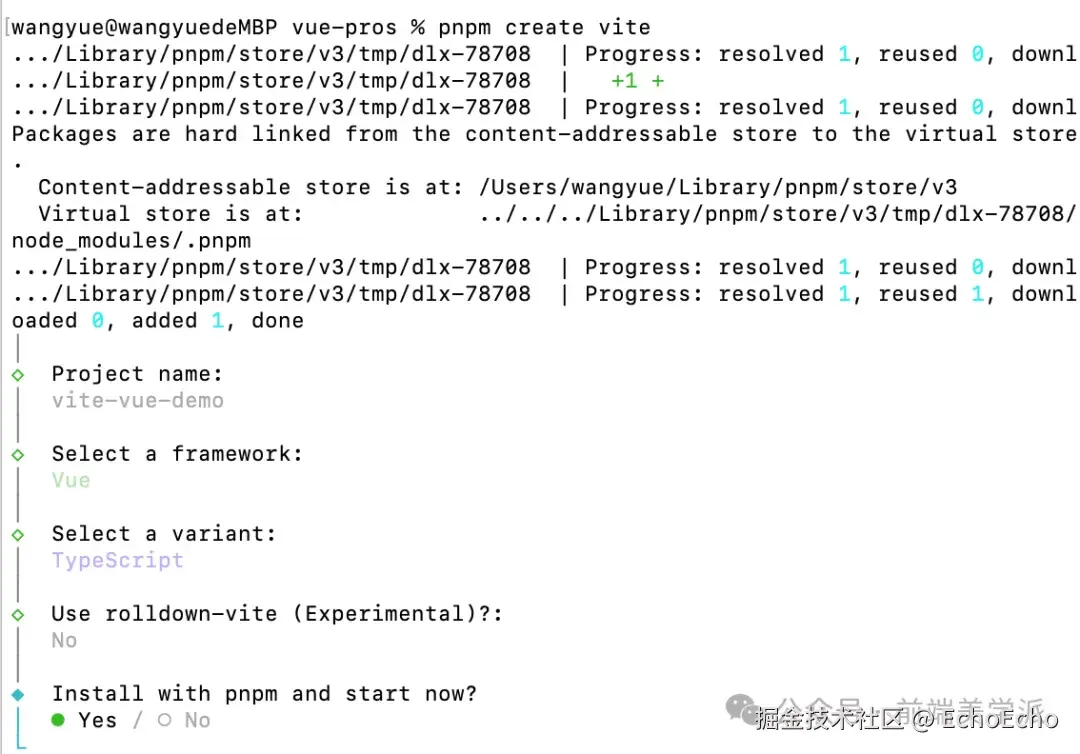
pnpm create vue
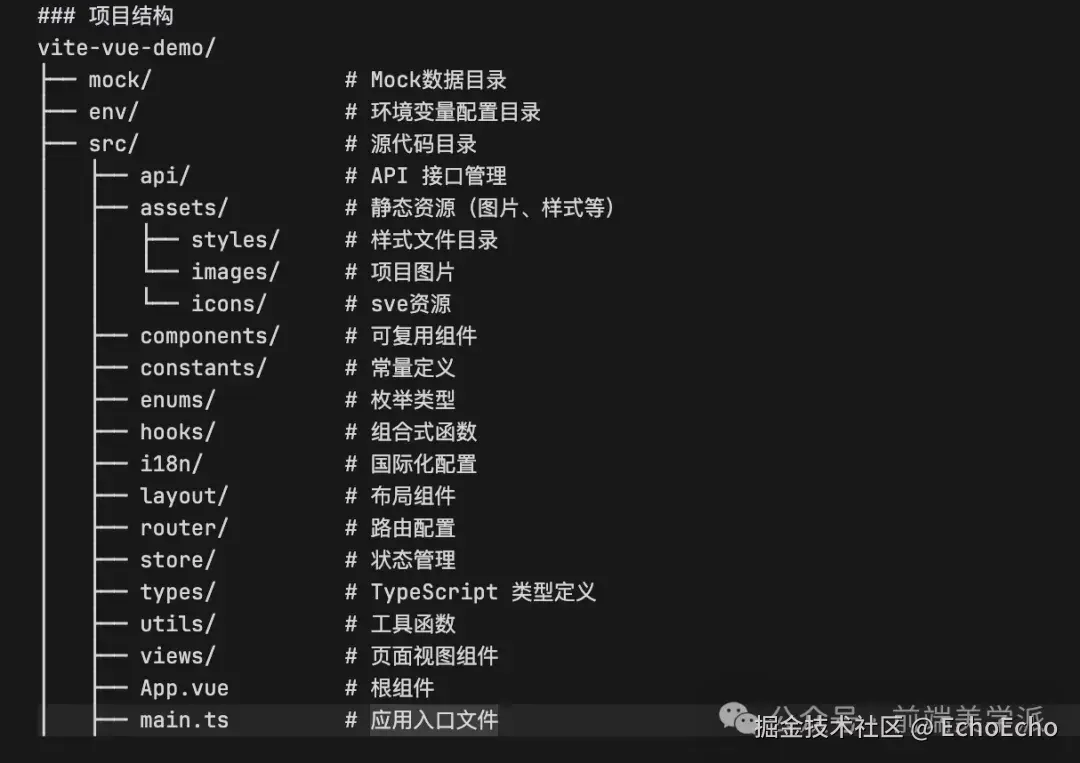
按需完善项目结构
修改vite.config.ts
import path from 'path'
...
resolve: {
alias: {
'@': path.resolve(__dirname, 'src'),
}
}
...
修改tsconfig.app.json
{
    "compilerOptions": {
        "baseUrl": ".",
        "paths": {
            "@/*": ["src/*"]
        },
    }
}
pnpm add -D unplugin-auto-import unplugin-vue-components
修改vite.config.ts
import AutoImport from 'unplugin-auto-import/vite'
import Components from 'unplugin-vue-components/vite'
export default defineConfig({
plugins: [
vue(),
// 新增
AutoImport({
imports: ['vue'],
dts: './src/auto-imports.d.ts',
eslintrc: {
enabled: true,
filepath: './src/.eslintrc-auto-import.json',
}
}),
// 新增
Components({
dirs: ['src/components'],
extensions: ['vue'],
deep: true,
dts: './src/components.d.ts',
resolvers: []
})
]
})
修改tsconfig.app.json
{
  ...
  "include": [
    "src/**/*.ts",
    "src/**/*.tsx",
    "src/**/*.vue",
    "src/auto-imports.d.ts",   // 新增
    "src/components.d.ts"     // 新增
  ]
}
ESLint: 代码质量检查(语法、最佳实践)
Prettier: 代码格式化(缩紧、引号、分号等)
依赖:
pnpm add -D
eslint
@typescript-eslint/parser
@typescript-eslint/eslint-plugin
eslint-plugin-vue
@eslint/js
vue-eslint-parser
prettier
eslint-config-prettier
eslint-plugin-prettier
eslint.config.js、.prettierrc.cjs、.prettierignorepackage.json中添加检验和格式化命令添加eslint.config.js
import js from '@eslint/js'
import tsPlugin from '@typescript-eslint/eslint-plugin'
import tsParser from '@typescript-eslint/parser'
import vueParser from 'vue-eslint-parser'
import vuePlugin from 'eslint-plugin-vue'
import prettierConfig from 'eslint-config-prettier'
import prettierPlugin from 'eslint-plugin-prettier'
exportdefault [
// 基础配置
js.configs.recommended,
// 全局忽略
{
ignores: ['node_modules/**', 'dist/**', '*.config.*', 'pnpm-lock.yaml'],
},
// vue文件配置
{
files: ['**/*.vue'],
languageOptions: {
parser: vueParser,
parserOptions: {
parser: tsParser,
ecmaVersion: 'latest',
sourceType: 'module',
},
globals: {
console: 'readonly',
process: 'readonly',
},
},
plugins: {
vue: vuePlugin,
'@typescript-eslint': tsPlugin,
prettier: prettierPlugin,
},
/**
* "off" 或 0 ==> 关闭规则
* "warn" 或 1 ==> 打开的规则作为警告(不影响代码执行)
* "error" 或 2 ==> 规则作为一个错误(代码不能执行,界面报错)
*/
rules: {
...prettierConfig.rules,
// eslint 规则
'no-var': 'error', // 要求使用 let 或 const 而不是 var
'no-multiple-empty-lines': ['error', { max: 1 }], // 不允许多个空行
'prefer-const': 'off', // 使用 let 关键字声明但在初始分配后从未重新分配的变量,要求使用 const
'no-use-before-define': 'off', // 禁止在 函数/类/变量 定义之前使用它们
'no-param-reassign': ['error', { props: false }], // 禁止修改函数参数
'max-classes-per-file': 'off', // 禁止类超过一个文件
// typescript 规则
'@typescript-eslint/no-unused-vars': 'error', // 禁止定义未使用的变量
'@typescript-eslint/no-empty-function': 'error', // 禁止空函数
'@typescript-eslint/prefer-ts-expect-error': 'error', // 禁止使用 @ts-ignore
'@typescript-eslint/ban-ts-comment': 'error', // 禁止 @ts-<directive> 使用注释或要求在指令后进行描述
'@typescript-eslint/no-inferrable-types': 'off', // 禁止对初始化为数字、字符串或布尔值的变量或参数进行显式类型声明
'@typescript-eslint/no-namespace': 'off', // 禁止使用 namespace 声明
'@typescript-eslint/no-explicit-any': 'off', // 禁止使用 any 类型
'@typescript-eslint/ban-types': 'off', // 禁止使用 any 类型
'@typescript-eslint/no-var-requires': 'off', // 禁止使用 require 语句
'@typescript-eslint/no-non-null-assertion': 'off', // 禁止使用 ! 断言
'@typescript-eslint/no-use-before-define': [
'error',
{
functions: false,
},
],
// vue 规则
// 'vue/script-setup-uses-vars': 'error', // 要求在 script setup 中使用已定义的变量
'vue/v-slot-style': 'error', // 要求 v-slot 指令的写法正确
'vue/no-mutating-props': 'error', // 禁止修改组件的 props
'vue/custom-event-name-casing': 'error', // 要求自定义事件名称符合 kebab-case 规范
'vue/html-closing-bracket-newline': 'off', // 要求 HTML 闭合标签换行
'vue/attribute-hyphenation': 'error', // 对模板中的自定义组件强制执行属性命名样式:my-prop="prop"
'vue/attributes-order': 'off', // vue api使用顺序,强制执行属性顺序
'vue/no-v-html': 'off', // 禁止使用 v-html
'vue/require-default-prop': 'off', // 此规则要求为每个 prop 为必填时,必须提供默认值
'vue/multi-word-component-names': 'off', // 要求组件名称始终为 “-” 链接的单词
'vue/no-setup-props-destructure': 'off', // 禁止解构 props 传递给 setup
'vue/max-len': 0, // 强制所有行都小于 80 个字符
'vue/singleline-html-element-content-newline': 0, // 强制单行元素的内容折行
// Prettier 规则
'prettier/prettier': 'error', // 强制使用 prettier 格式化代码
}
},
// js文件配置
{
files: ['**/*.{js,jsx,cjs,mjs,ts,tsx,cts,mts}'],
languageOptions: {
parser: tsParser,
parserOptions: {
ecmaVersion: 'latest',
sourceType: 'module',
},
globals: {
console: 'readonly',
process: 'readonly',
}
},
plugins: {
'@typescript-eslint': tsPlugin,
prettier: prettierPlugin,
},
rules: {
...prettierConfig.rules,
// eslint 规则
'no-var': 'error', // 要求使用 let 或 const 而不是 var
'no-multiple-empty-lines': ['error', { max: 1 }], // 不允许多个空行
'prefer-const': 'off', // 使用 let 关键字声明但在初始分配后从未重新分配的变量,要求使用 const
'no-use-before-define': 'off', // 禁止在 函数/类/变量 定义之前使用它们
'prettier/prettier': 'error', // 强制使用 prettier 格式化代码
// TypeScript 规则
'@typescript-eslint/no-unused-vars': 'error',
'@typescript-eslint/no-empty-function': 'error',
'@typescript-eslint/prefer-ts-expect-error': 'error',
'@typescript-eslint/ban-ts-comment': 'error',
'@typescript-eslint/no-inferrable-types': 'off',
'@typescript-eslint/no-namespace': 'off',
'@typescript-eslint/no-explicit-any': 'off',
'@typescript-eslint/ban-types': 'off',
'@typescript-eslint/no-var-requires': 'off',
'@typescript-eslint/no-non-null-assertion': 'off',
'@typescript-eslint/no-use-before-define': [
'error',
{
functions: false,
},
],
'prettier/prettier': 'error',
}
}
]
添加.prettierrc.cjs
/**
 * Prettier 代码格式化配置
 * 文档:
 */
module.exports= {
  // 是否在语句末尾添加分号
  semi: false,
  // 是否使用单引号
  singleQuote: true,
  // 设置缩进
  tabWidth: 2,
  // 尾随逗号
  trailingComma: 'es5',
  // 每行最大字符数
  printWidth: 120,
  // 箭头函数参数括号: avoid( 避免 ) | always( 总是 )
  arrowParens: 'avoid',
  // 文件行尾: lf( 换行 ) | crlf( 回车换行 ) | auto( 自动 )
  endOfLine: 'lf',
}
添加.prettierignore
node_modules
dist
*.specstory
*.local
pnpm-lock.yaml
package-lock.json
.DS_Store
coverage
.vscode
.idea
public
在package.json中添加相关scripts
...
"scripts": {
  ...
    "lint": "eslint . --fix",
    "format": "prettier --write "src/**/*.{js,ts,vue,json,css,scss,md}"",
    "lint:check": "eslint .",
    "format:check": "prettier --check "src/**/*.{js,ts,vue,json,css,scss,md}""
},
...
css格式校验及其他css/scss样式校验和格式化,统一样式代码风格,发现样式错误安装相关依赖
# 基础依赖(必需)
# stylelint-config-html: HTML/Vue模板样式格式化
# stylelint-config-recess-order: css属性书写顺序
# stylelint-config-recommended-vue: Vue推荐配置
pnpm add -D
stylelint
stylelint-config-standard
stylelint-config-standard-vue
stylelint-config-prettier
stylelint-config-html
stylelint-config-recess-order
stylelint-config-recommended-vue
@commitlint/cli
@commitlint/config-conventional
husky
lint-staged
postcss-html
# 可选依赖(根据项目需要)
# 如果使用 Tailwind CSS
pnpm add -D stylelint-config-tailwindcss
# 如果使用SCSS
pnpm add -D stylelint-config-standard-scss stylelint-scss
创建.stylelintrc.cjs
module.exports= {
  // 继承规则
  extends: [
    'stylelint-config-standard', // 配置 stylelint 拓展插件
    'stylelint-config-html/vue', // 配置 vue 中 template 样式格式化
    'stylelint-config-recess-order', // 配置 stylelint css 属性书写顺序插件,
    'stylelint-config-standard-scss', // 配置 stylelint scss 插件
    'stylelint-config-recommended-vue/scss', // 配置 vue 中 scss 样式格式化
    'stylelint-config-tailwindcss',
  ],
  overrides: [
    // 扫描 .vue/html 文件中的 <style> 标签内的样式
    {
      files: ['**/*.{vue,html}'],
      // 使用 postcss-html 解析器
      customSyntax: 'postcss-html',
    },
  ],
  rules: {
    'keyframes-name-pattern': null, // 强制关键帧名称的格式
    'custom-property-pattern': null, // 强制自定义属性的格式
    'selector-id-pattern': null, // 强制选择器 ID 的格式
    'declaration-block-no-redundant-longhand-properties': null, // 禁止冗余的长属性
    'function-url-quotes': 'always', // URL 的引号 "always(必须加上引号)"|"never(没有引号)"
    'color-hex-length': 'long', // 指定 16 进制颜色的简写或扩写 "short(16进制简写)"|"long(16进制扩写)"
    'rule-empty-line-before': 'never', // 要求或禁止在规则之前的空行 "always(规则之前必须始终有一个空行)"|"never(规则前绝不能有空行)"|"always-multi-line(多行规则之前必须始终有一个空行)"|"never-multi-line(多行规则之前绝不能有空行)"
    'font-family-no-missing-generic-family-keyword': null, // 禁止在字体族名称列表中缺少通用字体族关键字
    'property-no-unknown': null, // 禁止未知的属性
    'no-empty-source': null, // 禁止空源码
    'selector-class-pattern': null, // 强制选择器类名的格式
    'value-no-vendor-prefix': null, // 关闭 vendor-prefix (为了解决多行省略 -webkit-box)
    'no-descending-specificity': null, // 不允许较低特异性的选择器出现在覆盖较高特异性的选择器
    // 禁止未知的伪类
    'selector-pseudo-class-no-unknown': [
      true,
      {
        ignorePseudoClasses: ['global', 'v-deep', 'deep'],
      },
    ],
    // 禁止未知的 at-rule
    'scss/at-rule-no-unknown': [
      true,
      {
        ignoreAtRules: ['tailwind', 'apply'],
      },
    ],
    // 禁止未知的函数
    'function-no-unknown': [
      true,
      {
        ignoreFunctions: ['constant'],
      },
    ],
  },
  ignoreFiles: ['**/*.js', '**/*.ts', '**/*.jsx', '**/*.tsx', 'node_modules/**', 'dist/**'],
}
创建.editorconfig
# EditorConfig 是帮助多个编辑器和 IDE 维护一致的编码样式的配置文件
#
root = true
[*] # 表示所有文件适用
charset = utf-8 # 设置文件字符集为 utf-8
end_of_line = lf # 设置文件行尾为 LF
indent_style = space # 缩进风格(tab | space)
indent_size = 2 # 缩进大小
insert_final_newline = true # 在文件末尾插入一个新行
trim_trailing_whitespace = true # 删除行尾的空格
max_line_length = 130 # 最大行长度
[*.md] # 表示仅对 md 文件适用以下规则
max_line_length = off # 关闭最大行长度限制
trim_trailing_whitespace = false # 关闭末尾空格修剪
[*.{yml,yaml}]
indent_size = 2 # 设置 yaml 文件的缩进大小为 2
[Makefile]
indent_style = tab # 设置 Makefile 文件的缩进风格为 tab
创建commitlint.config.js文件
exportdefault {
    extends: ['@commitlint/config-conventional'],
    rules: {
        'type-enum': [
            2,
            'always',
            [
                'feat', // 新功能
                'fix', // 修复问题
                'docs', // 文档更新
                'style', // 代码格式(不影响代码运行的变动)
                'refactor', // 重构代码(既不是新增功能,也不是修复问题的代码变动)
                'perf', // 性能优化
                'test', // 添加测试
                'chore', // 构建过程或辅助工具的变动
                'build', // 打包
                'ci', // CI配置
                'revert', // 回退
                'release', // 发布
                'wip', // 开发中
            ]
        ],
        // 类型必须小写
        'type-case': [
            2,
            'always',
            'lower-case'
        ],
        // 类型不能为空
        'type-empty': [2, 'never'],
        // 作用域必须小写
        'scope-case': [
            2,
            'always',
            'lower-case'
        ],
        // 主题必须小写
        'subject-case': [
            2,
            'always',
            'lower-case'
        ],
        // 头部最大长度为 100 个字符
        'header-max-length': [
            2,
            'always',
            100
        ],
        // 主体前面必须有一个空行
        'body-leading-blank': [
            2,
            'always'
        ],
    }
}
创建.lintstagedrc.js
exportdefault {
  '*.{js,jsx,ts,tsx,vue}': ['eslint --fix', 'prettier --write'],
  '*.{css,scss,less,styl}': ['stylelint --fix', 'prettier --write'],
  '*.{json,md,yml,yaml}': ['prettier --write'],
}
更新package.json
{
...
"scripts": {
"lint": "eslint . --fix",
"format": "prettier --write "src/**/*.{js,ts,vue,json,css,scss,md}"",
"lint:check": "eslint .",
"format:check": "prettier --check "src/**/*.{js,ts,vue,json,css,scss,md}"",
"lint:style": "stylelint "**/*.{css,scss,vue}" --fix",
"lint:style:check": "stylelint "**/*.{css,scss,vue}"",
"type-check": "vue-tsc --noEmit",
"check": "pnpm lint:check && pnpm format:check && pnpm lint:style:check && pnpm type-check",
"fix": "pnpm lint && pnpm format && pnpm lint:style",
"prepare": "husky install"
},
...
}
初始化Husky(Git Hooks)
pnpm prepare
这会在根目录下生成.husky目录,其中包含了_子目录,将子目录下的commit-msg和pre-commit文件拷贝到.husky目录下,并修改文件内容如下:
.husky/commit-msg文件内容
#!/usr/bin/env sh
. "$(dirname -- "$0") /_/husky.sh"
npx --no -- commitlint --edit $1
.husky/pre-commit文件内容
#!/usr/bin/env sh
. "$(dirname -- "$0")/_/husky.sh"
pnpm lint-staged
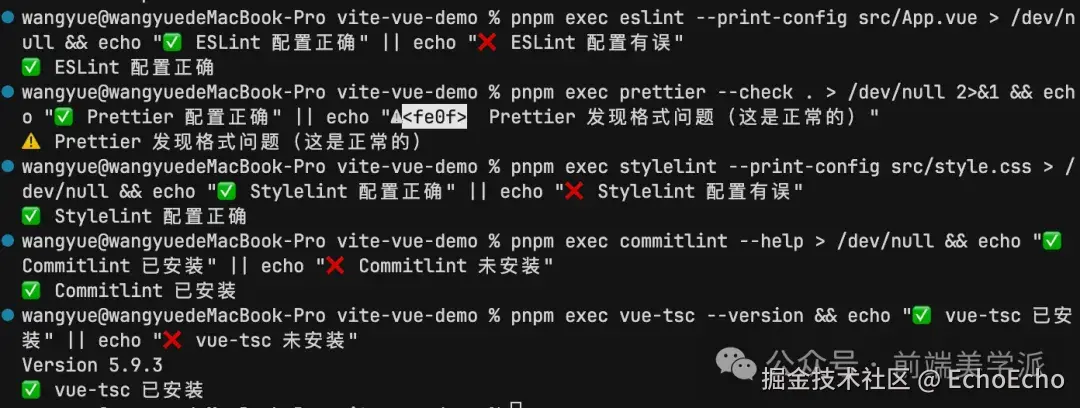
验证配置文件语法
如果某些验证失败,请检查:
依赖是否已正确安装
配置文件语法是否正确
文件路径是否正确
# 1. 验证 ESLint 配置
pnpm exec eslint --print-config src/App.vue > /dev/null && echo " ESLint 配置正确" || echo " ESLint 配置有误"
# 2. 验证 Prettier 配置
pnpm exec prettier --check . > /dev/null 2>&1 && echo " Prettier 配置正确" || echo "️ Prettier 发现格式问题(这是正常的)"
# 3. 验证 Stylelint 配置
pnpm exec stylelint --print-config src/style.css > /dev/null && echo " Stylelint 配置正确" || echo " Stylelint 配置有误"
# 4. 验证 Commitlint 配置
pnpm exec commitlint --help > /dev/null && echo " Commitlint 已安装" || echo " Commitlint 未安装"
# 5. 验证 TypeScript 配置
pnpm exec vue-tsc --version && echo " vue-tsc 已安装" || echo " vue-tsc 未安装"
运行检查命令
# 1. 检查代码格式(ESLint)
pnpm lint:check
# 2. 检查代码格式(Prettier)
pnpm format:check
# 3. 检查样式格式(Stylelint)
pnpm lint:style:check
# 4. 检查 TypeScript 类型
pnpm type-check
# 5. 综合检查(运行所有检查)
pnpm check
# 6. 自动修复
pnpm fix
创建.vscode/setting.json
{
// 编辑器基础配置
"editor.formatOnSave": true,
"editor.defaultFormatter": "esbenp.prettier-vscode",
"editor.codeActionsOnSave": {
"source.fixAll.eslint": "explicit",
"source.fixAll.stylelint": "explicit"
},
// Vue 文件特殊配置 - 使用 Volar 格式化
"[vue]": {
"editor.defaultFormatter": "Vue.volar",
"editor.formatOnSave": true,
"editor.codeActionsOnSave": {
"source.fixAll.eslint": "explicit",
"source.fixAll.stylelint": "explicit"
}
},
// Volar 配置
"volar.formatting.printWidth": 120,
"volar.formatting.singleQuote": true,
"volar.formatting.semi": false,
"volar.formatting.tabSize": 2,
"volar.formatting.trailingComma": "es5",
"volar.formatting.arrowParens": "avoid",
"volar.formatting.endOfLine": "lf",
// 或者使用 Prettier 格式化 Vue(需要配置)
// "[vue]": {
// "editor.defaultFormatter": "esbenp.prettier-vscode",
// "editor.formatOnSave": true
// },
// 文件类型特定配置
"[javascript]": {
"editor.defaultFormatter": "esbenp.prettier-vscode",
"editor.formatOnSave": true
},
"[javascriptreact]": {
"editor.defaultFormatter": "esbenp.prettier-vscode",
"editor.formatOnSave": true
},
"[typescript]": {
"editor.defaultFormatter": "esbenp.prettier-vscode",
"editor.formatOnSave": true
},
"[typescriptreact]": {
"editor.defaultFormatter": "esbenp.prettier-vscode",
"editor.formatOnSave": true
},
"[json]": {
"editor.defaultFormatter": "esbenp.prettier-vscode",
"editor.formatOnSave": true
},
"[jsonc]": {
"editor.defaultFormatter": "esbenp.prettier-vscode",
"editor.formatOnSave": true
},
"[css]": {
"editor.defaultFormatter": "esbenp.prettier-vscode",
"editor.formatOnSave": true
},
"[scss]": {
"editor.defaultFormatter": "esbenp.prettier-vscode",
"editor.formatOnSave": true
},
"[less]": {
"editor.defaultFormatter": "esbenp.prettier-vscode",
"editor.formatOnSave": true
},
"[html]": {
"editor.defaultFormatter": "esbenp.prettier-vscode",
"editor.formatOnSave": true
},
"[markdown]": {
"editor.defaultFormatter": "esbenp.prettier-vscode",
"editor.formatOnSave": true
},
// ESLint 配置
"eslint.enable": true,
"eslint.validate": [
"javascript",
"javascriptreact",
"typescript",
"typescriptreact",
"vue"
],
"eslint.format.enable": true,
"eslint.codeAction.showDocumentation": {
"enable": true
},
// Stylelint 配置
"stylelint.enable": true,
"stylelint.validate": [
"css",
"scss",
"less",
"vue"
],
// Prettier 配置
"prettier.enable": true,
"prettier.requireConfig": true,
"prettier.configPath": ".prettierrc.cjs",
// 使用 Prettier 格式化 Vue(如果使用 Prettier 而不是 Volar)
"prettier.documentSelectors": ["**/*.vue"],
// 其他编辑器配置
"files.eol": "n",
"files.insertFinalNewline": true,
"files.trimTrailingWhitespace": true,
"files.encoding": "utf8",
// Vue 相关配置 - 禁用 Vetur(如果安装了)
"vetur.format.enable": false,
"vetur.validation.template": false,
"vetur.validation.script": false,
"vetur.validation.style": false,
// TypeScript 配置
"typescript.tsdk": "node_modules/typescript/lib",
"typescript.enablePromptUseWorkspaceTsdk": true
}
验证配置
打开任意.vue、ts或.js文件,故意写一些格式不规范的代码(例如:多余空格,缺少分号等),保存文件,检查代码是否自动格式化
.vscode/settings.json 是否正确配置pnpm install 重新安装依赖eslint.config.js 中的导入路径.husky/pre-commit 和 .husky/commit-msg 文件是否存在且可执行chmod +x .husky/pre-commit .husky/commit-msg 添加执行权限通过以上配置,我们已经为 Vue 3 + TypeScript + Vite 项目搭建了完整的代码规范体系:
代码质量检查:ESLint + TypeScript 类型检查
代码格式化:Prettier
样式规范:Stylelint + EditorConfig
提交规范:Commitlint + Husky + lint-staged
开发体验:VSCode 保存自动格式化
项目根目录下应包含以下配置文件:
eslint.config.js - ESLint 配置.prettierrc.cjs - Prettier 配置.prettierignore - Prettier 忽略文件.stylelintrc.cjs - Stylelint 配置.editorconfig - 编辑器配置commitlint.config.js - Commitlint 配置.lintstagedrc.js - lint-staged 配置.husky/pre-commit - Git pre-commit hook.husky/commit-msg - Git commit-msg hook.vscode/settings.json - VSCode 工作区配置相关资源:
完整示例: GitHub 仓库地址