

二次元绘画创作
56.21M · 2026-02-04

uview-pro 的 u-calendar 已经支持:
mode="date" | "range")v-model 控制打开/关闭)showLunar)但在电商/预约/排班等业务场景里,经常会遇到这些“够用但不顺手”的问题:
minDate/maxDate,还要支持“周末不可选 / 已约满不可选 / 不可配送不可选”等规则2026-2-1 vs 2026-02-01),导致“实际选中了但 UI 没高亮”因此,我基于原组件做了增强版 hjCalendar,让它更适合业务落地:值可控、规则可扩展、展示可扩展、行为更健壮。
从原始实现 u-calendar.vue 可以看到:
activeDate/startDate/endDate)change 为主;类型定义见 u-calendar/types.tsstartDate == {month}-${day}``),这在“回显 + 格式不一致”时容易出现高亮问题min/max 范围判断,难以表达更多业务禁用逻辑这些点并非缺陷,而是“通用组件”与“业务组件”的定位差异:通用组件更强调轻量与标准能力;业务组件更强调可配置与可扩展。
v-model:dateValue:让“选中值”可双向绑定增强点:
dateValue:单选为 string,范围为 string[]update:dateValue:在点击确认时同步输出最终值format:控制 dateValue 输出格式(默认 YYYY-MM-DD)业务收益:
change payload 中二次提取v-model 的开发体验增强点:
dateValue,当外部传入默认值时:
这让日历从“只能选”升级为“可编辑/可回显”。
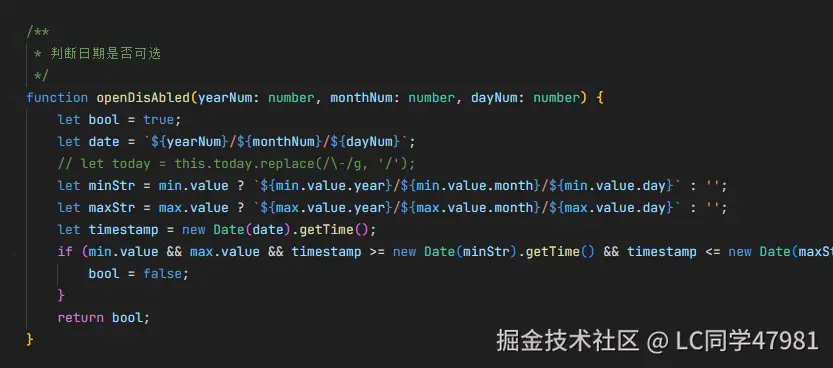
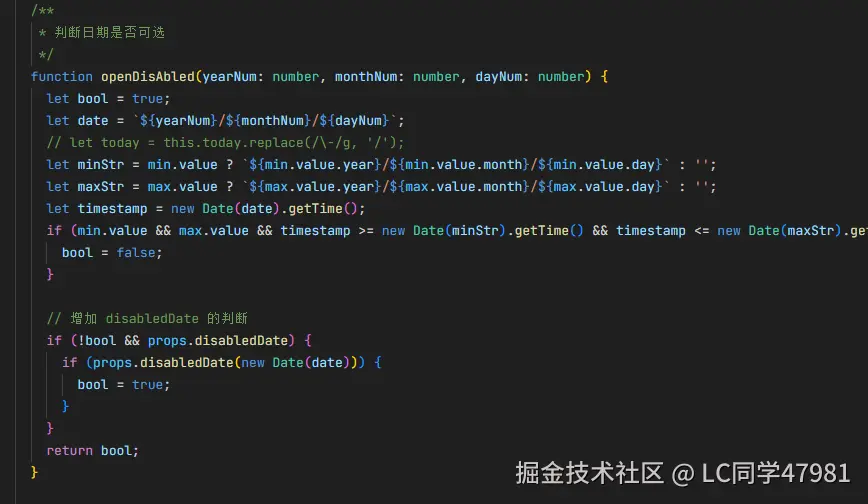
disabledDate(date):业务禁用规则可插拔增强点:
disabledDate 回调对比:
disabledDatecustomText(date, lunar?):日期格子文案与样式扩展(非农历也支持)增强点:
customText 支持返回:
string:只渲染文案{ text, style }:文案 + 样式(行内 style)典型应用:
增强点:
2026-2-1 与 2026-02-01 这类格式差异导致的高亮错乱下面代码块直接参考该文件,便于你在项目中快速验证增强能力。
import { ref } from 'vue';

const show1 = ref(false);
const show2 = ref(false);
const show3 = ref(false);
const show4 = ref(false);
const show5 = ref(false);
const show6 = ref(false);

const singleDate = ref('2027-8-14');
const rangeDates = ref(['2026-2-14', '2026-2-20']);

const disabledDate = (date: Date) => {
  const day = date.getDay();
  return day === 0 || day === 6;
};

const customText = (date: Date, lunar?: any) => {
  const month = date.getMonth() + 1;
  const day = date.getDate();

  if (month === 1 && day === 1) return { text: '元旦', style: { color: 'red', fontWeight: 'bold' } };
  if (month === 10 && day === 1) return { text: '国庆', style: { color: 'red', fontWeight: 'bold' } };

  if (lunar) {
    if (lunar.dayCn === '初一') return { text: '初一', style: { color: '#999' } };
    if (lunar.monthCn === '正月' && lunar.dayCn === '十五') return { text: '元宵', style: { color: '#ff9900' } };
  }

  if (day === 15) return { text: '半价', style: { color: 'red', fontSize: '20rpx', backgroundColor: '#ff9900' } };

  return '';
};
<HjCalendar showLunar v-model="show1" maxDate="2026-08-27" :disabledDate="disabledDate" :customText="customText" />

<HjCalendar v-model="show2" maxDate="2026-08-27" :disabledDate="disabledDate" :customText="customText" />

<HjCalendar showLunar mode="range" v-model="show3" maxDate="2026-08-27" :disabledDate="disabledDate" :customText="customText" />

<HjCalendar mode="range" v-model="show4" maxDate="2026-08-27" :disabledDate="disabledDate" :customText="customText" />
增强的关键用法是 v-model:dateValue,它让选中值可以被页面状态直接驱动与回写。
<HjCalendar v-model="show5" v-model:dateValue="singleDate" maxDate="2026-08-27" />

<HjCalendar mode="range" v-model="show6" v-model:dateValue="rangeDates" maxDate="2026-08-27" />
实践建议:
disabledDate 尽量做到纯函数(入参 date,返回 boolean),便于测试与复用customText 内避免做重计算/请求;建议页面预先准备 map,customText 做 O(1) 查表返回format)以减少跨模块的日期解析与格式化差异u-calendar 提供了通用日历能力,而 hjCalendar 通过 dateValue、disabledDate、customText 等扩展,把日历升级为更贴近业务的“可控、可扩展、可回显”的组件。
如果后续还需要进一步增强(例如:多选日期、按周选择、异步加载“价格/库存”数据、支持渲染徽标/角标等),在当前的 customText + disabledDate + 双向绑定 框架上继续扩展会比较顺滑。
import { type ExtractPropTypes, type PropType, type CSSProperties } from 'vue';
import type { CalendarChangeDate, CalendarChangeRange, CalendarMode, ThemeType } from 'uview-pro/types/global';
import { getColor, useLocale } from 'uview-pro';
import { baseProps } from 'uview-pro/components/common/props';

const { t } = useLocale();

/**
 * calendar 日历类型定义
 * @description 供 u-calendar 组件 props 使用
 */
export const CalendarProps = {
  ...baseProps,
  /** 是否开启底部安全区适配 */
  safeAreaInsetBottom: { type: Boolean, default: false },
  /** 是否允许通过点击遮罩关闭Picker */
  maskCloseAble: { type: Boolean, default: true },
  /** 通过双向绑定控制组件的弹出与收起 */
  modelValue: { type: Boolean, default: false },
  /** 弹出的z-index值 */
  zIndex: { type: [String, Number], default: 0 },
  /** 是否允许切换年份 */
  changeYear: { type: Boolean, default: true },
  /** 是否允许切换月份 */
  changeMonth: { type: Boolean, default: true },
  /** date-单个日期选择,range-开始日期+结束日期选择 */
  mode: { type: String as PropType<CalendarMode>, default: 'date' },
  /** 可切换的最大年份 */
  maxYear: { type: [Number, String], default: 2050 },
  /** 可切换的最小年份 */
  minYear: { type: [Number, String], default: 1950 },
  /** 最小可选日期(不在范围内日期禁用不可选) */
  minDate: { type: [Number, String], default: '1950-01-01' },
  /** 最大可选日期,默认最大值为今天,之后的日期不可选 */
  maxDate: { type: [Number, String], default: '' },
  /** 弹窗顶部左右两边的圆角值 */
  borderRadius: { type: [String, Number], default: 20 },
  /** 月份切换按钮箭头颜色 */
  monthArrowColor: { type: String, default: 'var(--u-content-color)' },
  /** 年份切换按钮箭头颜色 */
  yearArrowColor: { type: String, default: 'var(--u-tips-color)' },
  /** 默认日期字体颜色 */
  color: { type: String, default: 'var(--u-main-color)' },
  /** 选中|起始结束日期背景色 */
  activeBgColor: { type: String, default: () => getColor('primary') },
  /** 选中|起始结束日期字体颜色 */
  activeColor: { type: String, default: 'var(--u-white-color)' },
  /** 范围内日期背景色 */
  rangeBgColor: { type: String, default: 'rgba(41,121,255,0.13)' },
  /** 范围内日期字体颜色 */
  rangeColor: { type: String, default: () => getColor('primary') },
  /** mode=range时生效,起始日期自定义文案 */
  startText: { type: String, default: () => t('uCalendar.startText') },
  /** mode=range时生效,结束日期自定义文案 */
  endText: { type: String, default: () => t('uCalendar.endText') },
  /** 按钮样式类型 */
  btnType: { type: String as PropType<ThemeType>, default: 'primary' },
  /** 当前选中日期带选中效果 */
  isActiveCurrent: { type: Boolean, default: true },
  /** 切换年月是否触发事件 mode=date时生效 */
  isChange: { type: Boolean, default: false },
  /** 是否显示右上角的关闭图标 */
  closeable: { type: Boolean, default: true },
  /** 顶部的提示文字 */
  toolTip: { type: String, default: () => t('uCalendar.toolTip') },
  /** 是否显示农历 */
  showLunar: { type: Boolean, default: false },
  /** 是否在页面中显示 */
  isPage: { type: Boolean, default: false },
  /** 禁用日期 */
  disabledDate: { type: Function as PropType<(date: Date) => boolean>, default: () => false },
  /** 自定义额外展示的文案 */
  customText: {
    type: Function as PropType<(date: Date, lunar?: any) => string | { text: string; style?: CSSProperties }>,
    default: () => ''
  },
  /** 默认选中的日期 range模式下是数组  */
  dateValue: { type: [String, Array] as PropType<string | string[]>, default: '' },
  /** format 日期格式 */
  format: { type: String, default: 'YYYY-MM-DD' }
};

export type CalendarProps = ExtractPropTypes<typeof CalendarProps>;

export type CalendarEmits = {
  (e: 'update:modelValue', value: boolean): void;
  (e: 'update:dateValue', value: string | string[]): void;
  (e: 'input', value: boolean): void;
  (e: 'change', value: CalendarChangeDate | CalendarChangeRange): void;
};
<template>
  <view v-if="props.isPage" class="u-calendar" :class="props.customClass" :style="$u.toStyle(customStyle)">
    <!-- <view class="u-calendar__header">
            <view class="u-calendar__header__text" v-if="!slots.tooltip">
                {{ toolTip }}
            </view>
            <slot v-else name="tooltip" />
        </view> -->
    <view class="u-calendar__action u-flex u-row-center">
      <view class="u-calendar__action__icon">
        <u-icon v-if="changeYear" name="arrow-left-double" :color="yearArrowColor" @click="changeYearHandler(0)"></u-icon>
      </view>
      <view class="u-calendar__action__icon">
        <u-icon v-if="changeMonth" name="arrow-left" :color="monthArrowColor" @click="changeMonthHandler(0)"></u-icon>
      </view>
      <view class="u-calendar__action__text">{{ showTitle }}</view>
      <view class="u-calendar__action__icon">
        <u-icon v-if="changeMonth" name="arrow-right" :color="monthArrowColor" @click="changeMonthHandler(1)"></u-icon>
      </view>
      <view class="u-calendar__action__icon">
        <u-icon v-if="changeYear" name="arrow-right-double" :color="yearArrowColor" @click="changeYearHandler(1)"></u-icon>
      </view>
    </view>
    <view class="u-calendar__week-day">
      <view class="u-calendar__week-day__text" v-for="(item, index) in weekDayZh" :key="index">{{ item }}</view>
    </view>
    <view class="u-calendar__content">
      <!-- 前置空白部分 -->
      <block v-for="(item, index) in weekdayArr" :key="index">
        <view class="u-calendar__content__item"></view>
      </block>
      <view
        class="u-calendar__content__item"
        :class="{
          'u-hover-class': openDisAbled(year, month, index + 1),
          'u-calendar__content--start-date': (mode == 'range' && isSameDay(startDate, `${year}-${month}-${index + 1}`)) || mode == 'date',
          'u-calendar__content--end-date': (mode == 'range' && isSameDay(endDate, `${year}-${month}-${index + 1}`)) || mode == 'date'
        }"
        :style="{ backgroundColor: getColor(index, 1) }"
        v-for="(item, index) in daysArr"
        :key="index"
        @tap="dateClick(index)">
        <view class="u-calendar__content__item__inner" :style="{ color: getColor(index, 2) }">
          <view>{{ index + 1 }}</view>
        </view>
        <view class="u-calendar__content__item__tips" :style="{ color: activeColor }" v-if="mode == 'range' && isSameDay(startDate, `${year}-${month}-${index + 1}`) && startDate != endDate">
          {{ startText }}
        </view>
        <view class="u-calendar__content__item__tips" :style="{ color: activeColor }" v-if="mode == 'range' && isSameDay(endDate, `${year}-${month}-${index + 1}`)">
          {{ endText }}
        </view>
        <view
          v-if="
            props.showLunar &&
            !(mode == 'range' && isSameDay(startDate, `${year}-${month}-${index + 1}`) && startDate != endDate) &&
            !(mode == 'range' && isSameDay(endDate, `${year}-${month}-${index + 1}`))
          "
          class="u-calendar__content__item__tips"
          :style="[{ color: getColor(index, 2) }, $u.toStyle(getCustomText(index).style)]">
          {{ getCustomText(index).text || (lunarArr[index]?.dayCn === '初一' ? lunarArr[index].monthCn : (lunarArr[index]?.dayCn ?? '')) }}
        </view>
        <!-- 自定义文案(非农历模式) -->
        <view
          v-else-if="
            !props.showLunar &&
            !(mode == 'range' && isSameDay(startDate, `${year}-${month}-${index + 1}`) && startDate != endDate) &&
            !(mode == 'range' && isSameDay(endDate, `${year}-${month}-${index + 1}`))
          "
          class="u-calendar__content__item__tips"
          :style="[{ color: getColor(index, 2) }, $u.toStyle(getCustomText(index).style)]">
          {{ getCustomText(index).text }}
        </view>
      </view>
      <view class="u-calendar__content__bg-month">{{ month }}</view>
    </view>
    <!-- <view class="u-calendar__bottom">
            <view class="u-calendar__bottom__choose">
                <text>{{ mode == 'date' ? activeDate : startDate }}</text>
                <text v-if="endDate">至{{ endDate }}</text>
            </view>
            <view class="u-calendar__bottom__btn">
                <u-button :type="btnType" shape="circle" size="default" @click="btnFix(false)">确定</u-button>
            </view>
        </view> -->
  </view>
  <u-popup
    v-else
    :maskCloseAble="maskCloseAble"
    mode="bottom"
    :popup="false"
    v-model="popupValue"
    length="auto"
    :safeAreaInsetBottom="safeAreaInsetBottom"
    @close="close"
    :z-index="uZIndex"
    :border-radius="borderRadius"
    :closeable="closeable">
    <view class="u-calendar" :class="props.customClass" :style="$u.toStyle(customStyle)">
      <view class="u-calendar__header">
        <view class="u-calendar__header__text" v-if="!slots.tooltip">
          {{ toolTip }}
        </view>
        <slot v-else name="tooltip" />
      </view>
      <view class="u-calendar__action u-flex u-row-center">
        <view class="u-calendar__action__icon">
          <u-icon v-if="changeYear" name="arrow-left-double" :color="yearArrowColor" @click="changeYearHandler(0)"></u-icon>
        </view>
        <view class="u-calendar__action__icon">
          <u-icon v-if="changeMonth" name="arrow-left" :color="monthArrowColor" @click="changeMonthHandler(0)"></u-icon>
        </view>
        <view class="u-calendar__action__text">{{ showTitle }}</view>
        <view class="u-calendar__action__icon">
          <u-icon v-if="changeMonth" name="arrow-right" :color="monthArrowColor" @click="changeMonthHandler(1)"></u-icon>
        </view>
        <view class="u-calendar__action__icon">
          <u-icon v-if="changeYear" name="arrow-right-double" :color="yearArrowColor" @click="changeYearHandler(1)"></u-icon>
        </view>
      </view>
      <view class="u-calendar__week-day">
        <view class="u-calendar__week-day__text" v-for="(item, index) in weekDayZh" :key="index">
          {{ item }}
        </view>
      </view>
      <view class="u-calendar__content">
        <!-- 前置空白部分 -->
        <block v-for="(item, index) in weekdayArr" :key="index">
          <view class="u-calendar__content__item"></view>
        </block>
        <view
          class="u-calendar__content__item"
          :class="{
            'u-hover-class': openDisAbled(year, month, index + 1),
            'u-calendar__content--start-date': (mode == 'range' && isSameDay(startDate, `${year}-${month}-${index + 1}`)) || mode == 'date',
            'u-calendar__content--end-date': (mode == 'range' && isSameDay(endDate, `${year}-${month}-${index + 1}`)) || mode == 'date'
          }"
          :style="{ backgroundColor: getColor(index, 1) }"
          v-for="(item, index) in daysArr"
          :key="index"
          @tap="dateClick(index)">
          <!-- 文本展示内容 -->
          <view class="u-calendar__content__item__inner" :style="{ color: getColor(index, 2) }">
            <view>{{ index + 1 }} </view>
          </view>
          <!-- 选中日期提示 -->
          <view class="u-calendar__content__item__tips" :style="{ color: activeColor }" v-if="mode == 'range' && isSameDay(startDate, `${year}-${month}-${index + 1}`) && startDate != endDate">
            {{ startText }}
          </view>
          <view class="u-calendar__content__item__tips" :style="{ color: activeColor }" v-if="mode == 'range' && isSameDay(endDate, `${year}-${month}-${index + 1}`)">
            {{ endText }}
          </view>
          <!-- 农历日期提示 -->
          <view
            v-if="
              props.showLunar &&
              !(mode == 'range' && isSameDay(startDate, `${year}-${month}-${index + 1}`) && startDate != endDate) &&
              !(mode == 'range' && isSameDay(endDate, `${year}-${month}-${index + 1}`))
            "
            class="u-calendar__content__item__tips"
            :style="[{ color: getColor(index, 2) }, $u.toStyle(getCustomText(index).style)]">
            {{ getCustomText(index).text || (lunarArr[index]?.dayCn === '初一' ? lunarArr[index].monthCn : (lunarArr[index]?.dayCn ?? '')) }}
          </view>
          <!-- 自定义文案(非农历模式) -->
          <view
            v-else-if="
              !props.showLunar &&
              !(mode == 'range' && isSameDay(startDate, `${year}-${month}-${index + 1}`) && startDate != endDate) &&
              !(mode == 'range' && isSameDay(endDate, `${year}-${month}-${index + 1}`))
            "
            class="u-calendar__content__item__tips"
            :style="[$u.toStyle({ color: getColor(index, 2) }), getCustomText(index).style]">
            {{ getCustomText(index).text }}
          </view>
        </view>
        <!-- 背景月份 -->
        <view class="u-calendar__content__bg-month">{{ month }}</view>
      </view>
      <view class="u-calendar__bottom">
        <view class="u-calendar__bottom__choose">
          <text>{{ mode == 'date' ? activeDate : startDate }}</text>
          <text v-if="endDate">{{ t('uCalendar.to') }}{{ endDate }}</text>
        </view>
        <view class="u-calendar__bottom__btn">
          <u-button :type="btnType" shape="circle" size="default" @click="btnFix(false)">
            {{ t('uCalendar.confirmText') }}
          </u-button>
        </view>
      </view>
    </view>
  </u-popup>
</template>

<script lang="ts">
  export default {
    name: 'hj-calendar',
    options: {
      addGlobalClass: true,
      // #ifndef MP-TOUTIAO
      virtualHost: true,
      // #endif
      styleIsolation: 'shared'
    }
  };
</script>

<script setup lang="ts">
  import { ref, computed, watch, onMounted, useSlots } from 'vue';
  import { $u, useLocale } from 'uview-pro';
  import { CalendarProps, type CalendarEmits } from './types';
  import Calendar from 'uview-pro/libs/util/calendar';

  /**
   * calendar 日历
   * @description 此组件用于单个选择日期,范围选择日期等,日历被包裹在底部弹起的容器中。
   * @tutorial
   * @property {String} mode 选择日期的模式,date-为单个日期,range-为选择日期范围
   * @property {Boolean} v-model 布尔值变量,用于控制日历的弹出与收起
   * @property {Boolean} safe-area-inset-bottom 是否开启底部安全区适配(默认false)
   * @property {Boolean} change-year 是否显示顶部的切换年份方向的按钮(默认true)
   * @property {Boolean} change-month 是否显示顶部的切换月份方向的按钮(默认true)
   * @property {String Number} max-year 可切换的最大年份(默认2050)
   * @property {String Number} min-year 可切换的最小年份(默认1950)
   * @property {String Number} min-date 最小可选日期(默认1950-01-01)
   * @property {String Number} max-date 最大可选日期(默认当前日期)
   * @property {String Number} 弹窗顶部左右两边的圆角值,单位rpx(默认20)
   * @property {Boolean} mask-close-able 是否允许通过点击遮罩关闭日历(默认true)
   * @property {String} month-arrow-color 月份切换按钮箭头颜色(默认var(--u-content-color))
   * @property {String} year-arrow-color 年份切换按钮箭头颜色(默认var(--u-tips-color))
   * @property {String} color 日期字体的默认颜色(默认var(--u-main-color))
   * @property {String} active-bg-color 起始/结束日期按钮的背景色(默认主题色primary)
   * @property {String Number} z-index 弹出时的z-index值(默认10075)
   * @property {String} active-color 起始/结束日期按钮的字体颜色(默认var(--u-white-color))
   * @property {String} range-bg-color 起始/结束日期之间的区域的背景颜色(默认rgba(41,121,255,0.13))
   * @property {String} range-color 选择范围内字体颜色(默认主题色primary)
   * @property {String} start-text 起始日期底部的提示文字(默认 '开始')
   * @property {String} end-text 结束日期底部的提示文字(默认 '结束')
   * @property {String} btn-type 底部确定按钮的主题(默认 'primary')
   * @property {String} toolTip 顶部提示文字,如设置名为tooltip的slot,此参数将失效(默认 '选择日期')
   * @property {Boolean} closeable 是否显示右上角的关闭图标(默认true)
   * @property {Function} disabledDate 禁用日期函数(默认 () => false)
   * @property {Function} customText 自定义额外展示的文案函数(默认 () => '')
   * @property {String Number Array} dateValue 默认选中的日期 range模式下是数组
   * @example <u-calendar v-model="show" :mode="mode"></u-calendar>
   */

  const props = defineProps(CalendarProps);
  const emit = defineEmits<CalendarEmits>();
  const slots = useSlots();

  const { t } = useLocale();

  // 组件内部状态
  // 星期几,值为1-7
  const weekday = ref(1);
  const weekdayArr = ref<number[]>([]);
  const days = ref(0);
  const daysArr = ref<number[]>([]);
  const lunarArr = ref<any[]>([]);
  const showTitle = ref('');
  const year = ref(2020);
  const month = ref(0);
  // 当前月有多少天
  const day = ref(0);
  const startYear = ref(0);
  const startMonth = ref(0);
  const startDay = ref(0);
  const endYear = ref(0);
  const endMonth = ref(0);
  const endDay = ref(0);
  const today = ref('');
  const activeDate = ref('');
  const startDate = ref('');
  const endDate = ref('');
  const isStart = ref(true);
  const min = ref<{ year: number; month: number; day: number } | null>(null);
  const max = ref<{ year: number; month: number; day: number } | null>(null);
  const weekDayZh = ref([t('uCalendar.sun'), t('uCalendar.mon'), t('uCalendar.tue'), t('uCalendar.wed'), t('uCalendar.thu'), t('uCalendar.fri'), t('uCalendar.sat')]);

  const dataChange = computed(() => `${props.mode}-${props.minDate}-${props.maxDate}`);
  const lunarChange = computed(() => props.showLunar);
  // 如果用户有传递z-index值,优先使用
  const uZIndex = computed(() => (props.zIndex ? props.zIndex : $u.zIndex.popup));
  const popupValue = computed({
    get: () => props.modelValue,
    set: (val: boolean) => emit('update:modelValue', val)
  });

  watch([dataChange, lunarChange], () => {
    init();
  });

  watch(
    () => props.dateValue,
    () => {
      init();
    },
    { deep: true }
  );

  onMounted(() => {
    init();
  });

  /**
   * 格式化日期
   * @param date 日期
   * @param formatStr 格式化字符串
   */
  const formatDate = (date: string | Date, formatStr: string = 'YYYY-MM-DD') => {
    if (!date) return '';
    const d = new Date(typeof date === 'string' ? date.replace(/-/g, '/') : date);
    if (isNaN(d.getTime())) return '';
    const year = d.getFullYear();
    const month = d.getMonth() + 1;
    const day = d.getDate();
    const map: Record<string, string | number> = {
      YYYY: year,
      MM: formatNum(month),
      DD: formatNum(day),
      M: month,
      D: day
    };
    return formatStr.replace(/YYYY|MM|DD|M|D/g, matched => String(map[matched]));
  };

  /**
   * 判断两个日期是否为同一天
   * @param date1 日期1 (支持 YYYY-MM-DD 字符串或 Date 对象)
   * @param date2 日期2 (支持 YYYY-MM-DD 字符串或 Date 对象)
   */
  const isSameDay = (date1: string | Date, date2: string | Date) => {
    if (!date1 || !date2) return false;
    const d1 = new Date(typeof date1 === 'string' ? date1.replace(/-/g, '/') : date1);
    const d2 = new Date(typeof date2 === 'string' ? date2.replace(/-/g, '/') : date2);
    return d1.getFullYear() === d2.getFullYear() && d1.getMonth() === d2.getMonth() && d1.getDate() === d2.getDate();
  };
  /**
   * 获取日期颜色
   * @param index
   * @param type 1 背景色 2 字体色
   */
  function getColor(index: number, type: number) {
    let color = type == 1 ? '' : props.color;
    let dayNum = index + 1;
    let date = `${year.value}-${month.value}-${dayNum}`;
    let timestamp = new Date(date.replace(/-/g, '/')).getTime();
    let start = startDate.value.replace(/-/g, '/');
    let end = endDate.value.replace(/-/g, '/');
    if ((props.isActiveCurrent && isSameDay(activeDate.value, date)) || isSameDay(startDate.value, date) || isSameDay(endDate.value, date)) {
      color = type == 1 ? props.activeBgColor : props.activeColor;
    } else if (endDate.value && timestamp > new Date(start).getTime() && timestamp < new Date(end).getTime()) {
      color = type == 1 ? props.rangeBgColor : props.rangeColor;
    }
    return color;
  }

  /**
   * 初始化日历数据
   */
  function init() {
    let now = new Date();
    let minDateObj = new Date(String(props.minDate));
    let maxDateObj = new Date(String(props.maxDate || ''));
    if (isNaN(maxDateObj.getTime())) maxDateObj = new Date();
    if (now < minDateObj) now = minDateObj;
    if (now > maxDateObj) now = maxDateObj;
    year.value = now.getFullYear();
    month.value = now.getMonth() + 1;
    day.value = now.getDate();
    today.value = `${now.getFullYear()}-${month.value}-${day.value}`;
    activeDate.value = today.value;
    min.value = initDate(String(props.minDate));
    max.value = initDate(String(props.maxDate) || today.value);
    startDate.value = '';
    startYear.value = 0;
    startMonth.value = 0;
    startDay.value = 0;
    endYear.value = 0;
    endMonth.value = 0;
    endDay.value = 0;
    endDate.value = '';
    isStart.value = true;

    // 初始化 dateValue 逻辑
    if (props.dateValue) {
      if (props.mode === 'date' && typeof props.dateValue === 'string') {
        activeDate.value = props.dateValue;
        // 如果有默认日期,跳转到默认日期所在月份
        const defaultD = new Date(props.dateValue.replace(/-/g, '/'));
        if (!isNaN(defaultD.getTime())) {
          year.value = defaultD.getFullYear();
          month.value = defaultD.getMonth() + 1;
        }
      } else if (props.mode === 'range' && Array.isArray(props.dateValue)) {
        const [start, end] = props.dateValue;
        if (start) {
          startDate.value = start;
          const startD = new Date(start.replace(/-/g, '/'));

          if (!isNaN(startD.getTime())) {
            startYear.value = startD.getFullYear();
            startMonth.value = startD.getMonth() + 1;
            startDay.value = startD.getDate();
            // 跳转到开始日期所在月份
            year.value = startYear.value;
            month.value = startMonth.value;
          }
        }
        if (end) {
          endDate.value = end;
          const endD = new Date(end.replace(/-/g, '/'));
          if (!isNaN(endD.getTime())) {
            endYear.value = endD.getFullYear();
            endMonth.value = endD.getMonth() + 1;
            endDay.value = endD.getDate();
          }
          isStart.value = true;
        } else {
          // 只有 start 没有 end
          isStart.value = false;
        }
      }
    }

    changeData();
  }

  /**
   * 日期字符串转对象
   */
  function initDate(date: string) {
    let fdate = date.split('-');
    return {
      year: Number(fdate[0] || 1920),
      month: Number(fdate[1] || 1),
      day: Number(fdate[2] || 1)
    };
  }

  /**
   * 获取自定义文案
   */
  function getCustomText(index: number) {
    if (typeof props.customText === 'function') {
      let dayNum = index + 1;
      let date = new Date(`${year.value}/${month.value}/${dayNum}`);
      let lunar = props.showLunar ? lunarArr.value[index] : null;
      const res = props.customText(date, lunar);
      if (typeof res === 'string') {
        return { text: res, style: {} };
      }
      return res;
    }
    return { text: '', style: {} };
  }

  /**
   * 判断日期是否可选
   */
  function openDisAbled(yearNum: number, monthNum: number, dayNum: number) {
    let bool = true;
    let date = `${yearNum}/${monthNum}/${dayNum}`;
    // let today = this.today.replace(/-/g, '/');
    let minStr = min.value ? `${min.value.year}/${min.value.month}/${min.value.day}` : '';
    let maxStr = max.value ? `${max.value.year}/${max.value.month}/${max.value.day}` : '';
    let timestamp = new Date(date).getTime();
    if (min.value && max.value && timestamp >= new Date(minStr).getTime() && timestamp <= new Date(maxStr).getTime()) {
      bool = false;
    }

    // 增加 disabledDate 的判断
    if (!bool && props.disabledDate) {
      if (props.disabledDate(new Date(date))) {
        bool = true;
      }
    }
    return bool;
  }

  /**
   * 生成数组
   */
  function generateArray(start: number, end: number) {
    return Array.from(new Array(end + 1).keys()).slice(start);
  }

  /**
   * 格式化数字
   */
  function formatNum(num: number) {
    return num < 10 ? '0' + num : num + '';
  }

  /**
   * 获取某月天数
   */
  function getMonthDay(yearNum: number, monthNum: number) {
    return new Date(yearNum, monthNum, 0).getDate();
  }

  /**
   * 获取某月第一天星期几
   */
  function getWeekday(yearNum: number, monthNum: number) {
    let date = new Date(`${yearNum}/${monthNum}/01 00:00:00`);
    return date.getDay();
  }

  /**
   * 检查年份是否超出范围
   */
  function checkRange(yearNum: number) {
    let overstep = false;
    if (yearNum < Number(props.minYear) || yearNum > Number(props.maxYear)) {
      uni.showToast({ title: t('uCalendar.outOfRange'), icon: 'none' });
      overstep = true;
    }
    return overstep;
  }

  /**
   * 切换月份
   */
  function changeMonthHandler(isAdd: number) {
    if (isAdd) {
      let m = month.value + 1;
      let y = m > 12 ? year.value + 1 : year.value;
      if (!checkRange(y)) {
        month.value = m > 12 ? 1 : m;
        year.value = y;
        changeData();
      }
    } else {
      let m = month.value - 1;
      let y = m < 1 ? year.value - 1 : year.value;
      if (!checkRange(y)) {
        month.value = m < 1 ? 12 : m;
        year.value = y;
        changeData();
      }
    }
  }

  /**
   * 切换年份
   */
  function changeYearHandler(isAdd: number) {
    let y = isAdd ? year.value + 1 : year.value - 1;
    if (!checkRange(y)) {
      year.value = y;
      changeData();
    }
  }

  /**
   * 更新日历数据
   */
  function changeData() {
    days.value = getMonthDay(year.value, month.value);
    daysArr.value = generateArray(1, days.value);
    weekday.value = getWeekday(year.value, month.value);
    weekdayArr.value = generateArray(1, weekday.value);
    showTitle.value = `${year.value}${t('uCalendar.year')}${month.value}${t('uCalendar.month')}`;
    if (props.showLunar) {
      lunarArr.value = [];
      daysArr.value.forEach(d => {
        lunarArr.value.push(getLunar(year.value, month.value, d));
      });
    }
    if (props.isChange && props.mode == 'date') {
      btnFix(true);
    }
  }

  /**
   * 获取农历
   */
  function getLunar(year: number, month: number, day: number) {
    const val = Calendar.solar2lunar(year, month, day);
    return {
      dayCn: val.IDayCn,
      weekCn: val.ncWeek,
      monthCn: val.IMonthCn,
      day: val.lDay,
      week: val.nWeek,
      month: val.lMonth,
      year: val.lYear
    };
  }

  /**
   * 日期点击事件
   */
  function dateClick(dayIdx: number) {
    if (props.isPage) {
      return;
    }
    const d = dayIdx + 1;
    if (!openDisAbled(year.value, month.value, d)) {
      day.value = d;
      let date = `${year.value}-${month.value}-${d}`;
      if (props.mode == 'date') {
        activeDate.value = date;
      } else {
        let compare = new Date(date.replace(/-/g, '/')).getTime() < new Date(startDate.value.replace(/-/g, '/')).getTime();
        if (isStart.value || compare) {
          startDate.value = date;
          startYear.value = year.value;
          startMonth.value = month.value;
          startDay.value = day.value;
          endYear.value = 0;
          endMonth.value = 0;
          endDay.value = 0;
          endDate.value = '';
          activeDate.value = '';
          isStart.value = false;
        } else {
          endDate.value = date;
          endYear.value = year.value;
          endMonth.value = month.value;
          endDay.value = day.value;
          isStart.value = true;
        }
      }
    }
  }

  /**
   * 关闭弹窗
   */
  function close() {
    emit('input', false);
    emit('update:modelValue', false);
  }

  /**
   * 获取星期文本
   */
  function getWeekText(date: string) {
    const d = new Date(`${date.replace(/-/g, '/')} 00:00:00`);
    let week = d.getDay();
    return '星期' + ['日', '一', '二', '三', '四', '五', '六'][week];
  }

  /**
   * 确定按钮事件
   */
  function btnFix(show: boolean) {
    if (!show) {
      close();
    }
    if (props.mode == 'date') {
      let arr = activeDate.value.split('-');
      let y = props.isChange ? year.value : Number(arr[0]);
      let m = props.isChange ? month.value : Number(arr[1]);
      let d = props.isChange ? day.value : Number(arr[2]);
      let daysNum = getMonthDay(y, m);
      let result = `${y}-${formatNum(m)}-${formatNum(d)}`;
      let weekText = getWeekText(result);
      let isToday = false;
      if (`${y}-${m}-${d}` == today.value) {
        // 今天
        isToday = true;
      }
      const lunar = props.showLunar ? getLunar(y, m, d) : null;
      emit('update:dateValue', formatDate(result, props.format));
      emit('change', {
        year: y,
        month: m,
        day: d,
        days: daysNum,
        result: result,
        week: weekText,
        isToday: isToday,
        lunar: lunar
        // switch: show //是否是切换年月操作
      });
    } else {
      if (!startDate.value || !endDate.value) return;
      let startMonthStr = formatNum(startMonth.value);
      let startDayStr = formatNum(startDay.value);
      let startDateStr = `${startYear.value}-${startMonthStr}-${startDayStr}`;
      let startWeek = getWeekText(startDateStr);
      let endMonthStr = formatNum(endMonth.value);
      let endDayStr = formatNum(endDay.value);
      let endDateStr = `${endYear.value}-${endMonthStr}-${endDayStr}`;
      let endWeek = getWeekText(endDateStr);
      let startLunar = null;
      let endLunar = null;
      if (props.showLunar) {
        startLunar = getLunar(startYear.value, startMonth.value, startDay.value);
        endLunar = getLunar(endYear.value, endMonth.value, endDay.value);
      }
      emit('update:dateValue', [formatDate(startDate.value, props.format), formatDate(endDate.value, props.format)]);
      emit('change', {
        startYear: startYear.value,
        startMonth: startMonth.value,
        startDay: startDay.value,
        startDate: startDateStr,
        startWeek: startWeek,
        endYear: endYear.value,
        endMonth: endMonth.value,
        endDay: endDay.value,
        endDate: endDateStr,
        endWeek: endWeek,
        startLunar: startLunar,
        endLunar: endLunar
      });
    }
  }
</script>

<style scoped lang="scss">
  .u-calendar {
    color: $u-content-color;

    &__header {
      width: 100%;
      box-sizing: border-box;
      font-size: 30rpx;
      background-color: var(--u-bg-white);
      color: $u-main-color;

      &__text {
        margin-top: 30rpx;
        padding: 0 60rpx;
        display: flex;

        justify-content: center;
        align-items: center;
      }
    }

    &__action {
      padding: 40rpx 0 40rpx 0;

      &__icon {
        margin: 0 16rpx;
      }

      &__text {
        padding: 0 16rpx;
        color: $u-main-color;
        font-size: 32rpx;
        line-height: 32rpx;
        font-weight: bold;
      }
    }

    &__week-day {
      display: flex;
      align-items: center;
      justify-content: center;
      padding: 6px 0;
      overflow: hidden;

      &__text {
        flex: 1;
        text-align: center;
      }
    }

    &__content {
      width: 100%;
      display: flex;
      flex-wrap: wrap;
      padding: 6px 0;
      box-sizing: border-box;
      background-color: var(--u-bg-white);
      position: relative;

      &--end-date {
        border-top-right-radius: 8rpx;
        border-bottom-right-radius: 8rpx;
      }

      &--start-date {
        border-top-left-radius: 8rpx;
        border-bottom-left-radius: 8rpx;
      }

      &__item {
        width: 14.2857%;
        display: flex;
        align-items: center;
        justify-content: center;
        padding: 6px 0;
        overflow: hidden;
        position: relative;
        z-index: 2;

        &__inner {
          height: 84rpx;
          display: flex;
          align-items: center;
          justify-content: center;
          flex-direction: column;
          font-size: 32rpx;
          position: relative;
          border-radius: 50%;

          &__desc {
            width: 100%;
            font-size: 24rpx;
            line-height: 24rpx;
            transform: scale(0.75);
            transform-origin: center center;
            position: absolute;
            left: 0;
            text-align: center;
            bottom: 2rpx;
          }
        }

        &__tips {
          width: 100%;
          font-size: 24rpx;
          line-height: 24rpx;
          position: absolute;
          left: 0;
          transform: scale(0.8);
          transform-origin: center center;
          text-align: center;
          bottom: 8rpx;
          z-index: 2;
        }
      }

      &__bg-month {
        position: absolute;
        font-size: 130px;
        line-height: 130px;
        left: 50%;
        top: 50%;
        transform: translate(-50%, -50%);
        color: var(--u-border-color);
        z-index: 1;
      }
    }

    &__bottom {
      width: 100%;
      display: flex;
      align-items: center;
      justify-content: center;
      flex-direction: column;
      background-color: var(--u-bg-white);
      padding: 0 24rpx 32rpx 24rpx;
      box-sizing: border-box;
      font-size: 24rpx;
      color: $u-tips-color;

      &__choose {
        height: 50rpx;
      }

      &__btn {
        width: 100%;
      }
    }
  }
</style>