玩具小镇世界
213.53 MB · 2025-12-17

Controller结尾ControllerAttribute标注 public class TestController : Controller
{
}
[Controller]
public class Test : Controller
{
}
默认路由规则
{Domain}/{Controller}/{Action}数据形式
QueryString: ?name=zhangsan&age=22FormCookieSessionHeaderHttpRequest
        public IActionResult Hello()
        {
            // Query
            var name = Request.Query["name"];
            // QueryString
            var query = Request.QueryString.Value;
            // Form
            var username = Request.Form["username"];
            // Cookies
            var cookie = Request.Cookies["item"];
            // Headers
            var headers = Request.Headers["salt"];

            return Content("Hello");
        }
        public IActionResult Hello()
        {
            // byte[]
            HttpContext.Session.Set("byte", new byte[] { 1, 2, 3, 4, 5 });
            var bytes = HttpContext.Session.Get("byte");
            // string
            HttpContext.Session.SetString("name", "tom");
            var name = HttpContext.Session.GetString("name");
            // int
            HttpContext.Session.SetInt32("id", 20);
            var id = HttpContext.Session.GetInt32("id");
            HttpContext.Session.Remove("name");
            HttpContext.Session.Clear();

            return Content("Hello");
        }
        public IActionResult Hello(RequestModel request,int? age)
        {
            // 查询字符串
            var test = Request.Query["test"];
            // 简单类型
            var userAge = age;
            // 自定义类型
            var name = request.Name;

            return Content("Hello");
        }

        public class RequestModel
        {
            public string Name { get; set; }
        }
NonControllerAttribute /// <summary>
/// 拍卖师控制类
/// </summary>
[NonController]
public class AuctionController
{
}
        public IActionResult Say(
            [FromForm]string name,
            [FromQuery]int age,
            [FromHeader] string salt,
            [FromBody] string content
            )
        {
            return View();
        }
特性参数
IActionResult
    [Controller]
    public class Test : Controller
    {
        private readonly IMemoryCache _cache;

        public Test(IMemoryCache memoryCache)
        {
            this._cache = memoryCache;
        }

        public IActionResult ReadCache()
        {
            _cache.Set("name","tom");
            _cache.Get("name");

            _cache.Set("age",30);
            _cache.Get("age");

            User tom = new User(){ Name = "admin",Pwd = "123456"};
            _cache.Set<User>("user",tom);
            _cache.Get<User>("user");
            return Content("ok");
        }
    }

    public class User
    {
        public string Name { get; set; }
        public string Pwd { get; set; }
    }
ValidationAttribute public abstract class ValidationAttribute : Attribute
{
/// <summary>Initializes a new instance of the <see cref="T:System.ComponentModel.DataAnnotations.ValidationAttribute"></see> class.</summary>
protected ValidationAttribute();
/// <summary>Initializes a new instance of the <see cref="T:System.ComponentModel.DataAnnotations.ValidationAttribute"></see> class by using the function that enables access to validation resources.</summary>
/// <param name="errorMessageAccessor">The function that enables access to validation resources.</param>
/// <exception cref="T:System.ArgumentNullException"><paramref name="errorMessageAccessor">errorMessageAccessor</paramref> is null.</exception>
protected ValidationAttribute(Func<string> errorMessageAccessor);
/// <summary>Initializes a new instance of the <see cref="T:System.ComponentModel.DataAnnotations.ValidationAttribute"></see> class by using the error message to associate with a validation control.</summary>
/// <param name="errorMessage">The error message to associate with a validation control.</param>
protected ValidationAttribute(string errorMessage);
/// <summary>Gets or sets an error message to associate with a validation control if validation fails.</summary>
/// <returns>The error message that is associated with the validation control.</returns>
public string ErrorMessage { get; set; }
/// <summary>Gets or sets the error message resource name to use in order to look up the <see cref="P:System.ComponentModel.DataAnnotations.ValidationAttribute.ErrorMessageResourceType"></see> property value if validation fails.</summary>
/// <returns>The error message resource that is associated with a validation control.</returns>
public string ErrorMessageResourceName { get; set; }
/// <summary>Gets or sets the resource type to use for error-message lookup if validation fails.</summary>
/// <returns>The type of error message that is associated with a validation control.</returns>
public Type ErrorMessageResourceType { get; set; }
/// <summary>Gets the localized validation error message.</summary>
/// <returns>The localized validation error message.</returns>
protected string ErrorMessageString { get; }
/// <summary>Gets a value that indicates whether the attribute requires validation context.</summary>
/// <returns>true if the attribute requires validation context; otherwise, false.</returns>
public virtual bool RequiresValidationContext { get; }
/// <summary>Applies formatting to an error message, based on the data field where the error occurred.</summary>
/// <param name="name">The name to include in the formatted message.</param>
/// <returns>An instance of the formatted error message.</returns>
public virtual string FormatErrorMessage(string name);
/// <summary>Checks whether the specified value is valid with respect to the current validation attribute.</summary>
/// <param name="value">The value to validate.</param>
/// <param name="validationContext">The context information about the validation operation.</param>
/// <returns>An instance of the <see cref="System.ComponentModel.DataAnnotations.ValidationResult"></see> class.</returns>
public ValidationResult GetValidationResult(
object value,
ValidationContext validationContext);
/// <summary>Determines whether the specified value of the object is valid.</summary>
/// <param name="value">The value of the object to validate.</param>
/// <returns>true if the specified value is valid; otherwise, false.</returns>
public virtual bool IsValid(object value);
/// <summary>Validates the specified value with respect to the current validation attribute.</summary>
/// <param name="value">The value to validate.</param>
/// <param name="validationContext">The context information about the validation operation.</param>
/// <returns>An instance of the <see cref="System.ComponentModel.DataAnnotations.ValidationResult"></see> class.</returns>
protected virtual ValidationResult IsValid(
object value,
ValidationContext validationContext);
/// <summary>Validates the specified object.</summary>
/// <param name="value">The object to validate.</param>
/// <param name="validationContext">The <see cref="T:System.ComponentModel.DataAnnotations.ValidationContext"></see> object that describes the context where the validation checks are performed. This parameter cannot be null.</param>
/// <exception cref="T:System.ComponentModel.DataAnnotations.ValidationException">Validation failed.</exception>
public void Validate(object value, ValidationContext validationContext);
/// <summary>Validates the specified object.</summary>
/// <param name="value">The value of the object to validate.</param>
/// <param name="name">The name to include in the error message.</param>
/// <exception cref="T:System.ComponentModel.DataAnnotations.ValidationException"><paramref name="value">value</paramref> is not valid.</exception>
public void Validate(object value, string name);
}
常用数据验证
服务器端使用
前端使用
    public class UserLogin
    {
        [Required(ErrorMessage = "用户名不能为空")]
        [StringLength(10,ErrorMessage = "用户名长度不能超过10位")]
        public string UserName { get; set; }

        //[Required(ErrorMessage = "密码不能为空")]
        [StringLength(6,ErrorMessage = "密码长度不能超过6位")]
        public string Password { get; set; }
    }
    public class FormController : Controller
    {
        public IActionResult Index()
        {
            return View(new UserLogin());
        }

        public IActionResult PostData(UserLogin login)
        {
            return Content(ModelState.IsValid?"数据有效":"数据无效");
        }
    }
@model Lesson2.Models.UserLogin
@{
    Layout = null;
}

<!DOCTYPE html>

<html>
<head>
    <meta name="viewport" content="width=device-width" />
    <title>Index</title>
    <script src="~/lib/jquery/dist/jquery.min.js"></script>
    <script src="~/lib/jquery-validation/dist/jquery.validate.min.js"></script>
    <script src="~/lib/jquery-validation-unobtrusive/jquery.validate.unobtrusive.min.js"></script>
</head>
<body>
    <form asp-action="PostData" method="post">
        <table>
            <tr>
                <td>用户名</td>
                <td>@Html.TextBoxFor(m => m.UserName)</td>
                <td>@Html.ValidationMessageFor(m => m.UserName)</td>
            </tr>
            <tr>
                <td>密码</td>
                <td>@Html.PasswordFor(m => m.Password)</td>
                <td>@Html.ValidationMessageFor(m => m.Password)</td>
            </tr>
            <tr>
                <td></td>
                <td><input type="submit" value="登录" /></td>
                <td></td>
            </tr>
        </table>
    </form>
</body>
</html>
路由
路由配置
    app.UseMvc(routes =>
    {
        routes.MapRoute(
            name: "default",
            template: "{controller=Home}/{action=Index}/{id?}");

        routes.MapRoute(
            name: "admin_default",
            template: "admin/{controller=Home}/{action=Index}/{id?}");
    });
    [Route("admin/form")]
    public class FormController : Controller
    {
        [Route("index")]
        public IActionResult Index()
        {
            return View(new UserLogin());
        }

        public IActionResult PostData(UserLogin login)
        {
            return Content(ModelState.IsValid?"数据有效":"数据无效");
        }
    }
FormRouteAttribute匹配参数与路由数据的映射关系 public IActionResult Index([FromRoute] int? id)
{
return View();
}
Visual Studio发布应用:项目右键 -> 发布 -> 发布方式选择...dotnet publish命令行工具发布:dotnet publish --configuration Release --runtime win7-x64 --output c:svc.csproj文件MvcRazorCompileOnPublish为false<Project Sdk="Microsoft.NET.Sdk.Web">
<PropertyGroup>
<TargetFramework>netcoreapp2.1</TargetFramework>
<!-- 关闭视图预编译 -->
<MvcRazorCompileOnPublish>false</MvcRazorCompileOnPublish>
</PropertyGroup>
<ItemGroup>
<PackageReference Include="Microsoft.AspNetCore.App" />
<PackageReference Include="Microsoft.AspNetCore.Razor.Design" Version="2.1.2" PrivateAssets="All" />
<PackageReference Include="Microsoft.VisualStudio.Web.CodeGeneration.Design" Version="2.1.1" />
</ItemGroup>
</Project>
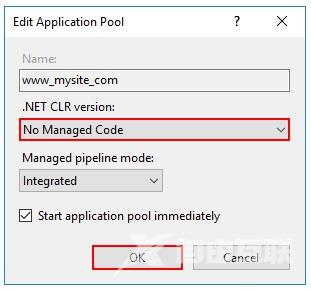
<!-- 依赖框架的部署 (FDD) -->
<PropertyGroup>
  <TargetFramework>netcoreapp2.2</TargetFramework>
  <RuntimeIdentifier>win7-x64</RuntimeIdentifier>
  <SelfContained>false</SelfContained>
  <IsTransformWebConfigDisabled>true</IsTransformWebConfigDisabled>
</PropertyGroup>
<!-- 独立部署 (SCD) -->
<PropertyGroup>
  <TargetFramework>netcoreapp2.2</TargetFramework>
  <RuntimeIdentifier>win7-x64</RuntimeIdentifier>
  <IsTransformWebConfigDisabled>true</IsTransformWebConfigDisabled>
</PropertyGroup>
    ...
    ...
    ...
到此这篇关于ASP.NET Core快速入门教程的文章就介绍到这了。希望对大家的学习有所帮助,也希望大家多多支持本站。