校外生活模拟器3
118.60M · 2026-02-11

文字居中的css代码是“text-align:center;”或“line-height:值;”。text-align属性规定元素文本的水平对齐方式,当值为center时,即可实现水平居中;而设置line-height可实现文字垂直居中。
本教程操作环境:windows7系统、CSS3&&HTML5版、Dell G3电脑。
css 文字居中
1、文字水平居中
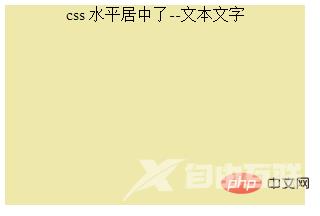
text-align 属性规定元素中的文本的水平对齐方式,当值为center时可实现水平居中。
<!DOCTYPE html><html> <head> <meta charset="utf-8"> <style type="text/css"> div { width: 300px; height: 200px; background: palegoldenrod; text-align: center } </style> </head> <body> <div>css 水平居中了--文本文字</div> </body></html>效果图:
【推荐教程:CSS视频教程 】
2、文字垂直居中
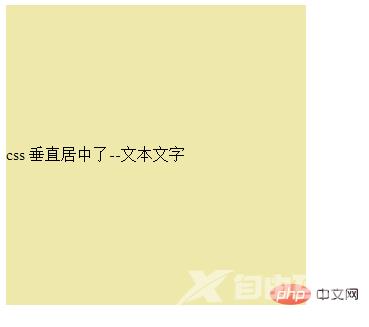
line-height 使单行文字垂直居中
<!DOCTYPE html><html> <head> <meta charset="UTF-8"> <title>css 垂直居中</title> <style> .box{ width: 300px; height: 300px; background: palegoldenrod; line-height:300px; } </style> </head> <body> <div class="box">css 垂直居中了--文本文字</div> </body></html>效果图:
更多编程相关知识,请访问:编程视频!!