老爹疯狂厨房
125.32M · 2026-03-31

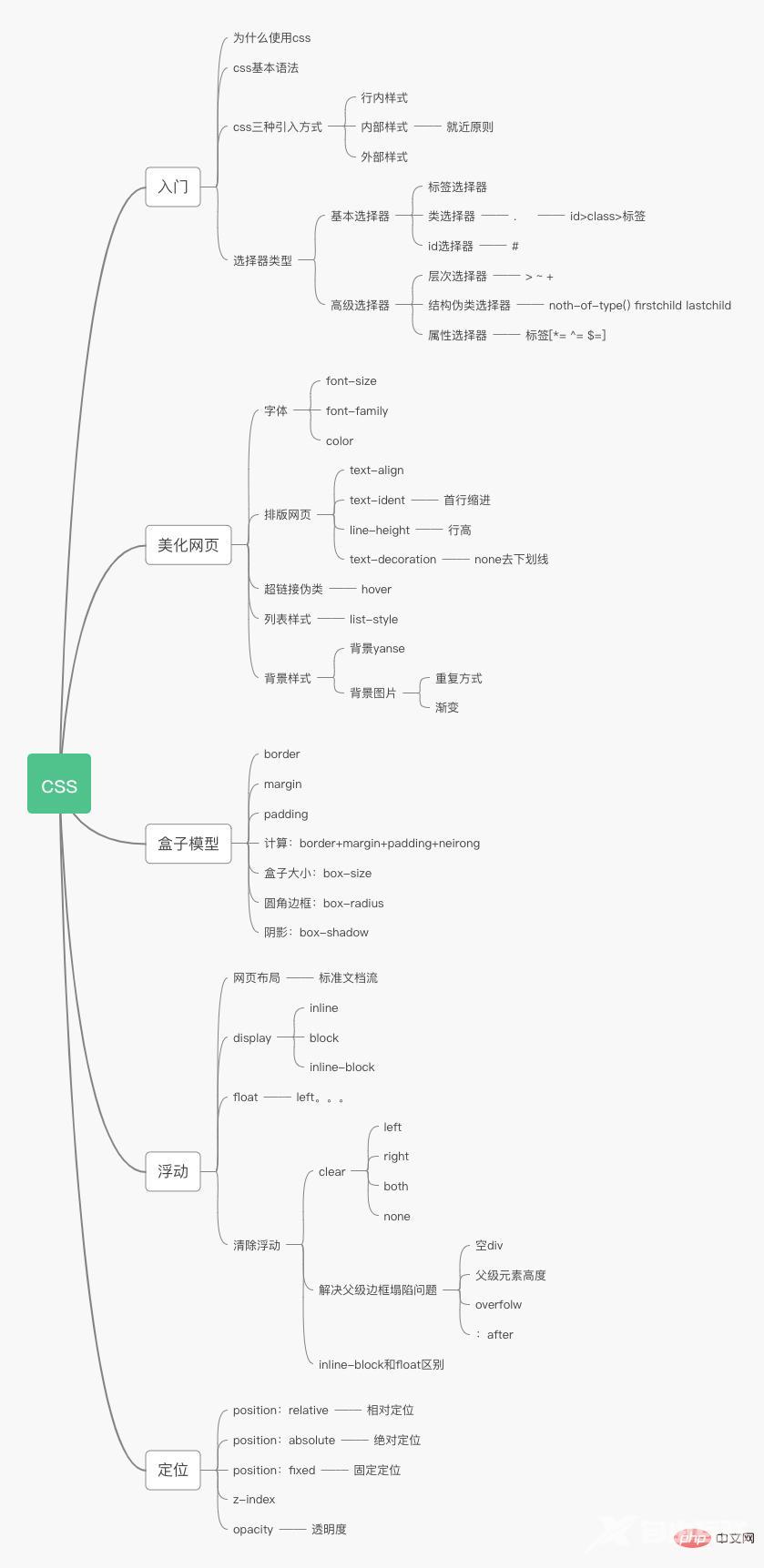
给分享一下CSS体系图,很有用,大家收藏吧,下面本篇文章带来大家了解一下CSS入门知识。
css 大致了解如下就可以:
Cascading Style Sheet层叠级联样式表
字体,颜色,边距,高度,宽度,背景图片,网页定位,网页浮动…
css选择器(重点)
美化网页(文字,阴影,超链接,列表,渐变)
盒子模型
浮动,定位
网页动画
css的优势;
1、内容和表现分离
2、网页结构表现统一,可以实现复用
3、样式十分的丰富
4、建议使用独立于html的css文件
5、利用SEO容易被搜索引擎收录!
一、选择器
1.选择页面上的某一个或者某一种元素
标签选择器
类选择器
id选择器
层次选择器
后代选择器:在某个元素的后面
body p{ background: #c56b22; }2.子选择器
/*子选择器,只选择向下一代*/body>p{ background: deepskyblue; }3.相邻兄弟选择器
/*相邻兄弟选择器,只有一个,向下*/ .active + p{ background: orange; }4.通用选择器
/*通用兄弟选择器,当前选中元素的向下的所有元素*/ .active~p{ background: aquamarine; }二、伪类选择器
/*ul的第一个子元素*/ul li:first-child{ background: #c56b22;}/*ul的最后一个子元素*/ul li:last-child{ background: aqua;}/*选中p1,定位到父元素,选择当前的第一个元素选择当前p元素的符集元素,选择符父级素的第一个,并且是当前元素才生效*/p:nth-child(1){ background: antiquewhite;}/*选中父元素,下的p元素的第二个,按类型*/p:nth-of-type(2) { background: #b04a6f; }三、美化网页
1、字体样式
<!--font-family:字体font-size:字体大小 px代表像素,em代表一个字的缩进大小font-weight:字体粗细 最大800,相当于boldercolor:字体颜色--><style> body{ font-family: Arial; } h1{ font-size: 40px; } p[class=p1]{ font-weight: bold; color: #b04a6f; }</style><style> /*字体风格*/ /*斜体 加粗 大小 字体*/ p{ font:oblique bold 20px Arial; }</style>2、文本样式
color rgb rgba text-align=centertext-indent:2emline-height:单行文字上下居中!text-decoration:/middle是垂直/vertical-align: middle;3、阴影
<style> #price{ /*阴影颜色,水平偏移,垂直偏移,垂直半径*/ text-shadow: #c5527d 5px -5px 1px; }</style><body><p id="price"> ¥30</p></body>4、超链接伪类
<style> /*默认的颜色*/ a{ text-decoration: none; color: #000000; } /*鼠标悬浮的颜色*/ a:hover{ color: #c56b22; font-size: 20px; } /*鼠标按住的颜色*/ a:active{ color: #c5527d; } /*鼠标未点击链接的颜色*/ /*a:link{*/ /* color: gray;*/ /*}*/ /*!*链接已访问状态*!*/ /*a:visited{*/ /* color: #66ccff;*/ /*}*/</style><body><a href="#"> <img src="images/1.jpg" alt="图片加载失败"></a><p> <a href="#">《从0到1开启商业与未来的秘密》</a></p><p> 作者:[美]<a href="#"> 彼得·蒂尔,布莱克·马斯特斯(Blake Masters)</a>著, <a href="#">高玉芳</a> 译</p></body>5、列表
1)背景
背景颜色
背景图片
<style> div{ width: 800px; height: 500px; border: 1px solid #fcb4dc; /*默认全部平铺*/ background-image: url("image/1.jpg"); } .div1{ background-repeat: repeat-x; } .div2{ background-repeat: repeat-y; } .div3{ background-repeat: no-repeat; }</style>.title{ font-size: 18px; /*font: oblique bold 20px/30px Arial;*/ font-weight: bold; text-indent: 1em; line-height: 35px; /*background: #fcb4dc;*/ /*颜色、图片、位置、平铺方式*/ background: #fcb4dc url("../image/d.jpeg") 250px 4px no-repeat;}ul li{ /*行高*/ height: 30px; list-style: none; text-indent: 1em; /*background: url("../image/r.jpeg") 200px 1px no-repeat;*/ background-image: url("../image/r.jpeg"); background-repeat: no-repeat; background-position: 200px 1px;}2)渐变
background-color: #A9C9FF;background-image: linear-gradient(60deg, #A9C9FF 0%, #FFBBEC 100%);
3)盒子模型
边框
内外边距
圆角边框
阴影
浮动
4)父级边框塌陷问题
/*clear:right; 右侧不允许又浮动元素clear:lerf; 左侧不允许有浮动元素clear:both; 两侧不允许有浮动元素clear:none;*/
解决方法:
#father{ border:1px #000 solid; height:800px}<p class="clear"></p>
.clear{ clear:both; margin:0; padding:0;}#在父级元素中添加一个 overflow:hodden;
#father:after{ content:''; display:block; clear:both;}浮动起来的话会脱离标准文档流,所以要解决父级边框塌陷的问题
6、定位
相对定位
相对于原来的位置进行指定偏移,相对定位的话,它任然在标准文档流中!原来位置会被保留position:relativetop:-20px;left:20px;bottom:-10px;right:20px;
绝对定位
position:absolute定位:基于xxx定位,.上下左右~1、没有父级元素定位的前提下,相对于浏览器定位2、假设父级元素存在定位,我们通常会相对于父级元素进行偏移~3、在父级元素范围内移动相对于父级或浏览器的位置,进行指定的偏移,绝对定位的话,它不在标准文档流中,原来的位置不会被保留
固定定位
position:fixed
z-index层级,默认是0,最高无限
/*背景透明度,或者使用rgba,早期版本filter:alpha(opacity=50)*/opacity:0.5/*filter:alpha(opacity=50)*/
推荐学习:CSS视频教程
【感谢龙石为本站提供数据质量管理系统,http://www.longshidata.com/pages/quality.html】