
Slashrun
100.37M · 2026-04-09

方法:首先使用“word-break:keep-all”语句设置不换行;然后使用“overflow:hidden”语句设置超出隐藏部分;最后使用“text-overflow:ellipsis”语句设置溢出显示省略号。

本教程操作环境:windows7系统、CSS3&&HTML5版、Dell G3电脑。
td溢出隐藏
table{ width:100px; table-layout:fixed;/* 只有定义了表格的布局算法为fixed,下面td的定义才能起作用。 */ } td{ width:100%; word-break:keep-all;/* 不换行 */ white-space:nowrap;/* 不换行 */ overflow:hidden;/* 内容超出宽度时隐藏超出部分的内容 */ text-overflow:ellipsis;/* 当对象内文本溢出时显示省略标记(...) ;需与overflow:hidden;一起使用*/ }全部代码:
<!DOCTYPE html> <html> <head> <meta http-equiv="Content-Type" content="text/html; charset=utf-8" /> <title>document</title> <style>table{ width:100px; table-layout:fixed;/* 只有定义了表格的布局算法为fixed,下面td的定义才能起作用。 */ } td{ width:100%; word-break:keep-all;/* 或是 white-space:nowrap;不换行 */ overflow:hidden;/* 内容超出宽度时隐藏超出部分的内容 */ text-overflow:ellipsis;/* 当对象内文本溢出时显示省略标记(...) ;需与overflow:hidden;一起使用*/ }</style></head> <body> <table border="1"> <tr> <td>19999</td> <td>19999</td> </tr> <tr> <td>19999</td> <td>19999</td> </tr> <tr> <td>19999</td> <td>19999</td> </tr> </table></body> </html>效果截图:
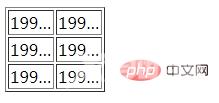
推荐学习:css视频教程