
山水画廊
70.10M · 2026-04-12

在css中,可以使用text-decoration属性设置删除线,语法“text-decoration:line-through”。text-decoration属性设置元素文本修饰,值为line-through时,定义穿过文本下的一条线。
本教程操作环境:windows7系统、CSS3&&HTML5版、Dell G3电脑。
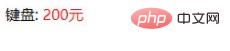
新建test.html页面,在test.html 页面body区域内,新建一个div,用来存放物品名。在div标签内新建span,用来存放物品价格。在test.html 页面body区域内新建style标签,在style标签里设置span标签内的价格为红色
<!DOCTYPE html><html lang="en"><head> <meta charset="UTF-8"> <meta http-equiv="X-UA-Compatible" content="IE=edge"> <meta name="viewport" content="width=device-width, initial-scale=1.0"> <title>Document</title> <style> .price{ color:red; } </style></head><body> <div>键盘: <span class="price">200元</span> </div></body></html>在浏览器里打开test.html,看一下目前的效果
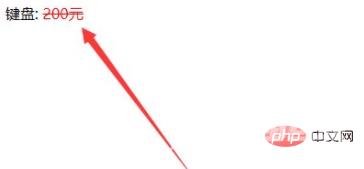
回到编辑器,在test的style标签内,给span设置text-decoration: line-through属性
<style> .price{ color:red; text-decoration: line-through; } </style>再次打开test.html,会发现价格上被加了删除线。
推荐学习:css视频教程
【文章转自 盐城网页制作公司 http://www.1234xp.com/yancheng.html 处的文章,转载请说明出处】