未感染者模拟器
62.73M · 2026-04-13

css实现内容超出隐藏效果的方法是,给文本内容添加text-overflow属性,例如【text-overflow:ellipsis】。text-overflow属性指定当文本溢出包含它的元素应该发生什么。

本文操作环境:windows10系统、css 3、thinkpad t480电脑。
css为我们提供了一个很适合的元素text-overflow,这个属性指定当文本溢出包含它的元素,应该发生什么。
语法:
text-overflow: clip|ellipsis|string;
属性值:
clip 修剪文本。
ellipsis 显示省略符号来代表被修剪的文本。
string 使用给定的字符串来代表被修剪的文本。
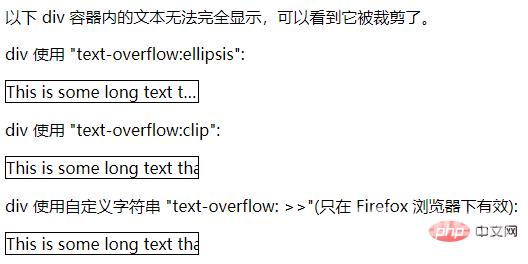
举个例子:
<!DOCTYPE html><html><head><meta charset="utf-8"> <title></title> <style> div.test{ white-space:nowrap; width:12em; overflow:hidden; border:1px solid #000000;}</style></head><body><p>以下 div 容器内的文本无法完全显示,可以看到它被裁剪了。</p><p>div 使用 "text-overflow:ellipsis":</p><div class="test" style="text-overflow:ellipsis;">This is some long text that will not fit in the box</div><p>div 使用 "text-overflow:clip":</p><div class="test" style="text-overflow:clip;">This is some long text that will not fit in the box</div><p>div 使用自定义字符串 "text-overflow: >>"(只在 Firefox 浏览器下有效):</p><div class="test" style="text-overflow:'>>';">This is some long text that will not fit in the box</div></body></html>展示效果: